

Automatic Gallery And Featured Image Sync
Automatically sync posts (or WooCommerce Product) and media images as featured image and gallery.
Plugin info
Maintenance & Compatibility
Maintenance score
Stale • Last updated 360 days ago • 1 reviews
Is Automatic Gallery And Featured Image Sync abandoned?
Likely maintained (last update 360 days ago).
Compatibility
Developers
Similar & Alternatives
Explore plugins with similar tags, and compare key metrics like downloads, ratings, updates, support, and WP/PHP compatibility.
Description
Automatically sync posts and media images as featured image and gallery.
Images with names are given as ID:
- Automatic syncing as featured image to posts
- Automatic syncing as featured image to pages
- Automatic syncing as featured image to WooCommerce products
- Automatic syncing as gallery images to WooCommerce products
Images named as product SKU (Pro):
- Automatic syncing as featured image to WooCommerce products
- Automatic syncing as gallery images to WooCommerce products
And many more features.
Support blog and feedback: Automatic Gallery And Featured Image Sync
Please comment 💬, rate ⭐ and share 👍
Need a custom work?
If you need template customization, optimization or custom software development service, please contact me.
Installation
- Add the plugin’s folder in the WordPress’ plugin directory, or install the plugin through the WordPress plugins screen directly..
- Activate the plugin through the ‘Plugins’ screen in WordPress.
Usage
- Go to “Tools” -> “Sync image”
- Select the articles you want to process from the list
- Select and apply the action.
Frequently Asked Questions
Please use contact form
Review feed
Screenshots
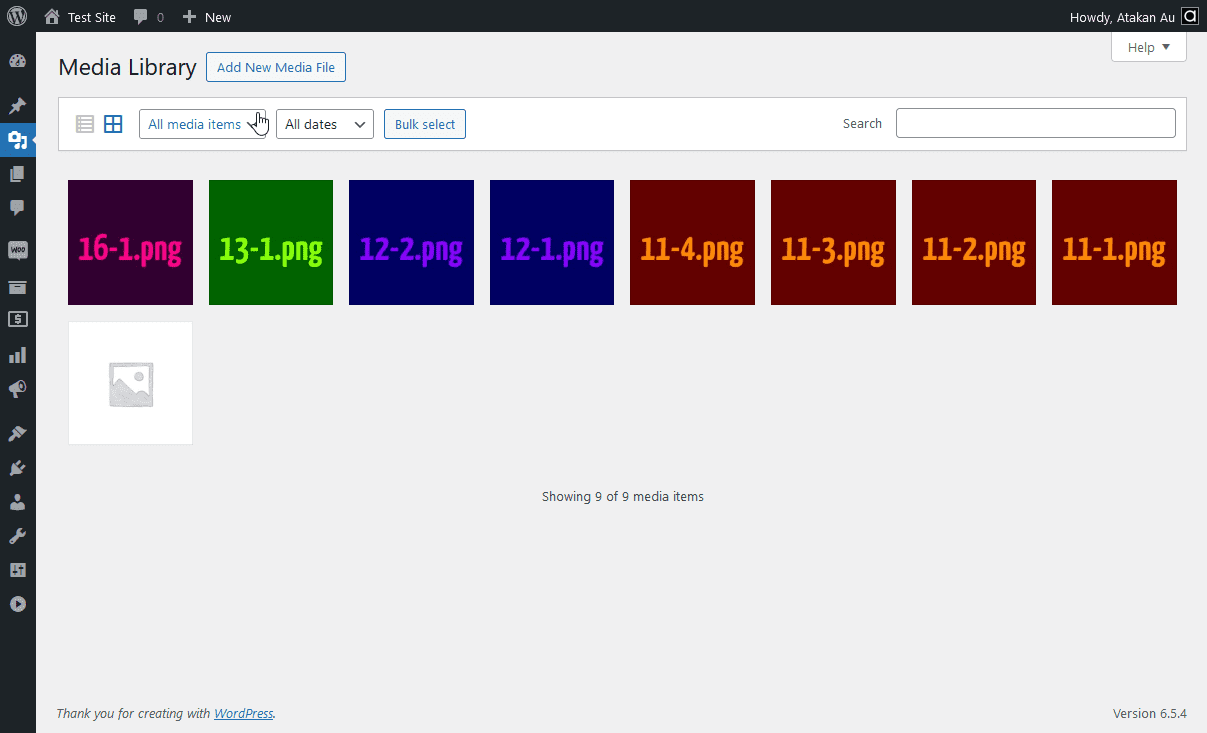
(ID)-(sequence).(png|jpg|jpeg|gif)

Automatically assign featured images and gallery images
Changelog
1.0.2
- (Minor) Source code upgraded PHP 8.X
- Tested up to:
6.8.x
1.0.1
- (Minor) Strings changed
- (Minor) Source code revamped for WordPress standards
1.0.0
- Initial version released