

Auto Login with Cloudflare
Super simple way to allow a single sign on to your Wordpress site when using Cloudflare Access.
Plugin info
Maintenance & Compatibility
Maintenance score
Possibly abandoned • Last updated 1230 days ago • 4 reviews
Is Auto Login with Cloudflare abandoned?
Possibly abandoned (last update 1230 days ago).
Compatibility
Similar & Alternatives
Explore plugins with similar tags, and compare key metrics like downloads, ratings, updates, support, and WP/PHP compatibility.
Description
Enable Cloudflare Access self-hosted application to protect your /wp-admin folder. Add your auth domain and aud settings from Cloudflare Access. Authenticated user will be automatically logined to WordPress if their email address matches.
Follow Cloudflare document to setup Access.
You can also define configs in wp-config.php
define('WP_CF_ACCESS_AUTH_DOMAIN', 'yourdomain.cloudflareaccess.com');
define('WP_CF_ACCESS_JWT_AUD', 'examplef2nat0rkar2866wn829a0x2ztdg');
define('WP_CF_ACCESS_REDIRECT_LOGIN', true);
This plugin is not affiliated with nor developed by Cloudflare. All trademarks, service marks and company names are the property of their respective owners.
Installation
Frequently Asked Questions
Enable the “Redirect login page” option and all future logins will be redirected to /wp-admin and trigger Access authentication.
The option assumes that /wp-admin folder is protected by Cloudflare Access. If the folder is not protected, then auto-login will fail and redirect back to the login page, causing the redirect loop.
Review feed
Great Auth plugin
I love this! Thank you!
Screenshots
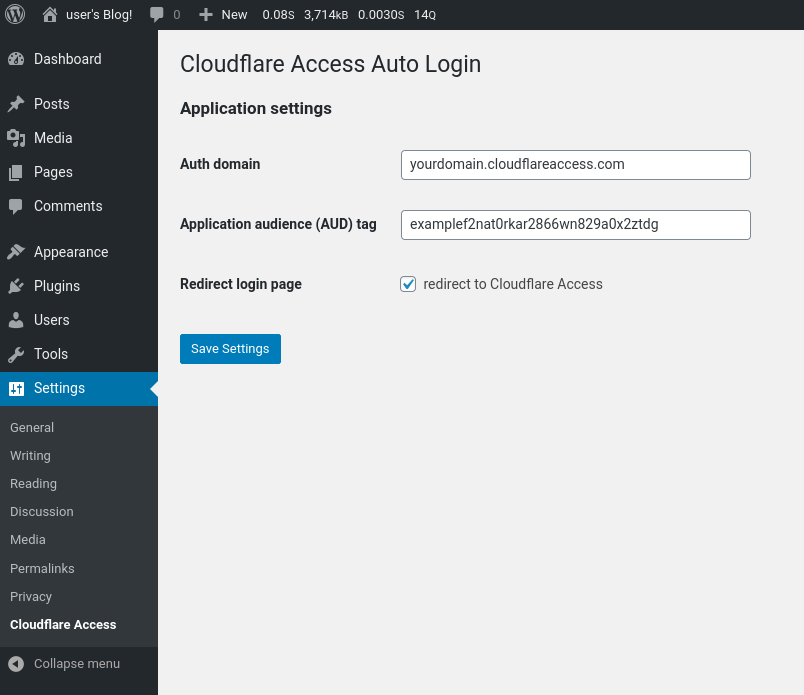
Settings
Changelog
1.1.4
- Fix redirect issue for non-default wp-admin urls
1.1.3
- Tested with WordPress 6.1.1
1.1.2
- Tested with WordPress 5.9
- Fixed errors when activated in multi-site enabled installation
1.1.1
- Show an error message when user does not exist to prevent redirect loop
1.0.0
- Tested with WordPress 5.8
- Update php-jwt to 5.4
- Stable. No major change planned
0.9.3
- Tested with WordPress 5.7
0.9.2
- update minimum requirements
- update php-jwt to 5.2.1
0.9.0
- First beta release.