

BuddyPress Default Group Avatar
Adds a default group avatar to BuddyPress without disabling Gravatars for users.
Plugin info
Maintenance & Compatibility
Maintenance score
Possibly abandoned • Last updated 4852 days ago • 1 reviews
Is BuddyPress Default Group Avatar abandoned?
Possibly abandoned (last update 4852 days ago).
Compatibility
Similar & Alternatives
Explore plugins with similar tags, and compare key metrics like downloads, ratings, updates, support, and WP/PHP compatibility.
Description
This plugin is tested only with BP 1.6.2 and WordPress 3.5, and is not meant to be backwards compatible! If you’re running an older version of WordPress, use Vernon’s original plugin BuddyPress Group Default Avatar
Allows specifying the URL of an image to use as the BuddyPress default group avatar. This makes it easy to distinguish groups from members who are using the mystery man default user avatar.
It works in all situations (activity stream, groups, forums, directory, etc). Upload your image to somewhere within your theme and drop the full URL in the options screen.
If you had BuddyPress Group Default Avatar previously installed, this plugin will use the avatar set in that plugin. Otherwise it’s bundled with a default avatar for groups (see screenshots).
Not tested on multisite/network install yet (please confirm if it’s working!).
Installation
- Upload
bp-default-group-avatarto the/wp-content/plugins/directory. - Activate the plugin through the ‘Plugins’ menu in WordPress.
- Go to BP Group Avatar under the BuddyPress menu and set your image URL.
Frequently Asked Questions
Does the plugin allow me to upload images directly?
No. Use the media uploader or FTP.
Review feed
Screenshots
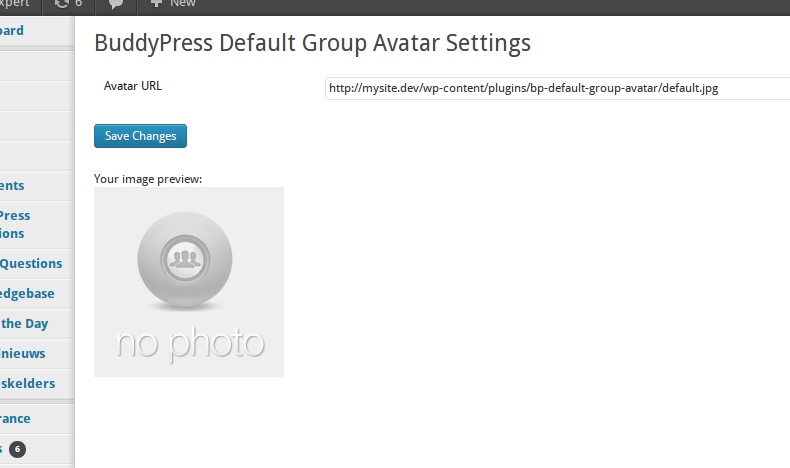
Settings show the URL input and a preview of your image.
Changelog
0.2
- Complete rewrite of Vernon’s original plugin – only the admin page is left