

Bubuku Media Library
Manage image file size and alt text in your WordPress Media Library to improve performance, accessibility and SEO.
Plugin info
Maintenance & Compatibility
Maintenance score
Maintained • Last updated 130 days ago • 6 reviews
Is Bubuku Media Library abandoned?
Likely maintained (last update 130 days ago).
Compatibility
Similar & Alternatives
Explore plugins with similar tags, and compare key metrics like downloads, ratings, updates, support, and WP/PHP compatibility.
Description
This plugin enables content and marketing teams to quickly detect heavy images and missing alt text directly in the WordPress Media Library. With sorting, filters, bulk actions, dashboard widgets and downloadable reports, you can keep your images optimized for better performance, accessibility and image SEO.
You can:
- Sort the Media Library by file size to easily identify large files.
- Filter images that don’t have alternative text (alt text).
- Use size-based filters (for example: optimal size, medium size, large size) to prioritize which images to optimize first.
- Run a Bulk Action in the Media Library to calculate file sizes for existing uploads.
- Export CSV reports including file size, format (MIME type), URL, alt text, image date, post title and post URL — ideal for audits or sharing with your team.
- See a summary of your Media Library in a dashboard widget, including how many images are heavy or missing alt text.
- Configure weekly or monthly email reports so you can monitor the optimization status of your images without logging into WordPress.
More information (in Spanish) about how the plugin works: How to know if we have to reduce weight to the image and Alt SEO attribute
Quick Start
-
From your server (SSH), move the plugin folder to the plugins directory:
wp-content/plugins/bubuku-media-library/
-
Activate the plugin via the WordPress admin or using WP-CLI:
wp plugin activate bubuku-media-library
-
(Optional) Run the bulk action in Media > Library to calculate file sizes for existing images.
Evaluate results
Recommended Tools
– Lighthouse (in Chrome DevTools) — Analyze image weight and format, as well as the use of alternative text (ALT).
– WebPageTest — Check how images affect real-world load times.
– Squoosh — Compare visual quality and file size savings when optimizing images.
– WAVE Accessibility Tool — Verify whether images are missing ALT attributes or if the alternative texts are descriptive.
Evaluation Guidelines
– Identify images without ALT text or with excessive file size before running external tests.
– After replacing large images or adding ALT text, repeat your evaluations to confirm improvements.
– Evaluate both new and existing content — not only the most recent uploads.
– Define an internal size limit (for example, 200 KB per image) and monitor it regularly.
– Keep in mind that accessibility also affects SEO and overall user experience.
SUPPORT
Need help or have a suggestion?
Please use the official WordPress.org Support Forum for any issues related to the plugin.
Official Website
For additional information or to get in touch with the development team, please visit our official website.
Like the plugin?
Please leave a 5-star review and help others discover Bubuku Media Library.
ABOUT BUBUKU_CODE
We develop custom solutions for WordPress focused on performance, accessibility, and maintainable code. Our work includes plugins, themes, and integrations designed to improve the daily workflow of marketing and content teams.
Installation
- Unzip the plugin ZIP file on your computer.
- Copy or move the resulting folder to the “wp-content/plugins/” directory of your WordPress installation.
- Log in to the WordPress admin area and navigate to the “Plugins” screen.
- Locate “Bubuku Media Library” in the plugins list and click “Activate” to enable the plugin.
- (Optional) Go to the plugin settings page to configure report options (weekly, monthly or disabled) and other filters.
- Ensure your installation meets the requirements listed in the plugin header (WordPress and PHP versions) before using it in production.
Frequently Asked Questions
Green = <= 100KB (good), Orange = 100KB – 500KB (medium), Red = >= 500KB (poor).
Use the “Calculate file size” Bulk Action in the Media Library, or click the recalculate button on individual attachments to update the stored file size.
Yes — go to the plugin settings page and select the report frequency: Weekly, Monthly or Disabled.
The plugin uses WordPress localization files. If your language is available under the languages/ directory, the texts will be displayed in that language when WordPress is configured accordingly.
Use the size filter provided by the plugin in Media Library to select a predefined range or enter custom limits. You can also sort the size column to quickly find the largest or smallest files.
Use the “Alt Text” filter in the Media Library to show items missing alternative text, or sort the Alt column to group empty values together for quick review.
Use the Export / Reports functionality in the plugin and click the “Export CSV” button. The generated CSV contains the following columns: ID, Image Name, Image URL, File Size, Format (MIME type), Alt Text, Image Date (Y-m-d H:i:s), Post Title, Post URL.
Example (CSV columns separated by commas):
123,"my-image.jpg","https://example.com/wp-content/uploads/2024/01/my-image.jpg","256.34 KB","image/jpeg","An example alt text","2024-01-10 12:34:56","Example Post","https://example.com/example-post/"
The plugin adds a UTF-8 BOM to the CSV for better compatibility with Excel. If Excel shows garbled characters, import the CSV using Excel’s Data From Text/CSV and choose UTF-8 encoding.
Yes — the export checks that the current user has the upload_files capability and verifies a nonce (bml_filter_nonce) to prevent CSRF. If the checks fail, the export is blocked.
Review feed
Imprescindible en la biblioteca de utilidades WPO
Tus archivos de imágenes bajo control
Screenshots

The column where we show the image size information and if it has alt text. We can also sort by size from largest to smallest.

Filter to better identify the images that have the alt text
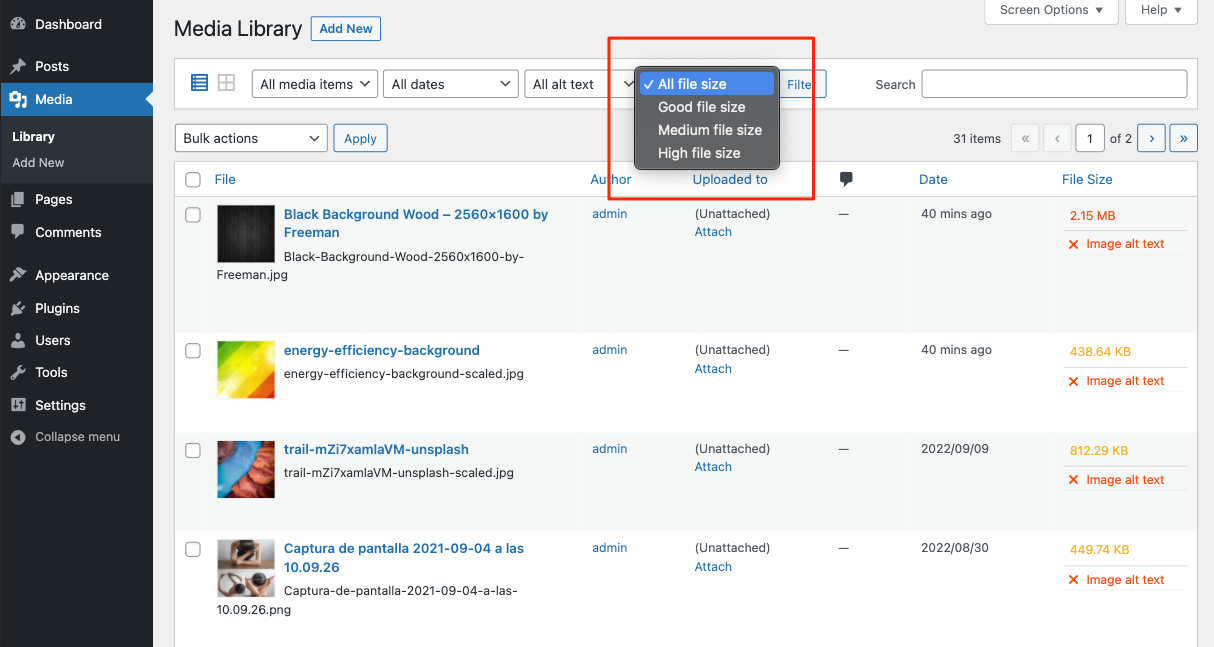
Filter to identify images with larger or smaller sizes.
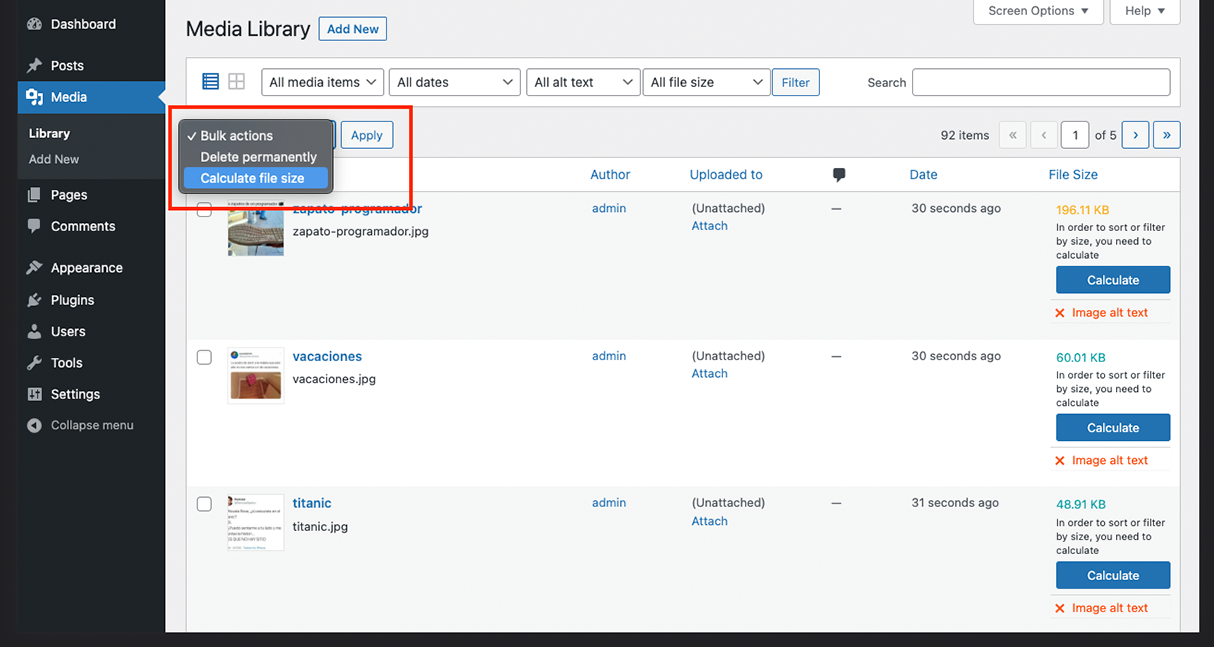
Bulk Action to calculate file size.

Plugin settings page

Weekly report that are sent by email with the optimization status of the images and alternative text.

Dashboard widget where the media library summary is displayed.
Changelog
1.1.7
- Updated banners and icons for WordPress.
1.1.6
- Documentation: small README update.
1.1.5
- Added CSV export functionality.
1.1.4
- Replaced number_format_i18n() with an integer return in calculate_img_alt_empty for a plain alt text count.
1.1.3
- Improve performance and simplify SQL queries.
- Implemented caching for the calculated number of images by size and those lacking alt attributes.
1.1.2
- Added security and performance improvements
- Fix some PHP errors.
- Compatibility: WordPress 6.8 – WordPress 6.8.1.
1.1.1
- fix widget texts
- Compatibility: WordPress 6.5 – WordPress 6.5.3.
1.1.0
- Add dashboard widget to display media library summary
- Remove friendly url functionality in image file names. Gave problems with image optimization plugins.
1.0.9
- Remove “Weekly” in informative texts.
- Fix image URL in metadata[‘file’].
1.0.8
- Default media library reporting was disabled, and modifications were made to the email report texts.
- Configuration options for sending the report: weekly, monthly or deactivated.
- Fix error when renaming images to lowercase.
1.0.7
- Make filename URLs and thumbnail URLs friendly.
- Updates image size value when edited.
- Add button on image to recalculate size.
- Fix API error when WordPress is configured to end with a slash.
- Compatibility: WordPress 6.1 – WordPress 6.4.2.
1.0.6
- Compatibility: WordPress 6.1 – WordPress 6.3.
1.0.5
- Add weekly reports that are sent by email with the optimization status of the images and alternative text.
- Add plugin settings page.
1.0.4
- Compatibility: WordPress 6.1 – WordPress 6.2.
- Fix some PHP errors.
- Add WordPress JavaScript dependencies.
1.0.3
- Add a Bulk Action to calculate file size in WordPress admin.
- Improvements in measurement ranges.
- fix: Internationalization Issues.
1.0.2
- Rename variables.
- Correctly filter by file size.
- Styling WordPress Button.
1.0.1
- Add calculate message to sort and filter.
- Add ‘This media is not supported’ message in the file size column.
1.0.0
- Initial release.