

Bulk Move
Move or remove posts in bulk from one category, tag or custom taxonomy to another.
Plugin info
Maintenance & Compatibility
Maintenance score
Possibly abandoned • Last updated 796 days ago • 47 reviews
Is Bulk Move abandoned?
Possibly abandoned (last update 796 days ago).
Compatibility
Developers
Similar & Alternatives
Explore plugins with similar tags, and compare key metrics like downloads, ratings, updates, support, and WP/PHP compatibility.
Description
Bulk Move Plugin allows you to move posts in bulk from one category, tag or custom taxonomy to another.
This Plugin also allows you to disassociate posts from a certain category, tag or custom taxonomy.
If you looking for deleting posts or users in Bulk, instead of just moving them, then use Bulk Delete Plugin instead.
Features
The following modules are available in the Bulk Move plugin.
Move posts from one category to another
This module allows you to move posts from one category to another or disassociate posts from a specific category.
Move posts from one tag to another
This module allows you to move posts from one tag to another or disassociate posts from a specific tag.
Move posts from category to tag
This module allows you to move posts from one category to another tag.
Move posts by custom taxonomy
This module allows you to move posts from one custom taxonomy to another. This module supports custom post types as well.
Development
The development of the Plugin happens over at github. If you want to contribute to the Plugin, fork the project at github and send me a pull request.
If you are not familiar with either git or Github then refer to this guide to see how fork and send pull request.
If you are looking for ideas, then you can start with one of the following TODO items 🙂
TODO
- Bulk Move pages to posts
- Bulk Move users from one role to another
Support
- If you have found a bug/issue or have a feature request, then post them in github issues
- If you have a question about usage or need help to troubleshoot, then post in WordPress forums or leave a comment in Plugins’s home page
- If you like the Plugin, then kindly leave a review/feedback at WordPress repo page. This will help more people to discover the plugin.
- If anything else, then contact me in twitter.
Translation
- Brazilian Portuguese (Thanks Marcelo of Criacao de Sites em Ribeirao Preto)
- Turkish Portuguese (Thanks Bahadir Yildiz)
- Spanish (Thanks Brian Flores of InMotion Hosting)
- Bulgarian (Thanks Nikolay Nikolov of Skype Fan Blog)
- Hindi (Thanks Love Chandel)
- Lithuanian (Thanks Vincent G)
Readme Generator
This Readme file was generated using wp-readme, which generates readme files for WordPress Plugins.
Installation
The simplest way to install the plugin is to use the built-in automatic plugin installer. Go to plugins -> Add New and then enter the name of the plugin to automatically install it.
If for some reason the above method doesn’t work then you can download the plugin as a zip file, extract it and then use your favorite FTP client and then upload the contents of the zip file to the wp-content/plugins/ directory of your WordPress installation and then activate the Plugin from Plugins page.
Frequently Asked Questions
Yes, it’s possible to just disassociate the post from a category, tag or custom taxonomy. Just choose Remove Category/Tag/Term option in the right side dropdown.
Yes. Use the ‘Bulk Move Category by Tag’ module to move posts from a category to a tag.
Yes. Use the ‘Bulk Move Custom Taxonomies’ module.
Review feed
Didnt work for me! Instead it messed up things on the server
Screenshots

This screenshot shows the Tools menu through which you can access the Bulk Move page.

This screenshot shows the Bulk Move Page. You can access the various Bulk Move modules here.

This screenshot shows the screen options where you can show or hide various Bulk Move Modules.

The 'Bulk Move by Category' module allows you to bulk move posts from one tag to another.
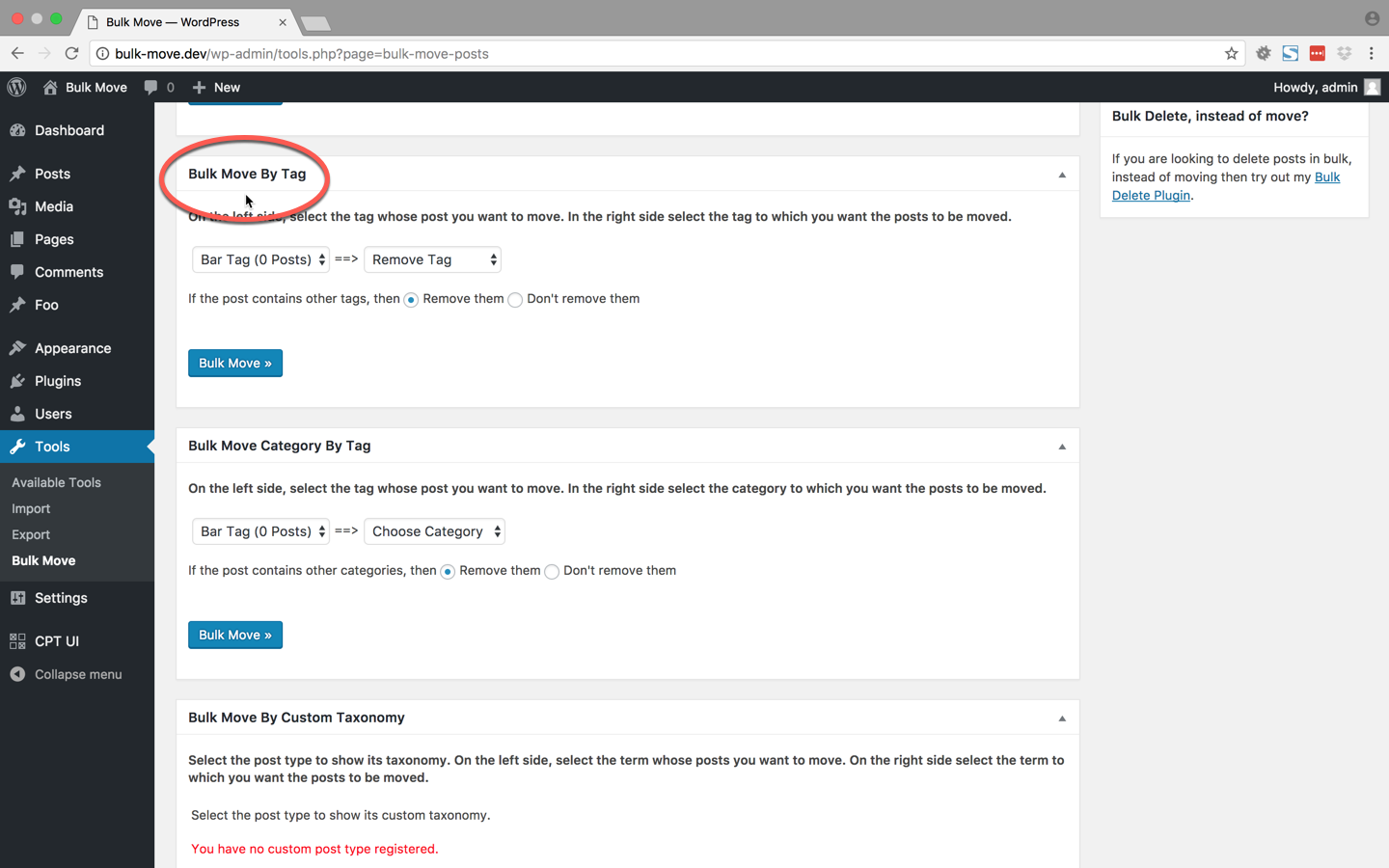
The 'Bulk Move by Tag' module allows you to bulk move posts from one tag to another.
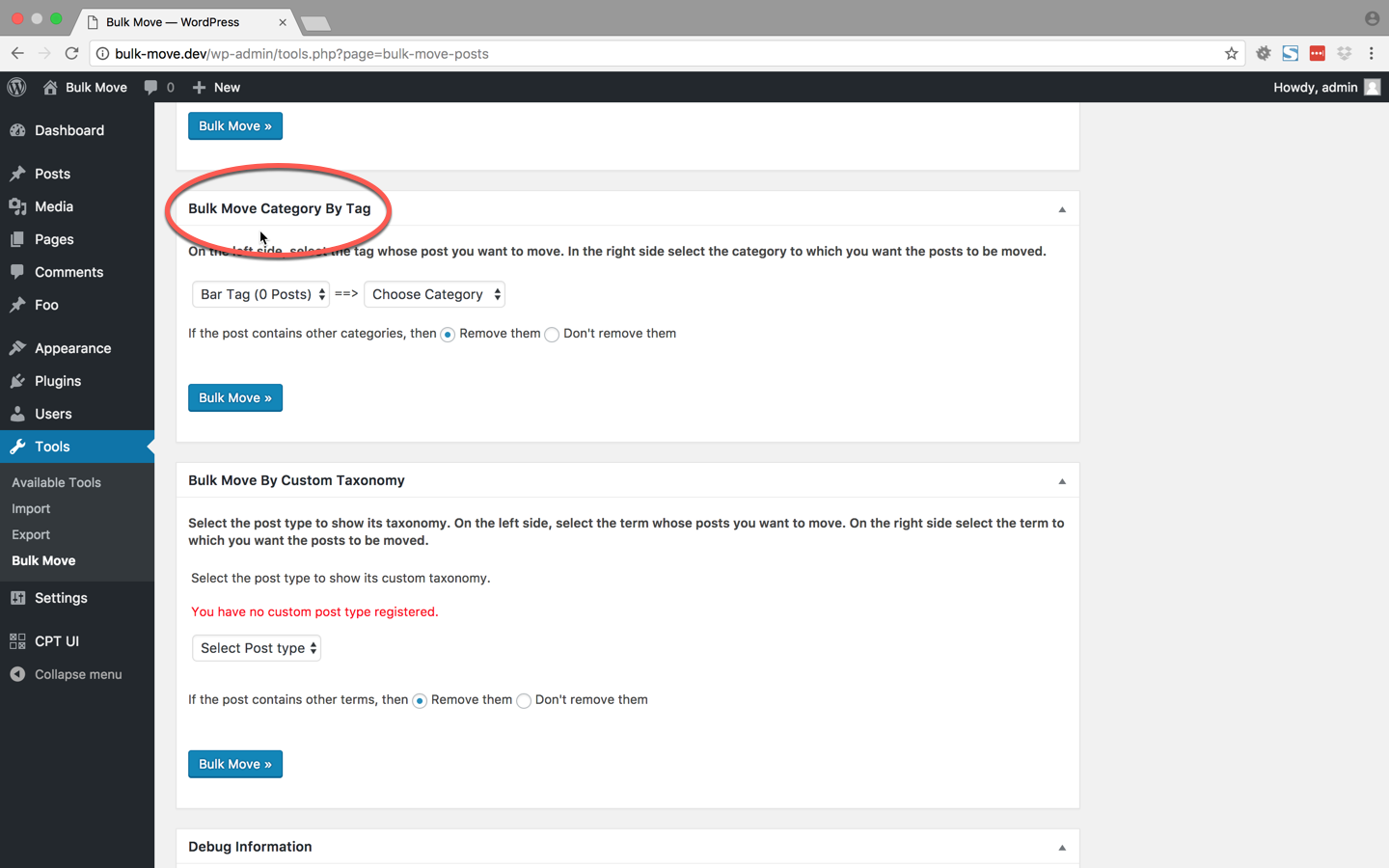
The 'Bulk Move Category by Tag' module allows you to bulk move posts from one tag to another category.

The 'Bulk Move Custom Taxonomy' module allows you to bulk move posts from one custom taxonomy to another custom taxonomy.

In case you are facing issues and have to give us information about your server, then you can copy the information from the Debug Information module.
Changelog
v1.3 (2014-08-17) (Dev time: 0.5 hours)
- Tweak: Fixed a warning in meta box implementation
v1.2.1 (2014-06-05) (Dev time: 0.5 hours)
- Tweak: Indent sub categories in the category dropdown. (Issue #10)
v1.2 (2014-04-21) (Dev time: 6 hours)
- Add: Add the ability to specify the PHP script timeout. Thanks https://github.com/grantnorwood
- Add: Add uninstall.php file to remove option when plugin is removed. Thanks https://github.com/grantnorwood
- Fix: Clean whitespace in HTML attributes. Thanks https://github.com/grantnorwood
- Add: Add the ability to move categories by tag. Thanks https://github.com/grantnorwood
- Tweak: Change the capability to
edit_others_posts. (issue #7) - Tweak: Make Bulk_Move class as a singleton
- Add: Add WordPress version to debug information. (issue #6)
v1.1.1 (2014-02-12) (Dev time: 0.5 hours)
- Add: Add German translation
- Fix: Fix link to Bulk Delete plugin
v1.1 (2013-12-19) (Dev time: 3 hours)
- Fix: Change the content displayed in sidebar
- Tweak: Remove
screen_iconwhich is not used in WordPress 3.8 - New: Add support moving posts by tags
v1.0 (2013-10-13) (Dev time: 3 hours)
- Revamped GUI
v0.9 (2012-07-10) (Dev time: 0.5 hour)
- Added Hindi translations
- Added Lithuanian translations
v0.8 (2012-01-13)
- Added Bulgarian translations
v0.7 (2011-12-16)
- Removed spaces from first line which was starting the output
v0.6 (2011-11-19)
- Added Spanish translation
v0.5 (2011-08-25)
- Fixed a warning and added Turkish translation
v0.4 (2011-02-08)
- Added Brazilian Portuguese translation
v0.3 (2010-11-28)
- Fixes for blank screen issue. Thanks Carlos
v0.2 (2009-05-08)
- Second version
v0.1 (2009-02-04)
- First version