

Carolyn Google Analytics
A (very) simple plugin for embedding a Google Analytics tracking code in your WordPress site.
Maintenance 22/1004846d since update
Active installs
10
Downloads
2,333
Reviews
1
Age
13.3y
Plugin info
Total downloads: 2,333
Active installs: 10
Total reviews: 1
Average rating: 5
Support threads opened: 0
Support threads resolved: 0 (0%)
Available in: 1 language(s)
Contributors: 1
Last updated: 11/11/2012 (4846 days ago)
Added to WordPress: 11/11/2012 (13 years old)
Minimum WordPress version: 3.4
Tested up to WordPress version: 3.4.2
Minimum PHP version: f
Maintenance & Compatibility
Maintenance score
Possibly abandoned • Last updated 4846 days ago • 1 reviews
22/100
Is Carolyn Google Analytics abandoned?
Possibly abandoned (last update 4846 days ago).
Compatibility
Requires WordPress: 3.4
Tested up to: 3.4.2
Requires PHP: f
Similar & Alternatives
Explore plugins with similar tags, and compare key metrics like downloads, ratings, updates, support, and WP/PHP compatibility.
WP Statistics – Simple, privacy-friendly Google Analytics alternative
Rating 4.1/5 (740 reviews) • Active installs 600,000
GA Google Analytics – Connect Google Analytics to WordPress
Rating 4.9/5 (158 reviews) • Active installs 400,000
Independent Analytics – Google Analytics Alternative for WordPress
Rating 4.8/5 (145 reviews) • Active installs 100,000
Koko Analytics – Privacy+Friendly statistics for WordPress
Rating 5.0/5 (212 reviews) • Active installs 60,000
Google Analytics Dashboard Widget by Analytify
Rating 5.0/5 (4 reviews) • Active installs 10,000
Better Google Analytics
Rating 4.2/5 (34 reviews) • Active installs 3,000
Description
This is a (very) simple plugin for embedding a Google Analytics (GA) tracking code in your site. It has two features:
- It stores the GA code as a site setting. This means no modifying theme files, which is especially useful in a Multisite context;
- The GA code is NOT inserted for logged-in users, meaning you won’t run up your visitor counts as you administer your site;
And that’s it! It works with Google’s “Asynchronous” tracking code, which goes in the page’s head.
Installation
- Install and activate the plugin, in the normal way;
- Go to Google Analytics and follow the various steps to generate your tracking code. Copy the entire tracking code to your clipboard;
- From your site’s Dashboard, navigate to Settings -> Google Analytics;
- Paste your tracking code into the large box and click “Save Changes”;
That’s it!
Frequently Asked Questions
No FAQ available
Review feed
No reviews available
Screenshots
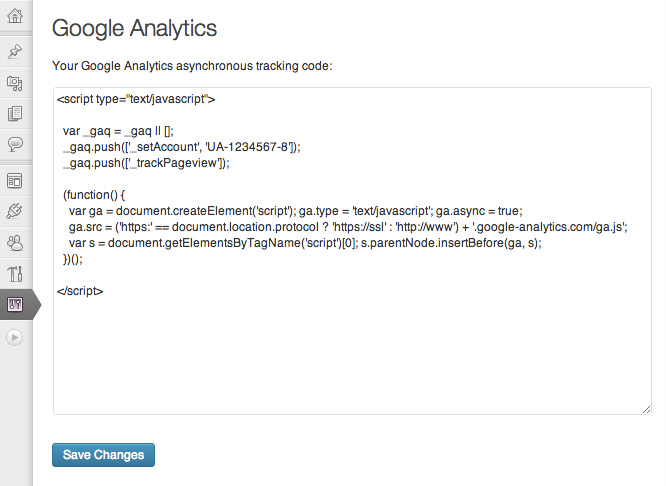
Paste your Google Analytics tracking code into the box
Changelog
No changelog available