

Plugin info
Maintenance & Compatibility
Maintenance score
Maintained • Last updated 129 days ago • 11 reviews
Is Category Featured Image abandoned?
Likely maintained (last update 129 days ago).
Compatibility
Developers
Languages
Similar & Alternatives
Explore plugins with similar tags, and compare key metrics like downloads, ratings, updates, support, and WP/PHP compatibility.
Description
Set a featured image for post by a category
- Bulk set the featured image of all the posts, when setting the category featured image.
- If there are multiple categories, the parent category featured image takes precedence.
- Can apply a category featured image to the post featured image, when posting.
- Supports Custom Post Types.
Warning
- Pressing the “Update” button after “Add New Image” or “Replace Image” under “Edit Category” will change the featured image for all posts in that category.
- Even if you do not set an image, pressing the “Update” button under “Edit Category” will remove the featured image for all posts in that category.
- If you do not need this feature, do not use this plugin !
Installation
- Upload
category-featured-imagedirectory to the/wp-content/plugins/directory - Activate the plugin through the ‘Plugins’ menu in WordPress
Frequently Asked Questions
none
Review feed
Screenshots

Add image to category
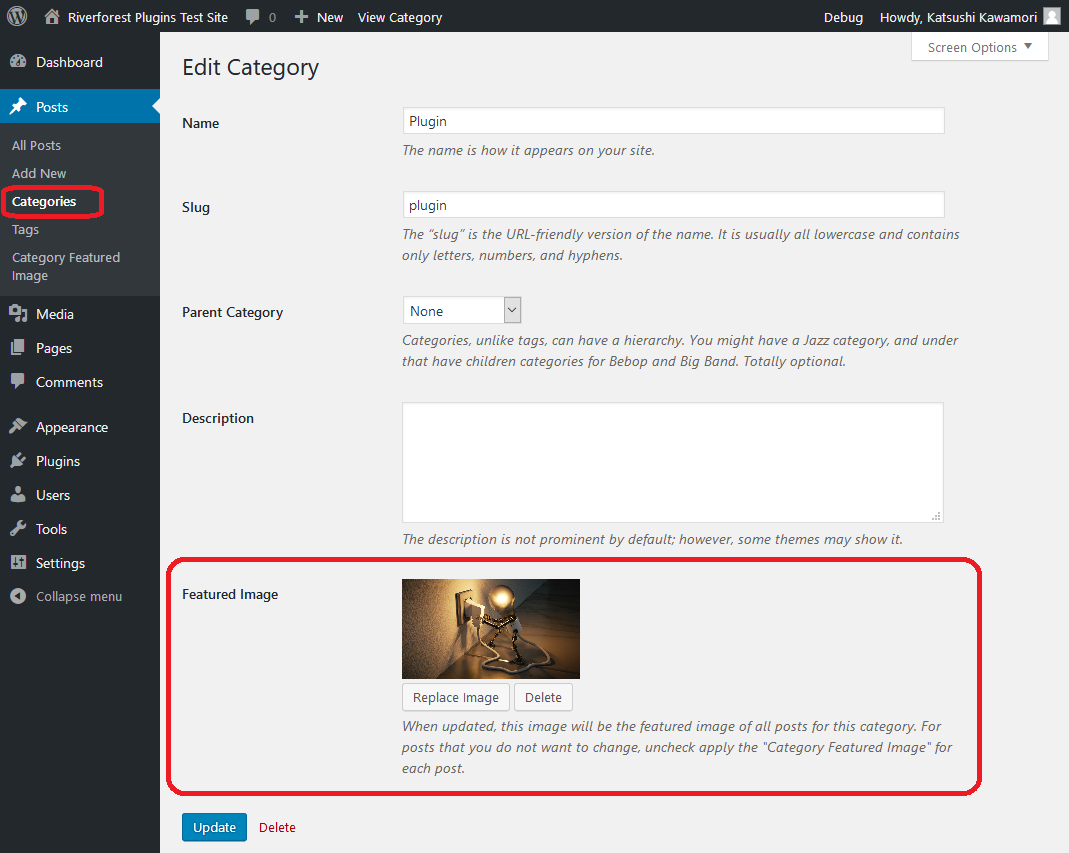
Update image of category
Changelog
[2.09] 2025/04/19
- Fix – Loading the management screen.
2.08
Supported WordPress 6.4.
PHP 8.0 is now required.
2.07
Fixed translation.
2.06
Added a note on the use of this plugin.
2.05
Supported WordPress 5.7.
2.04
Fixed an issue with theme support.
2.03
Fixed an issue with getting category metadata.
Thanks @prionkor !
2.02
Fixed an error when acquiring terms.
2.01
Fixed translation.
2.00
Excluded the exclusion settings.
1.06
Fixed an error when acquiring terms.
1.05
Fixed an error when acquiring terms.
Fixed a problem when featured image was not applied.
1.04
Fixed a problem with new posts.
1.03
Conformed to the WordPress coding standard.
1.02
Add the function to apply or exclude category bulk changes by post.
Supports Custom Post Types.
1.01
Addition of termmeta deletion when uninstalling.
1.00
Initial release.