

Change WP URL
Use this only if you're trying to move your WordPress install to another domain.
Plugin info
Maintenance & Compatibility
Maintenance score
Possibly abandoned • Last updated 5661 days ago • 1 reviews
Is Change WP URL abandoned?
Possibly abandoned (last update 5661 days ago).
Compatibility
Similar & Alternatives
Explore plugins with similar tags, and compare key metrics like downloads, ratings, updates, support, and WP/PHP compatibility.
Description
We do a lot of WordPress installs for clients when we set up new websites for them. One hassle we always go through is setting up the development site as a sub-domain or as a complete other domain, and then having to move it to the new domain. Since WordPress uses absolute URLs in posts, links, etc., editing by hand is definitely not an option. We also couldn’t find a really good solution, so I wrote a plugin that will go through all of your posts, pages, options and guids and update your old domain to your new domain!
Installation
- Upload the folder
change-wp-urlto the/wp-content/plugins/directory - Activate the plugin through the ‘Plugins’ menu in WordPress
- Backup your database. (Either get a plugin to do this, or do it with phpMyAdmin)
- Use this BEFORE you move your install to the new location: this should be the last thing you do before moving
- Enter your new URL WITH NO TRAILING SLASH and click “Update”
- Once you run this, the “old” WordPress URL will stop working, so move all of your files and database to the new location (if necessary), go to your “new” URL and re-login
- Go to your Settings->General tab, and update the Blog Address, if necessary (only if your blog url is different from base url)
- Deactivate and delete this plugin
Frequently Asked Questions
There sure are a lot of warnings on here. How dangerous is this?
Well, we’ve used it tons of times with no problems. Just take a backup beforehand just in case. Note that if you have a lot of other plugins, this will not update any domains in them.
Review feed
Screenshots
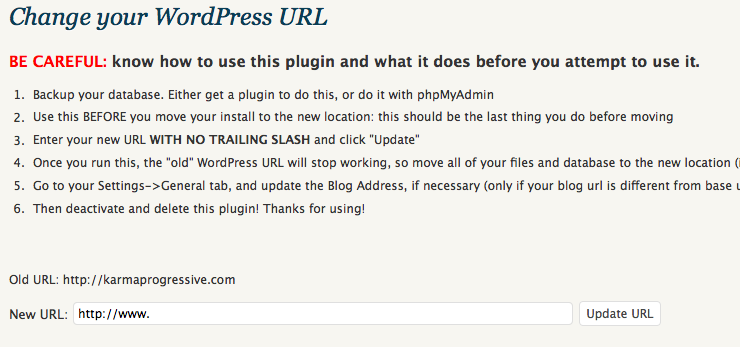
Change WP URL ready to be used.
Changelog
1.0
- Initial release