

Conditional Menus
This plugin enables you to set conditional menus per posts, pages, categories, archive pages, etc.
Plugin info
Maintenance & Compatibility
Maintenance score
Possibly abandoned • Last updated 401 days ago • Support resolved 0% • 72 reviews
Is Conditional Menus abandoned?
Possibly abandoned (last update 401 days ago).
Compatibility
Similar & Alternatives
Explore plugins with similar tags, and compare key metrics like downloads, ratings, updates, support, and WP/PHP compatibility.
Description
Conditional Menus is a simple yet useful WordPress plugin by Themify, which allows you to swap the menus in the theme as per specific conditions. In short, you can have different menus in different posts, pages, categories, archive pages, etc. It works with any WordPress theme that uses the standard WordPress menu function.
How to use it
Once you activate the plugin, you will see the conditional menus on the Manage Locations tab located in your WP Admin > Appearance > Menus page.
1) To add conditional menu: click “Conditional Menu” and select a menu from the list (you can create these menus in the “Edit Menus” tab)
– You can remove the menu by selecting “Disable Menu” from the list.
2) Click on “+ Conditions” to add conditions in the modal box (tick the checkboxes where you want the menu to appear)
3) To remove the conditional menus, click on the “X” button
Visit https://themify.me/conditional-menus for more details.
Installation
- Login to your wp-admin > go to Plugins > Add New and upload the ‘conditional-menus.zip’
- Activate the plugin
Frequently Asked Questions
Review feed
Screenshots
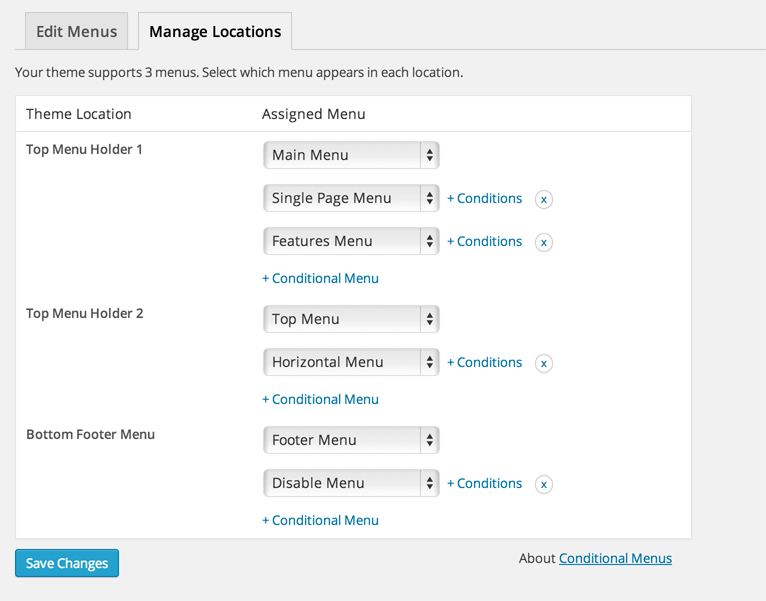
Admin interface
Changelog
The changelog is located at: https://themify.org/changelogs/conditional-menus.txt