

Countdown Timer
Simple countdown timer shortcode. Specify date/time, will show YMD... until target.
Plugin info
Maintenance & Compatibility
Maintenance score
Possibly abandoned • Last updated 5154 days ago • 1 reviews
Is Countdown Timer abandoned?
Possibly abandoned (last update 5154 days ago).
Compatibility
Similar & Alternatives
Explore plugins with similar tags, and compare key metrics like downloads, ratings, updates, support, and WP/PHP compatibility.
Description
Provides a shortcode/function to render a countdown timer of the form “Years until target: X, Months until target: Y, Days until target: Z…”.
You can specify the date/time of the target, as well as output formats with placeholders (including HTML wrappers) all from within the admin options page.
Display result using the shortcode; you can override global options from within the shortcode too.
By default, result will be something like "Months 0/Days 0/Years 0; Hours 4:Minutes 59:Seconds 54".
About AtlanticBT
From About AtlanticBT.
Our Story
Atlantic Business Technologies, Inc. has been in existence since the relative infancy of the Internet. Since March of 1998, Atlantic BT has become one of the largest and fastest growing web development companies in Raleigh, NC. While our original business goal was to develop new software and systems for the medical and pharmaceutical industries, we quickly expanded into a business that provides fully customized, functional websites and Internet solutions to small, medium and larger national businesses.
Our President, Jon Jordan, founded Atlantic BT on the philosophy that Internet solutions should be customized individually for each client?s specialized needs. Today we have expanded his vision to provide unique custom solutions to a growing account base of more than 600 clients. We offer end-to-end solutions for all clients including professional business website design, e-commerce and programming solutions, business grade web hosting, web strategy and all facets of internet marketing.
Who We Are
The Atlantic BT Team is made up of friendly and knowledgeable professionals in every department who, with their own unique talents, share a wealth of industry experience. Because of this, Atlantic BT always has a specialist on hand to address each client?s individual needs. Due to the fact that the industry is constantly changing, all of our specialists continuously study the latest trends in all aspects of internet technology. Thanks to our ongoing research in the web designing, programming, hosting and internet marketing fields, we are able to offer our clients the most recent and relevant ideas, suggestions and services.
Installation
- Unzip, upload plugin folder to your plugins directory (
/wp-content/plugins/) - Activate plugin
- Add countdown shortcode anywhere you need it.
Check out the included admin help page for complete explanation within WordPress!
Frequently Asked Questions
What’s the shortcode?
In full glory:
[countdown_timer
    target_time="2012-05-05 14:03:00"
    complete_text="It's Done!"
    format= {CUSTOM HTML FORMAT - SEE BELOW}
    date_separator='<span class="d-sep">/</span>'
    time_separator='<span class="t-sep">:</span>'
    label_format="<em>%s</em>"
    timezone="America/New_York"
]
Developer Hooks
The following filters are provided to adjust both the attributes (before rendering) and the format (after rendering).
You would use them like:
add_filter( 'abt_countdown_timer__pre_render', 'my_countdown_prerender' );
function my_countdown_prerender($attributes) { ... }

add_filter( 'abt_countdown_timer__post_render', 'my_countdown_postrender' );
function my_countdown_postrender($output, $attributes) { ... }
This is how they’re used in the plugin:
// hook - adjust attributes used to render the countdown
$attributes = apply_filters( 'abt_countdown_timer__pre_render', $attributes );

// hook - add "before", "after"; alter rendered output
$formatted_time = apply_filters( 'abt_countdown_timer__post_render', $formatted_time, $attributes );
Other Options
- Title and Link – tooltip text when hovering over timer; optional link from clicking timer
- Timezones – specify a timezone for calculations (if different than WP timezone)
- Output format – HTML wrapper for result fields; uses special placeholder formats for label, separators, and time values (see
[strftime][]) - Date Separator – text between date values, if used in Output Format
- Time Separator – text between time values, if used in Output Format
- Interval Label – wrapper for laber for “Year”, “Month”, etc
Review feed
Screenshots
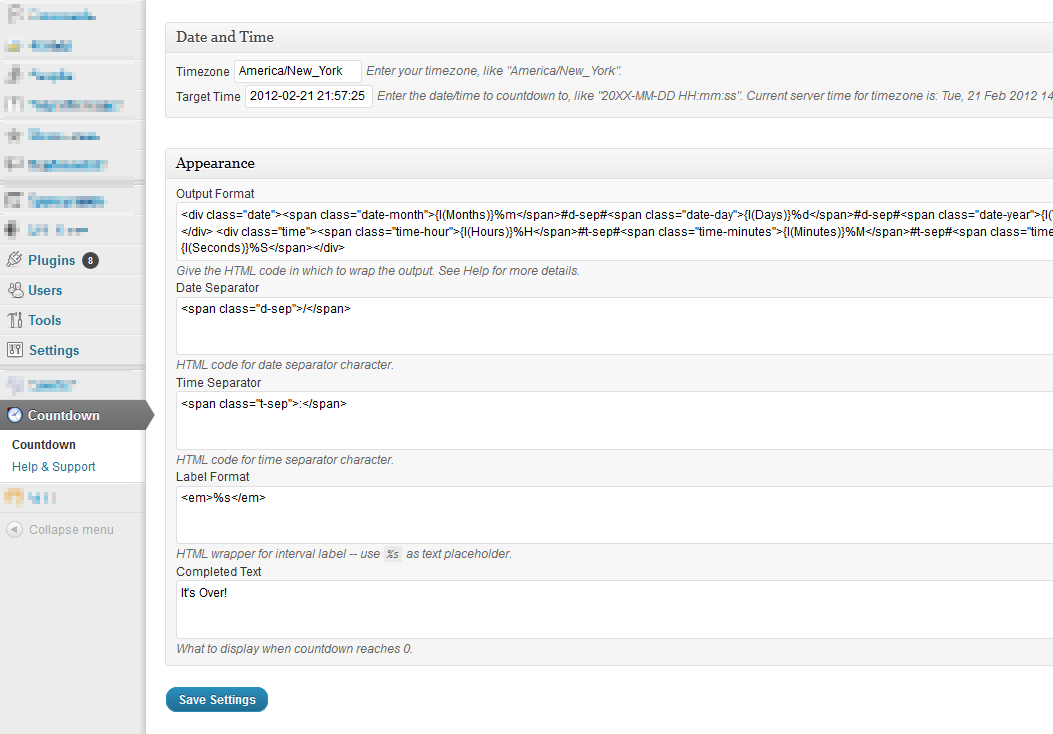
Admin options page with templates, placeholders
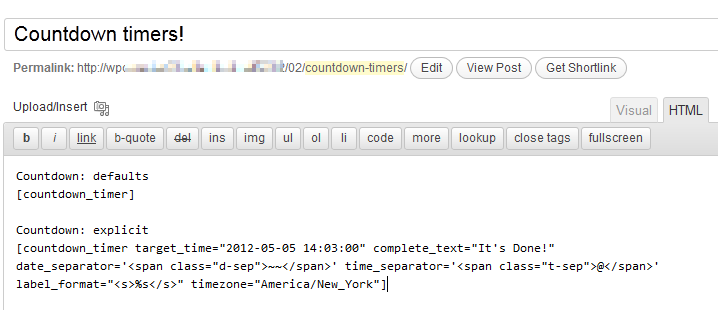
Usage example - note that "explicit" options use single-quotes to allow double-quotes in HTML
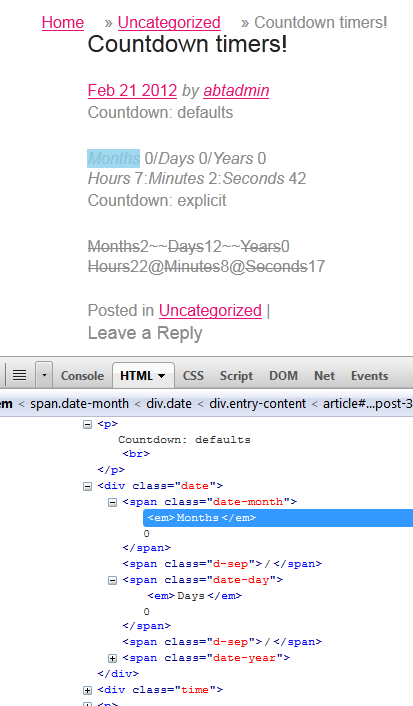
Output example - with Firebug showing HTML
Changelog
0.7
- bugfixes, singleton, hooks
- submitted to WP
0.6
- refactored for public consumption
0.5
- split plugin from custom code