

Custom Logging Service
Provides a simple API for storing miscellaneous log entries and displays them in a Dashboard subpage.
Plugin info
Maintenance & Compatibility
Maintenance score
Possibly abandoned • Last updated 3405 days ago
Is Custom Logging Service abandoned?
Possibly abandoned (last update 3405 days ago).
Compatibility
Similar & Alternatives
Explore plugins with similar tags, and compare key metrics like downloads, ratings, updates, support, and WP/PHP compatibility.
Description
This plugin is derived from the no longer supported
WordPress Logging Service.
Despite that it is not compatiple with it, and there is no upgrade path from one
to the other.
Features
- No log entries generated by the plugin itself, all come from external API calls
- Organisation of log entries in freetext categories
- Severity levels
- Freetext log messages
- Entries can be marked as seen and then filtered from being displayed again
- Filtering by minimum severity level
- Sort by date, category, user name, severity or blog name (in Multisite installations)
- Access to the log page can be granted by user role
API
Constants
Check to test if the plugin is active:
CLGS = true
Defined severity levels:
CLGS_NOSEVERITY = 0
CLGS_INFO = 1
CLGS_NOTICE = 2
CLGS_WARNING = 3
CLGS_ERROR = 4
CLGS_FATALERROR = 5
Functions
clgs_is_registered ( $category )
string $category
returns true if $category is registered.
clgs_register ( $category, $description )
registers $category as a log category. $description will be shown in the
management page.
It is good practice to use unique categories for each plugin that publishes
log messages.
string $categoryAt most 190 (unicode) charactersstring $descriptioncan contain HTML same as comments (filtered by
wp_kses_data)
returns false if the category is already registered or it is too long.
clgs_clear ( $category )
deletes all log entries of $category.
string $descriptionexisting category
returns number of deleted entries or false if action failed.
clgs_unregister( $category );
deletes all log entries and then removes $category.
string $descriptionexisting category
returns false if false if action failed.
clgs_log( $category, $text, $severity = null, $user = null, $blog_id = null, $date = null );
writes a new log entry in the specified category
string $descriptiona registered category namestring $textthe logged message, can contain HTML same as comments (filtered
bywp_kses_data)int $severityone of defined severity levels (see above); if missing defaults to
CLGS_NOCATEGORYint | string | WP_User $useruser id, slug or WP user object are aceptable; if missing
defaults to current user (or a placeholder if none is logged in)int $blog_idblog id; if missing defaults to current blogint | double | string $datea UNIX timestamp or a string recognized bystrtotime();
if missing defaults to current time
returns false if entering the log failed.
Installation
- Install from Plugins -> Add New
- Or download the .zip and extract to
wp-content/plugins - Activate the plugin from the Plugins menu. In Multisite installations, feel free
to activate as a network plugin or to leave it to individual blogs. - Go to Settings -> Custom Logging Service for the next steps
Settings
- Minimum severity for notification: You will see the number of unseen log entries
of that level or above next to the menu entry for the log page. - Default minimum severity filter: Which severity levels you will see in the log page.
You can change this filter later on the page. - Roles that can manage Custom Logs: Decide who can see and interact with the log page.
- Log entries per page: Set the number of entries per page.
Generating Log messages
This plugin does not generate any log messages by itself. You need other plugins to
interact with it through the API; see the API section for details.
Frequently Asked Questions
Where are the logs?
Find them under Dashboard -> Selected Logs.
I can’t find the option to add roles for log management!
If the plugin has been installed network-wide in Multisite, only the Super Admin
has access to the logs. Sorry, I don’t understand role management in Multisite.
Review feed
Screenshots
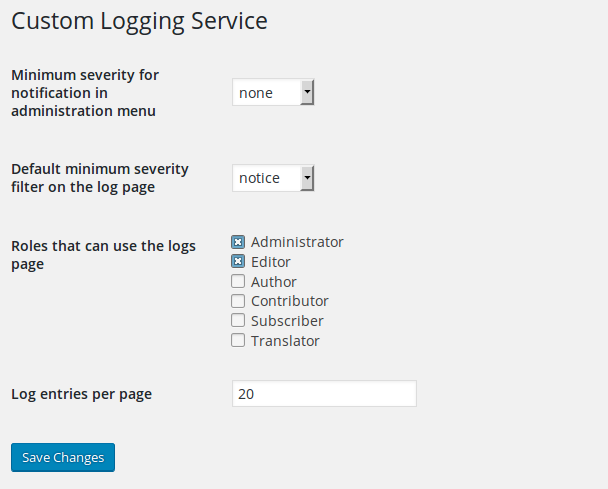
Settings screen

Log page
Changelog
1.0.3
Compatibility with WP 4.7
1.0.2
Compatibility with WP 4.6
1.0.1
Compatibility with WP 4.5
1.0.0
First version, derived from zaantar’s
WordPress Logging Service