

Custom Payment Gateways for WooCommerce
Custom payment gateways for WooCommerce - create custom payment gateways to never miss out any payments for your WooCommerce Store.
Plugin info
Maintenance & Compatibility
Maintenance score
Stale • Last updated 334 days ago • 19 reviews
Is Custom Payment Gateways for WooCommerce abandoned?
Likely maintained (last update 334 days ago).
Compatibility
Similar & Alternatives
Explore plugins with similar tags, and compare key metrics like downloads, ratings, updates, support, and WP/PHP compatibility.
Description
Custom Payment Gateways for WooCommerce lets you easily create and manage your own manual or offline WooCommerce payment gateways without any code.
Over 40% of customers abandon checkout if their preferred payment method isn’t available. Never miss out on these sales and recover additional revenue by offering alternative payment methods on your WooCommerce stores.
This plugin is perfect if your preferred payment provider doesn’t have a WooCommerce gateway. You can now support bank transfers, local wallets, in-person payments, and much more.
Now create those additional payment methods for WooCommerce using Custom Payment Gateways for WooCommerce.
🧩 Compatible with WooCommerce Checkout Blocks
Seamlessly integrate your custom payment gateways into the modern block-based WooCommerce Checkout experience.
Features
Create fully functional WooCommerce custom gateways with settings for:
- ✅ Payment Gateway Title, Description, and Icon
- ✅ Checkout & Email Instructions
- ✅ Enable for selected Shipping Methods
- ✅ Support Virtual/Downloadable Products
- ✅ Custom Return URL (Thank You page)
- ✅ Default Order Status
- ✅ Trigger Additional Emails
- ✅ Add a Custom Input Field to Collect Info at Checkout
- ✅ Add Gateway Fees (or Discounts)
I used this to create a gateway using Zelle, Apple Pay, Gpay and many others. Worked like a charm. I hit a snag on a Woo update and support was all over it. Awesome plugin.
Works like charm and support rocks
abossola
Premium Version
With Pro version you can:
- 🔄 Add multiple payment gateways – Create unlimited payment gateways on your WooCommerce store.
- 🧾 Add multiple input fields – Create unlimited input fields on your WooCommerce Checkout page under payment gateway options to capture necessary details.
- 💸 Add multiple fees or discounts.
- 🛒 Set a Minimum WooCommerce Order amount for which the WooCommerce Custom Payment Gateway must appear.
- 🛒 Set a Maximum WooCommerce Order amount for which the WooCommerce Custom Payment Gateway must not appear for checkout.
- ✨ Additional placeholders for instructions and Custom URL’s
Our other plugins
-
Custom Shipping Methods for WooCommerce – Create custom shipping methods for your WooCommerce store and manage dynamic shipping with ease.
-
Payment Gateways by User Roles for WooCommerce – Allow payment gateways to be available or not available for only particular user roles.
-
File Uploads Addon for WooCommerce – Create a print on demand store by allowing users to upload their files when adding products to cart on your WooCommerce store.
-
Variations Radio Buttons for WooCommerce – Convert your variations dropdown into radio buttons there by allowing customers a much better user experience and speeding up the checkout process.
-
WooCommerce Variations Reports – Get a report of how your variations sales are happening on your WooCommerce Store.
Feedback
- We are open to your suggestions and feedback. Thank you for using or trying out one of our plugins!
- Visit plugin site.
Installation
- Upload the entire plugin folder to the
/wp-content/plugins/directory. - Activate the plugin through the “Plugins” menu in WordPress.
- Start by visiting plugin settings at “WooCommerce > Settings > Custom Payment Gateways”.
Frequently Asked Questions
Review feed
Screenshots

General Settings - Select the number of Gateways you want to add.

Input Fields - Settings related to values submitted via custom fields to be displayed on Thank you page.

Email settings.

Other settings.

Settings related to Fees.
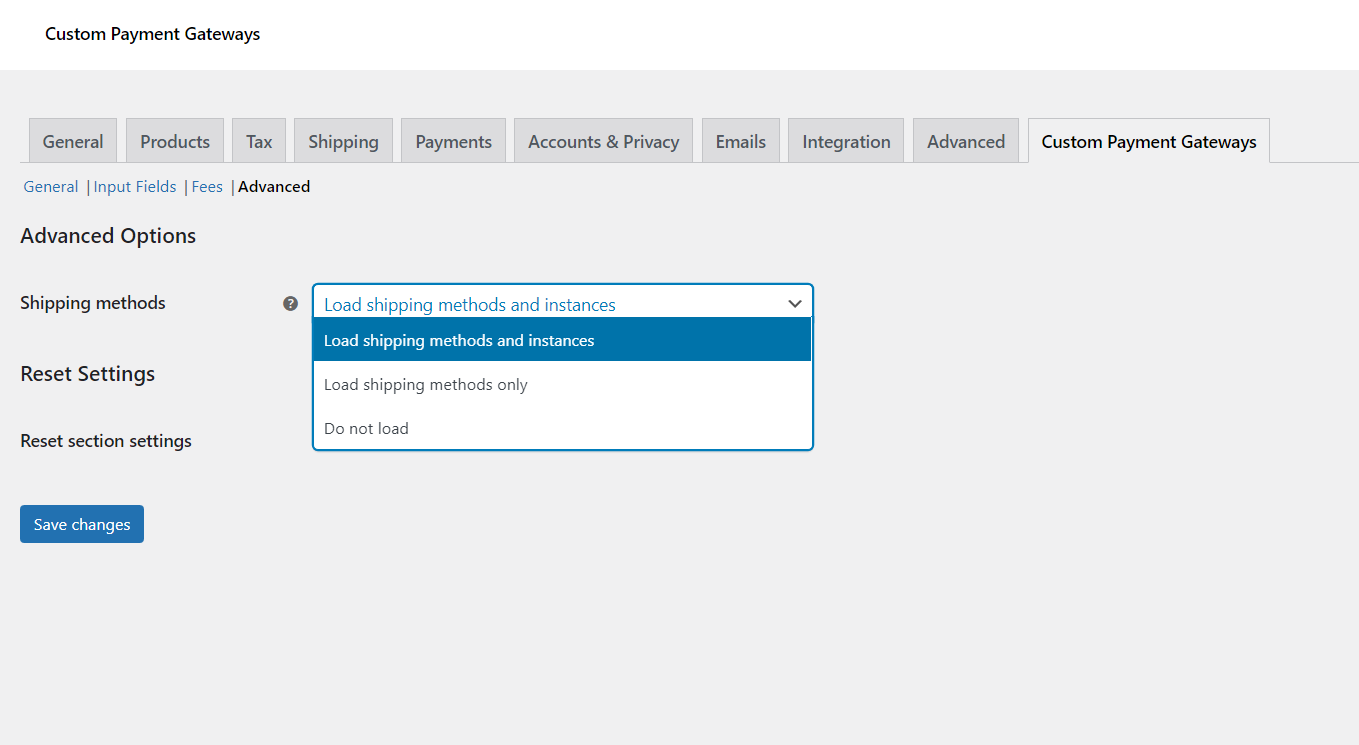
Gateways based on Shipping methods.

Gateway settings.
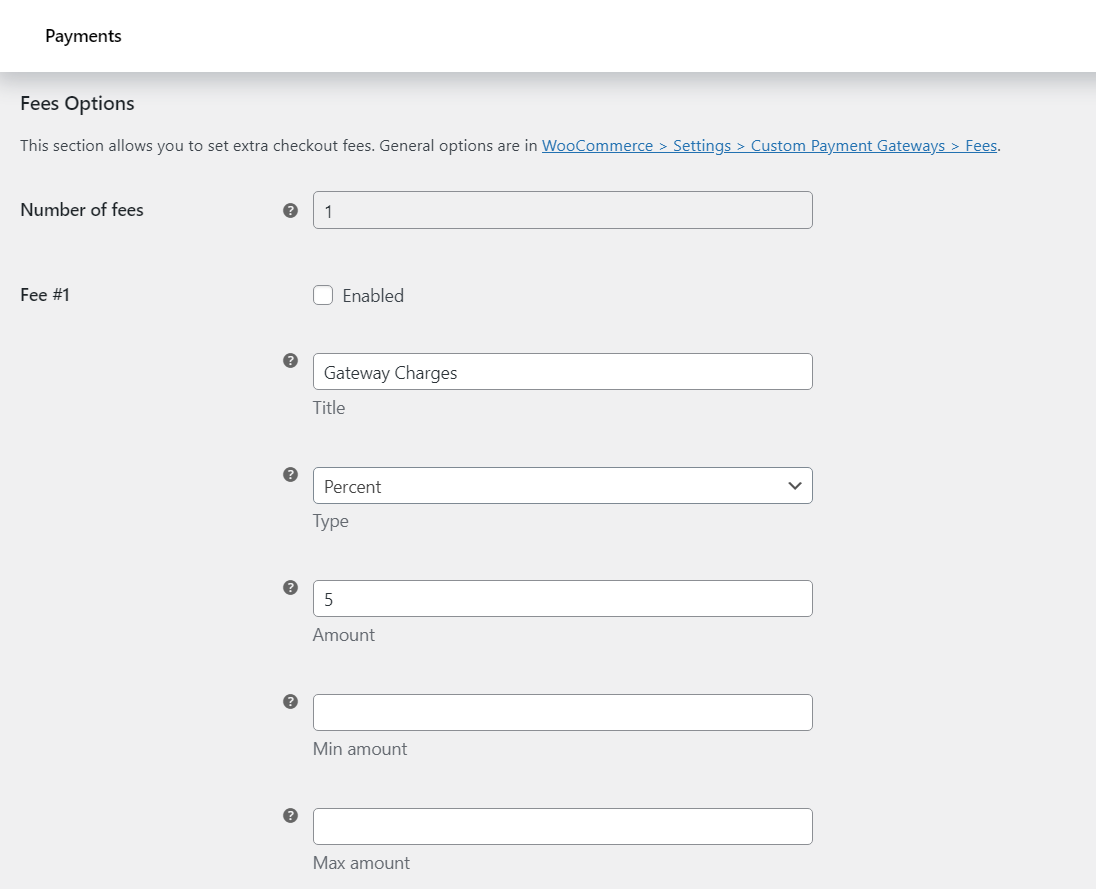
Configure fees for gateways.

Configure input fields for gateways.
Changelog
2.1.0 – 04/05/2025
- Fixed an issue related to placeholder and label overlapping with WooCommerce Checkout Blocks.
2.0.0 – 23/12/2024
- Compatibility with Checkout Blocks – Custom Payment Gateways are now available with Checkout Blocks
1.8.1 – 14/11/2023
- Fixed a bug resulting in fatal error when editing a product.
1.8.0 – 20/10/2023
- Compatibility with WooCommerce HPOS
- Compatibility with PHP 8.2
1.7.0 – 18/04/2023
- Added provisions for allowing discounts in fees via negative values in the Fees field.
- Added Maximum Order value field which will not show the Custom Payment Gateway if the order amount has reached a particular value.
- Fixed a bug related to Fees not getting applied when Minimum Order value is set.
- Fixed compatibility issues with Polylang plugin.
- WC tested upto 7.6
1.6.6 – 23/06/2021
- Fix – Input field was not visible when using WPML.
- Fix – Title and Description were not translatable.
- Fix – Stock levels not reducing once an order was placed.
- WC tested upto 5.4
1.6.5 – 18/10/2020
- Code refactoring as per WPCS standards.
- WC tested up to: 4.6
1.6.4 – 12/03/2020
- WC tested up to: 4.0
1.6.3 – 04/02/2020
- Dev – Custom return URL (Thank You page) –
%order_total%placeholder added.
1.6.2 – 03/02/2020
- Dev – Code refactoring.
- Plugin description updated.
- WC tested up to: 3.9.
1.6.1 – 03/01/2020
- Dev – Input Fields – ‘Process in “Advanced Order Export For WooCommerce” plugin’ options added.
- Dev – Typo fixed in admin settings.
1.6.0 – 25/12/2019
- Dev – “Fees” options section added.
- Dev – Input Fields – “Enable section” option added.
- Dev – Code refactoring.
1.5.0 – 02/12/2019
- Dev – Input Fields – “Add to order notes” option added.
- Dev – Admin settings descriptions updated.
- Dev – Code refactoring.
- WC tested up to: 3.8.
- Tested up to: 5.3.
1.4.2 – 10/09/2019
- Dev – Input Fields – “Textarea” type added.
- WC tested up to: 3.7.
1.4.1 – 20/07/2019
- Dev – Input Fields – Type – “Checkbox” option added.
1.4.0 – 18/06/2019
- Dev – Input Fields – General Options – “Add to order details” option added.
- Dev – Input Fields – General Options – “Add to emails” options added.
- Dev – Input Fields – “Type” option added.
- Dev – General admin settings split into sections.
- Dev – Code refactoring.
1.3.0 – 22/05/2019
- Dev – “Input Fields” options added.
- Dev – Advanced Options – Shipping methods – “Do not load” option added.
- Tested up to: 5.2
- WC tested up to: 3.6
1.2.2 – 15/04/2019
- Dev – Custom return URL (Thank You page) –
%order_id%and%order_key%placeholders added.alg_wc_custom_payment_gateway_custom_return_urlfilter added.
1.2.1 – 01/04/2019
- Fix – “Text Domain” renamed to
custom-payment-gateways-woocommerce. - Dev – Advanced Options – “Load shipping method instances” option added.
- Dev – Empty values are now allowed in custom payment gateway’s “Title” and “Description”.
1.2.0 – 14/12/2018
- Dev – Enable for shipping methods – Listing all shipping instances (i.e. by shipping zones) now (instead of just shipping methods).
- Dev – Code refactoring.
- Dev – Admin settings restyled.
1.1.1 – 05/08/2018
- Dev – Admin settings restyled and descriptions updated.
- Dev – Plugin link updated.
- Dev – readme.txt updated.
1.1.0 – 26/07/2017
- Dev – WooCommerce v3 compatibility –
reduce_order_stock()replaced withwc_reduce_stock_levels(). - Dev – WooCommerce v3 compatibility – Order status, payment method and shipping method – Getting with functions instead of accessing properties directly.
- Dev – Autoloading plugin options.
- Dev – Link updated from http://coder.fm to https://wpcodefactory.com.
- Dev – Plugin header (“Text Domain” etc.) updated.
- Dev – POT file added.
1.0.0 – 17/02/2017
- Initial Release.