

Custom Strava Integration
This plugin provides an easy way to add your strava activities to your posts without leaving your site.
Plugin info
Maintenance & Compatibility
Maintenance score
Possibly abandoned • Last updated 3794 days ago
Is Custom Strava Integration abandoned?
Possibly abandoned (last update 3794 days ago).
Compatibility
Similar & Alternatives
Explore plugins with similar tags, and compare key metrics like downloads, ratings, updates, support, and WP/PHP compatibility.
Description
The “Custom Strava Integration” is a powerful plugin that makes integrating strava activities easy and simple. It gives you the opportunity to create output exactly the way you like it.
The Plugin
Basically what this plugin does is adding the shortcode [strava id=”[activity id]”] to your post, receiving data via Strava API v3 and filling the preconfigured template with this information.
Configuration
You want full control of the shortcode’s output ? No Problem. You can specify a template at the settings page and define the positions of strava information. Therefore ‘Custom Strava Integration’ provides these placeholders:
- [distance] – Overall distance of the activity
- [description] – Description of the activity
- [duration] – Duration of the activity
- [elevation] – Overall elevation of the activity
- [location] – Location of the activity
- [name] – Name of the activity
- [speed] – Depending on type (ride or run) – either running pace or riding speed
- [time] – Local start time of the activity
- [type] – Type of the activity (run – ride – swim)
You can not only customize the style by using CSS features, moreover you have full control over the html output.
Moreover you can choose the type of display unit (mi/ft or km/m) you want to use.
Difference to other solutaions
We know that strava also does offer their own embedded widget, but this plugin:
- does not use iframes (if you want to)
- allows you to fully customize the content
- can display more information than the widget
- does not require you to leave the site
You can concentrate on the important things – writing good blog posts!
Installation
- Upload the folder
strava-for-wordpressto the/wp-content/plugins/directory - Activate the plugin through the ‘Plugins’ menu in WordPress
Plugin Setup
- Please create a application on Strava first! Go here [http://www.strava.com/developers] for more details.
- It is also important to make sure that the redirect URI you enter is the same as your site.
- After creating the application go to the Settings page and enter the client id and secret.
- Save settings
- Click “Connect with Strava” on the settings page to generate an access token
Add to page/post
Basically what this plugin does is adding the shortcode [strava id=”[activity id]”] to your post, receiving data via Strava API v3 and filling the preconfigured template with this information. Of course you could paste the snippet manually, but in order to do so you would have to leave your site and find the needed id by yourself. The easier way is to choose one of the listed activities in the right corner of your post editing page and let the plugin do the work for you. No more copy and paste!
Frequently Asked Questions
Do i really need to add a strava app?
Yes this is required by strava to allow access to your activities
Review feed
Screenshots
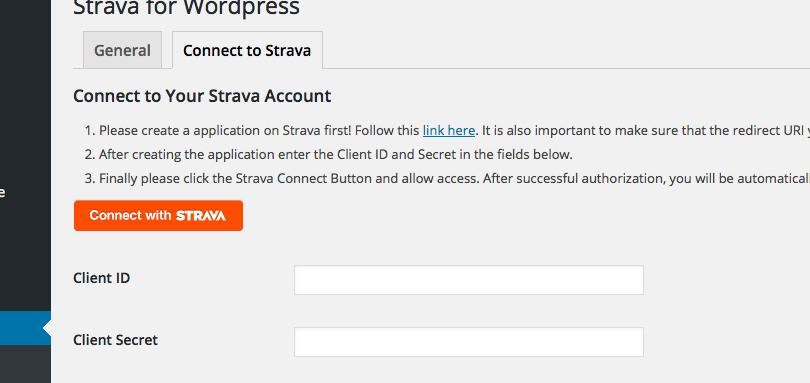
Add Client Id & Secret to be able to connect to strava

Configure the template the way you like it

Add Shortcode(s) by choosing from the list of activities
Changelog
1.0
- Plugin released.