

Maintenance 32/100290d since update
Active installs
50,000
Downloads
730,549
Reviews
10
Age
8.7y
Plugin info
Total downloads: 730,549
Active installs: 50,000
Total reviews: 10
Average rating: 5
Support threads opened: 1
Support threads resolved: 0 (0%)
Available in: 16 language(s)
Contributors: 3
Last updated: 6/19/2025 (290 days ago)
Added to WordPress: 7/31/2017 (8 years old)
Minimum WordPress version: 4.6
Tested up to WordPress version: 6.8.3
Minimum PHP version: f
Maintenance & Compatibility
Maintenance score
Stale • Last updated 290 days ago • Support resolved 0% • 10 reviews
32/100
Is Customizer Search abandoned?
Likely maintained (last update 290 days ago).
Compatibility
Requires WordPress: 4.6
Tested up to: 6.8.3
Requires PHP: f
Similar & Alternatives
Explore plugins with similar tags, and compare key metrics like downloads, ratings, updates, support, and WP/PHP compatibility.
Kirki Customizer Framework
Rating 4.5/5 (78 reviews) • Active installs 600,000
Customizer Export/Import
Rating 4.8/5 (114 reviews) • Active installs 100,000
Custom Login Page Customizer
Rating 4.8/5 (405 reviews) • Active installs 90,000
Clever Fox
Rating 3.0/5 (5 reviews) • Active installs 40,000
Custom Login Page Customizer – Login Designer
Rating 4.8/5 (150 reviews) • Active installs 30,000
Nimble Page Builder
Rating 4.7/5 (113 reviews) • Active installs 30,000
Description
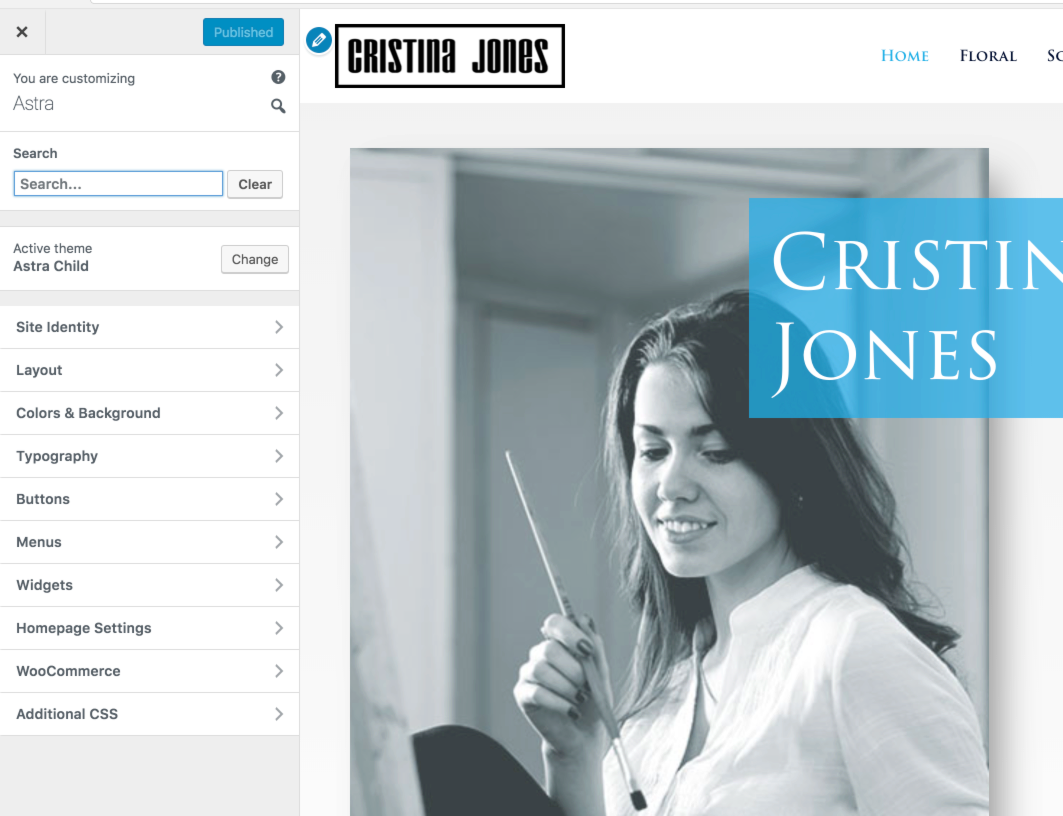
Using a theme powered by the WordPress Customizer? Then you will love this plugin. Save the time and frustration finding options. Simply search for the setting you’re looking for and get there instantly.
Works with all WordPress themes.
Installation
- Upload the plugin files to the
/wp-content/plugins/customizer-searchdirectory, or install the plugin through the WordPress plugins screen directly. - Activate the plugin through the ‘Plugins’ screen in WordPress
- Search field will appear when in the customizer.
Frequently Asked Questions
No FAQ available
Review feed
oceanwp
A must-have plugin
Thank you for creating such a great plugin, work perfectly with OceanWP. A must-have for any themes :)
Verdi Heinz
Big time saver for such a small plugin!
This will be a default plugin for all our projects.
In excellent themes like Astra colors, typography and layout are in sperate sections. This clear division is great to have, but can sometimes be a disadvantage when you only want to quickly change something like H1 colors and typography. Using this plugin you just type in H1 and you can very quickly change the settings. Naturally, there are many more examples.
Until the customizer settings have tabs at the top like Elementor but with "General", "Style" and "Advanced" (for example), I'll be using this plugin!
Screenshots

Changelog
1.2.1
- Improvement: Updated Readme file.
1.2.0
- Fix: Fixed security issue which originated from Astra-Notices library.
1.1.6
- Fix: Admin notice CSS console error in admin area.
1.1.5
- Fix: Fixed compatibility with other plugins with respect to the admin notice.
1.1.4
- New: Users can now share non-personal usage data to help us test and develop better products. ( https://store.brainstormforce.com/usage-tracking/?utm_source=wp_dashboard&utm_medium=general_settings&utm_campaign=usage_tracking )
1.1.3
- Setup plugin translations through https://translate.wordpress.org/projects/wp-plugins/customizer-search/.
1.1.2
- Change the background color highlight in the searched results.
1.1.1
- Highlight the characters that are matched in the results.
- Auto focus the search input when the search icon is clicked.
1.1.0
- Rewrite the search logic to improve the search results.
- The search results are direct links to the customizer panel where the searched setting resides, This improves the required clicks to get to the search setting from old version.
1.0.0
- Initial Release