

Markdown Editor (Formerly Dark Mode)
Quickly edit content in your WordPress site by getting an immersive, peaceful and natural writing experience with the coolest editor.
Plugin info
Maintenance & Compatibility
Maintenance score
Stale • Last updated 302 days ago • 83 reviews
Is Markdown Editor (Formerly Dark Mode) abandoned?
Likely maintained (last update 302 days ago).
Compatibility
Languages
Similar & Alternatives
Explore plugins with similar tags, and compare key metrics like downloads, ratings, updates, support, and WP/PHP compatibility.
Description
If you want to quickly edit content in WordPress without thinking about blocks, Markdown Editor is the perfect choice for you! Get an immersive, peaceful and natural writing experience with the coolest editor – Markdown Editor.
Whether you are a Markdown fan or newbie as a Markdown writer, you will love Markdown Editor. This is the simplest plugin for a developer to write content in WordPress.
Using technology at night time can have a negative effect on your eyesight.
Markdown Editor will also darken the colors of your admin dashboard making it easier for you to work at night.
Use Markdown Editor plugin to create a stunning dark version for your WordPress admin dashboard. Dark Mode works automatically as per their preferred operating system preference.
Markdown Editor (Formerly Dark Mode) Features
- Typography Settings – You can change the typography of your editor screen, using four different fonts, and controls for font size, line height, line width, and paragraph spacing.
- Ready-made Color Schema – Quickly choose your favourite color from the ready-made color schema available in Markdown. Highlight and edit your content the way you want.
- Syntax Shortcuts – A Markdown cheat sheet is available for you which shows other keyboard shortcuts for heading, formatting and the interface.
- Emoji Supported – You can make your content more interactive and attractive with emojis. Markdown Editor supports all types of emojis in your write up.
- Custom Colors – You can customize the background text and color as you want with the custom color feature of our Markdown Editor. Pick the color schema of your preference and make it yours!
- Makes it easy and fast – formatting in WordPress without thinking about the blocks.
- Dark Mode Switch – You can toggle between the dark and light mode using the admin bar dark mode switch menu anytime.
- Auto Match OS Theme – Automatically shows Darkmode if the OS preferred theme is dark.
- Remember Dark Mode – The dark mode remains saved once you activated the dark mode.
How to use?
After activating the plugin, a new row action Edit (Markdown) will be added in the post/ page table row actions.
For editing any page/ post with the markdown editor, you need to click the Edit (Markdown) button in the post/ page row actions.
Then you will redirect to the Markdown editor and can start editing with the markdown syntax.
You can find the Markdown editor shortcuts by clicking the keyboard icon at the right-bottom side of the editor.
You can see a Dark mode switch added to the admin bar menu.
You can toggle between the dark and light mode by using that switch any time.
External services
This plugin does not connect to any third-party or external services.
Privacy Policy
Markdown Editor uses Appsero SDK to collect some telemetry data upon user’s confirmation. This helps us to troubleshoot problems faster & make product improvements.
Appsero SDK does not gather any data by default. The SDK only starts gathering basic telemetry data when a user allows it via the admin notice. We collect the data to ensure a great user experience for all our users.
Integrating Appsero SDK DOES NOT IMMEDIATELY start gathering data, without confirmation from users in any case.
Learn more about how Appsero collects and uses this data.
Installation
Frequently Asked Questions
You can write and edit content easily in WordPress without thinking about blocks and hassle of formatting with Markdown Editor. It also brings a dark mode flavour for you!
A Markdown cheat sheet is available for you which shows other keyboard shortcuts for heading, formatting and the interface.
Yes, choose your favourite color from the ready-made color schema available in Markdown Editor. You can also customize the colors for highlighting the background and image of your content.
Yes, Markdown Editor supports all types of emojis in your write up.
Yes, We have tested this plugin in all modern browsers (Safari, Chrome, Firefox, Edge etc) works without any issue.
Markdown Editor is a developer’s way of writing content. Developers or coding folks will love it. But even if you are a newbie, you can easily use the plugin once the commands are familiar for you.
Review feed
Another hijacked plugin
Bait and Switch
Not the same plugin as in screenshoots.
Doesn't have the title feature
Plugin doesn't deliver markdown
Screenshots

Markdown Editor in default color.

Ready-made Color Schema.

Color customizing options.

Typography customizing options.

Markdown Editor More options.

Markdown Editor Settings.
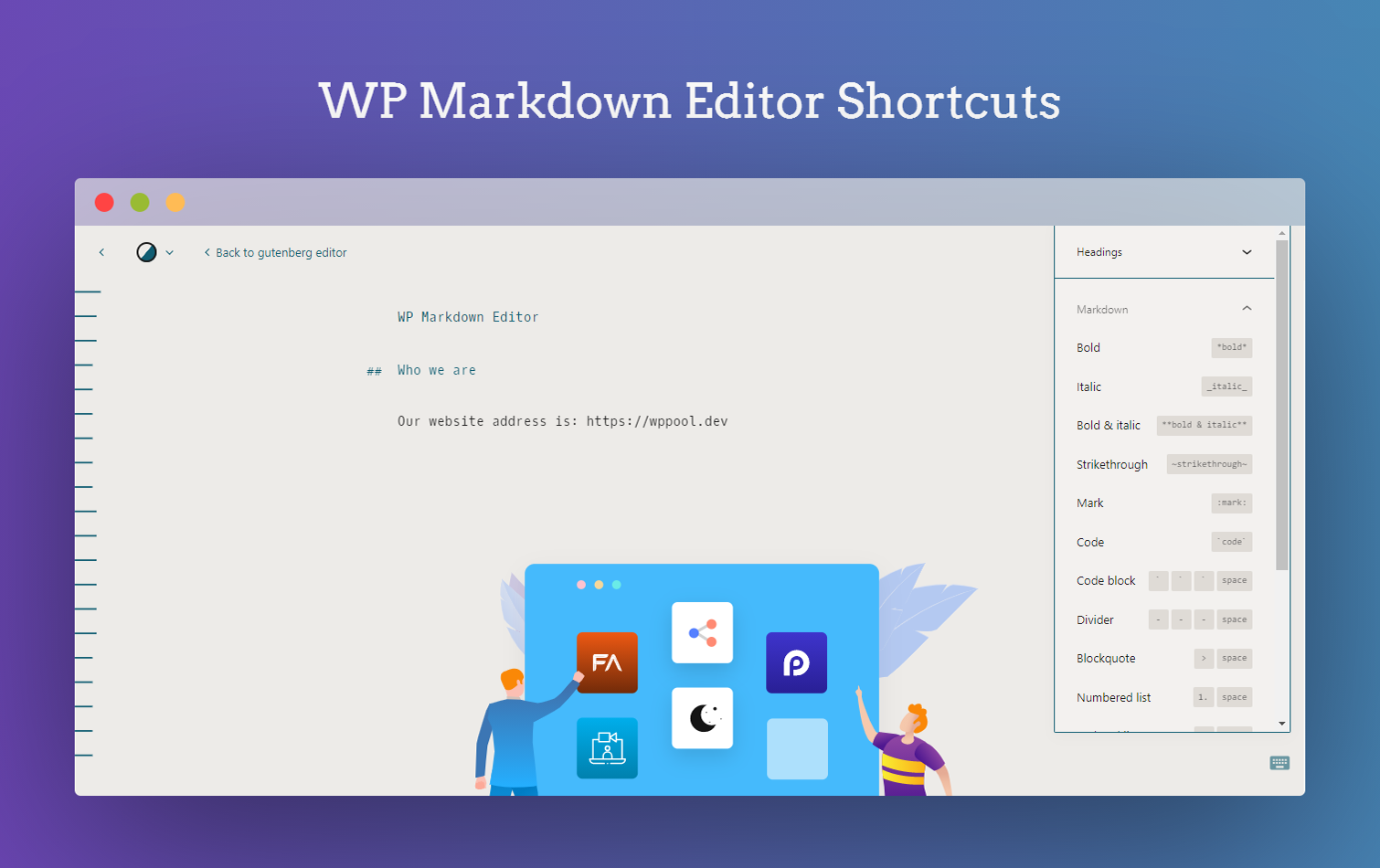
Markdown Editor shortcuts.

Dark Mode Switch Button.

Admin Dashboard in Dark Mode.
Changelog
4.2.0
- Improvement: Resolved all coding standard issues to improve code quality, compliance, and compatibility.
4.1.8
- Improvement: Updated plugin icon, banners and identity
4.1.7
- Improvement: Removed Appsero client
- Improvement: Checked compatibility with WordPress 6.5
4.1.6
- Improvement: Updated Appsero client
- Improvement: Updated WPPOOL sdk
4.1.5
- Fix: Fixed FluentCRM not collect leads
4.1.4
- Improvement: Updated Appsero client
- Improvement: Updated WPPOOL sdk
- Improvement: Checked compatibility with WordPress 6.2
- Fix: Fixed FluentCRM not collect leads
4.1.3
- Fix: Fixed CSRF vulnerability
- Improved: Updated all files according to wordPress coding standards
4.1.2
- FluentCRM integration and minor bug fixings
4.1.1
- Update: Updated the FluenCRM webhook
4.1.0
- Fix: Fixed the dark mode flicker issue
4.0.9
- Fix: Fixed sanitization using proper sanitize, escaping functions
4.0.8
- Update: Removing Markdown functionality from the plugin. Giving proper credits to Iceberg plugin which we forked to enable the Markdown functionality. Markdown functionality has been moved to premium version only because of the WordPress plugin team’s guideline
4.0.7
- Update: Restore old darkmode algorithm
- New: Added new fonts
- New: Added music components
4.0.6
- New: Added Settings Page
4.0.5
- Fix: Fixed OS Aware Darkmode
4.0.4
- Fix: Fixed Christmas Offer Notice
4.0.3
- Fix: Fixed WordPress 5.6 Compatibility
4.0.2
- Fix: Make Darkmode as Default Theme of the editor
4.0.1
- Fix: Fixed the classic editor dark mode
- New: Add color palettes for Gutenberg editor
- New: Add Dark Mode color theme to Markdown editor.
4.0.0
- New: Write post/ page with markdown syntax (Markdown Editor)
- New: Add admin bar switch menu
- New: Add OS aware dark mode
- Remove: Removed the Dark Mode checkbox from the user profile settings
3.3.1
- New: Add RankMath plugin support
3.3.0
- New: Add Gutenberg Editor Color Scheme
- New: Add Appsero Integration
3.2.1
- Styling: Fixed style issue with media uploads and site health dashboard.
- Bugfix: Allow plugin to be installed in any directory, instead of forcing
dark-mode - Misc: PHPCS coding style updates.
- Misc: Removed unused CSS files.
- Misc: Documentation updates.
3.2 – March 15, 2019
- Updated author and GitHub links.
- Removed PLUGIN_VERSION constant. The plugin version is now derived dynamically so you don’t have to update manually.