
Plugin info
Maintenance & Compatibility
Maintenance score
Possibly abandoned • Last updated 4020 days ago • 1 reviews
Is Dashy abandoned?
Possibly abandoned (last update 4020 days ago).
Compatibility
Similar & Alternatives
Explore plugins with similar tags, and compare key metrics like downloads, ratings, updates, support, and WP/PHP compatibility.
Description
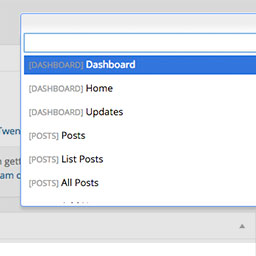
Dashy gives you a search field to get to admin pages quicker. More keyboard shortcuts right inside of WordPress. Get to pages, post, plugins, custom post types, faster. You can even search and get a to single post with the keyboard. To activate, use Control+Space.
To get to a specific page, type “list” and choose “List Pages”. From there you will be showing all of your pages that you can edit. Start searching the page name, and hit enter to go directly to editing that page. This supports posts, pages, and custom post types.
Installation
- Upload ‘dashy’ to the
/wp-content/plugins/directory - Activate the plugin through the ‘Plugins’ menu in WordPress
- Press Control+Shift+D to activate.
Frequently Asked Questions
Review feed
Screenshots

View of Dashy when activated.

Search for menu items to get to them quickly.

Go directly to pages, posts, and CPTs from the "List ___" option.