

Live Drag and Drop Builder for Contact Form 7
Use a nice Drag and Drop Form Builder when you Create forms with Contact Form 7.
Plugin info
Maintenance & Compatibility
Maintenance score
Possibly abandoned • Last updated 430 days ago • 5 reviews
Is Live Drag and Drop Builder for Contact Form 7 abandoned?
Possibly abandoned (last update 430 days ago).
Compatibility
Languages
Similar & Alternatives
Explore plugins with similar tags, and compare key metrics like downloads, ratings, updates, support, and WP/PHP compatibility.
Description
Contact Form 7 is a very simple plugin. You create forms using shortcodes and tweaking html.
This plugin is a contact form 7 extension.
It provides a live form builder. You can add fields by drag and dropping, you can see the form changes live, you can see how the form will look, and you can edit the fields easily.
Use a nice Drag and Drop Form Builder when you Create forms with Contact Form 7.
You can use multiple field types, including text fields, textarea fields, dropdown selects, multiple choices selector, and more.
Check the screenshots to see the plugin in action.
Your old forms will keep working as before. You dont need to recreate them. You can use the drag and drop builder and the old builder at the same time.
The plugin is very lightweight , it wont affect the site speed. It doesnt load in the frontend, only on the backend.
Use cases
-
Create contact forms quickly
-
Create “request quote” forms easily
-
Edit your form fields live
-
Sort / rearrange form fields by drag and dropping them
-
Create contact form 7 forms without using shortcodes or html
Installation
Automatic installation
Automatic installation is the easiest option as WordPress handles the file transfers itself and you don’t need to leave your web browser. To do an automatic install log in to your WordPress dashboard, navigate to the Plugins menu and click Add New.
In the search field type the plugin name and click Search Plugins. Once you’ve found our plugin by VegaCorp you can install it by simply clicking “Install Now”.
Manual installation
The manual installation method involves downloading our plugin and uploading it to your webserver via your favourite FTP application. The WordPress codex contains instructions on how to do this here.
Frequently Asked Questions
Review feed
Great for creating forms quickly
Simple and Functional
Screenshots
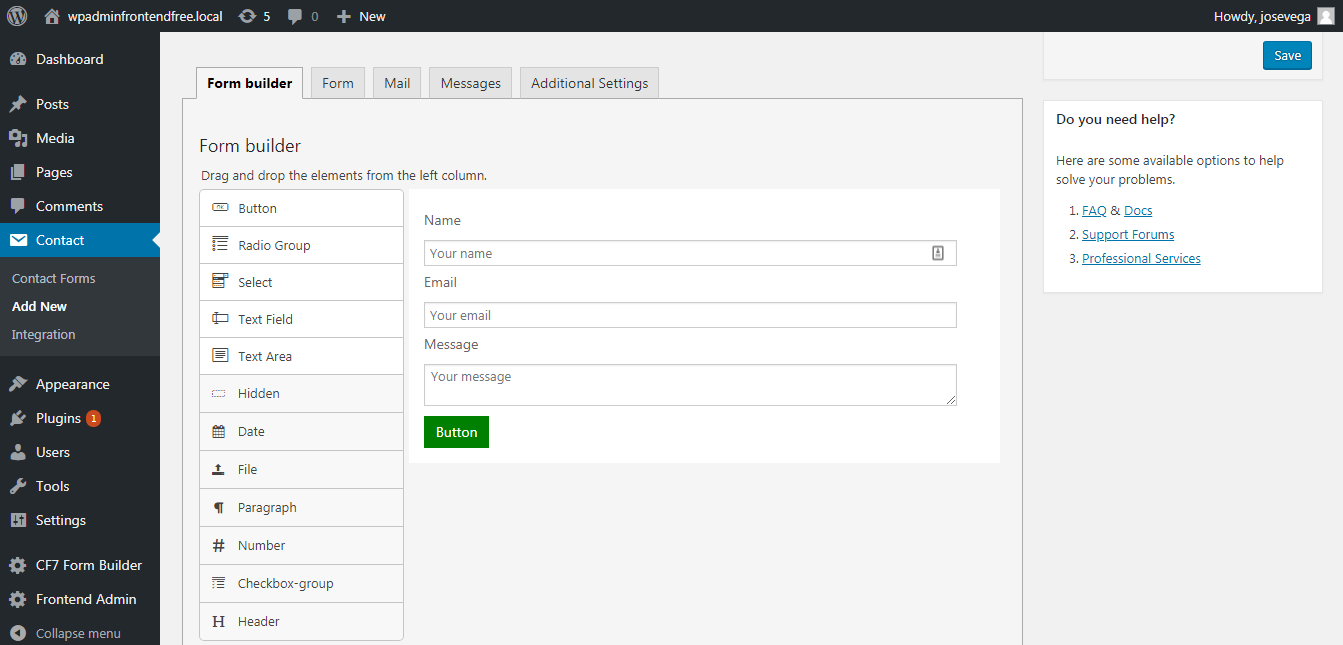
Form builder
Changelog
1.2.8 – 2025-01-27
CHANGE – Update freemius sdk
1.2.7 – 2024-11-11
CHANGE – Update freemius sdk
1.2.6 – 2023-07-05
CHANGE – Update freemius sdk
1.2.5 – 2023-01-04
CHANGE – Update freemius sdk
1.2.4 – 2022-03-17
CHANGE – Update freemius sdk
1.2.3 – 2021-01-22
FIX – Copy form builder settings when a form is duplicated
1.2.2 – 2020-11-14
CHANGE – Update freemius sdk
1.2.1 – 2020-09-15
CHANGE – Allow to translate the form builder
1.2.0 – 2020-03-22
NEW – Add new field type “Shortcode” to insert any shortcode from other plugins or other integrations
NEW – Add new options to the “textarea” field: cols and rows
NEW – Add new options to all the “input” fields for selecting default value from the current user profile
NEW – Add 4 form designs to select
NEW – Allow to select the width for each field
NEW – Add email field
CHANGE – Update to freemius v2.3.2
FIX – In small screens, the fields sidebar appears on top of the form builder
1.1.1
Update to freemius v2.2.4.
Fix JS error caused by gutenberg
Moved admin page to the settings dropdown.
1.1.0
Fix error in php < 7.0
1.0.1
Changed freemius sdk settings.
1.0.0
First version of plugin.