

Duplicate Content Cure
Duplicate content cure is a simple plugin that improves SEO by preventing search engines from indexing pages that contain duplicate content.
Plugin info
Maintenance & Compatibility
Maintenance score
Possibly abandoned • Last updated 3957 days ago
Is Duplicate Content Cure abandoned?
Possibly abandoned (last update 3957 days ago).
Compatibility
Similar & Alternatives
Explore plugins with similar tags, and compare key metrics like downloads, ratings, updates, support, and WP/PHP compatibility.
Description
Duplicate Content Cure is an extremely simple plugin that makes WordPress more Search Engine
friendly (And therefore improving SEO). It does this by preventing search engine spiders/bots
from accessing pages like Archives, Tags, and Categories, which tend to contain duplicated content
from elsewhere on your site. This is achieved by adding nofollow, noindex to
these problem pages.
Duplicate Content Cure doesn’t have a lot of features that other SEO plugins have, but
it also is lightning fast by comparison.
Installation
- download the plugin
- Unzip the downloaded plugin and upload the duplicate-content-cure directory to your plugins directory
- By default, everything but Pages, Posts, the Home Page, and the blog home page will have the “noindex,follow” tag added. If you wish to
allow your category or tag pages to be indexed, just go into the settings and uncheck those you want indexed.
Frequently Asked Questions
Review feed
Screenshots
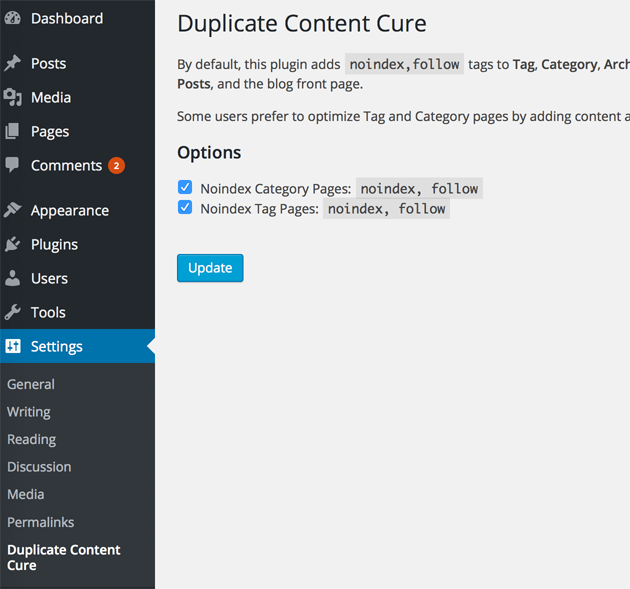
Screenshot of the admin options page
Changelog
1.0 (2015.05.25)
- Updated plugin and moved to HowToStartaBlog.org
- Added admin/ settings page
- Added new opton to leave Categories indexed
0.2 (2007.05.19)
- added closing forward slash to meta tags for XHTML validation – Thanks Kelson!
- updated plugin url
0.1 (2007.03.01)
- Plugin released – Originally on SEOlogs.com