

Easy WP Voting With Payment
Easy WP Voting With Payment allows you to create a simple voting system with payment method
Plugin info
Maintenance & Compatibility
Maintenance score
Possibly abandoned • Last updated 790 days ago • 5 reviews
Is Easy WP Voting With Payment abandoned?
Possibly abandoned (last update 790 days ago).
Compatibility
Similar & Alternatives
Explore plugins with similar tags, and compare key metrics like downloads, ratings, updates, support, and WP/PHP compatibility.
Description
This is a Easy WP Voting With Payment.
Our mission is to provide a plugin that support payment method without stressing yoursel, with this one plugin you are good to go. Currently this plugin support only one payment method in which in the future we are going to add more method.
To signup for a Paystack Merchant account visit their website by clicking here
Easy WP Voting With Payment allows you to accept payment on your voting system using Mastercard, Visa, Verve and others using Paystack.
With this Easy WP Voting With Payment plugin, you will be able to accept the following payment methods in your website
Note
This plugin is meant to be used by merchants in Nigeria.
Installation
Automatic Installation
- Login to your WordPress Admin area
- Go to “Plugins > Add New” from the left hand menu
- In the search box type Easy WP Voting With Payment
- From the search result you will see Easy WP Voting With Payment click on Install Now to install the plugin
- A popup window will ask you to confirm your wish to install the Plugin.
- After installation, activate the plugin.
- Open the settings page for Easy WP Voting With Payment and configure your voting system.
Manual Installation
- Download the plugin zip file
- Login to your WordPress Admin. Click on “Plugins > Add New” from the left hand menu.
- Click on the “Upload” option, then click “Choose File” to select the zip file from your computer. Once selected, press “OK” and press the “Install Now” button.
- Activate the plugin.
- Open the settings page for Easy WP Voting With Payment and configure your voting system.
Configure the plugin
To configure the plugin, go to Easy WP Voting With Payment then click settings .
- Amount of one vote – Enter amount for one vote in NGN.
- Paystack Public Key – Enter your Test/Live Secret Key here. Get your API keys from your Paystack account under Settings > Developer/API
- Paystack Secret Key – Enter your Test/Live Public Key here. Get your API keys from your Paystack account under Settings > Developer/API
- Click on Save Changes for the changes you made to be effected.
Frequently Asked Questions
You need to open a Paystack merchant account on Paystack
Review feed
Screenshots
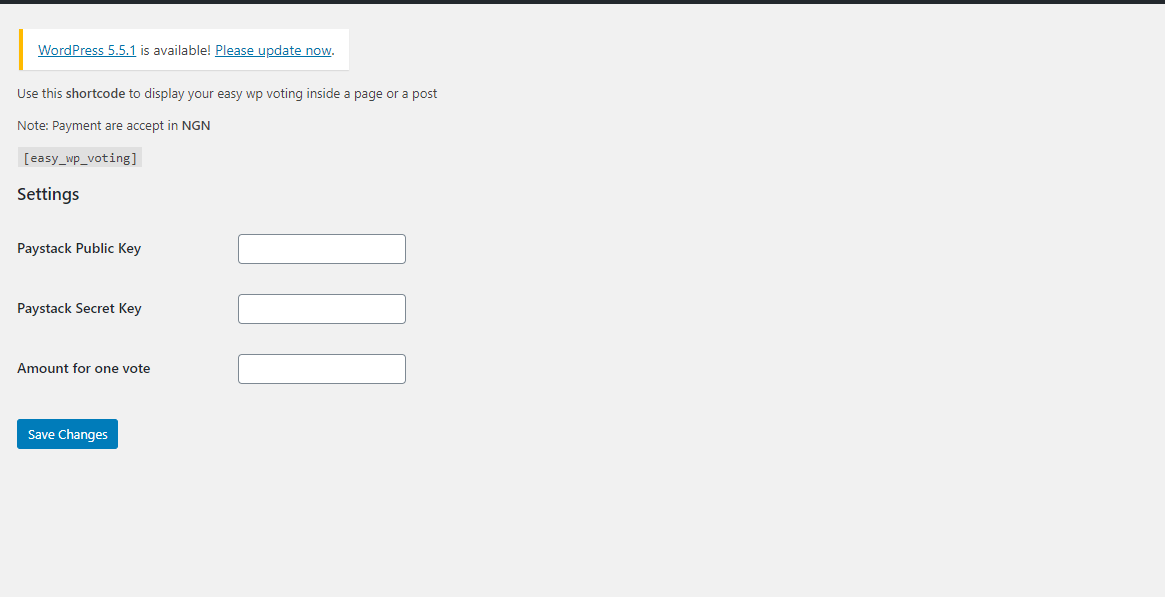
Easy WP Voting With Payment Setting Page

Easy WP Voting With Payment voting page
Changelog
1.0.0 – October 03, 2020
- First release
1.5.0 – October 11, 2020
- Second release
- Fixed some issues
- Select templates
- Choose to display vote and state count public
1.6.0 – October 11, 2020
- Fixed css issues
2.0.0 – October 26, 2020
- Add contest category