

EasyPayment Payment Gateway for Stripe for WooCommerce
Accept credit/debit card payments via Stripe using Stripe, with authorize/capture, saved cards, refunds, and automatic webhook management.
Plugin info
Maintenance & Compatibility
Maintenance score
Actively maintained • Last updated 77 days ago
Is EasyPayment Payment Gateway for Stripe for WooCommerce abandoned?
Likely maintained (last update 77 days ago).
Compatibility
Similar & Alternatives
Explore plugins with similar tags, and compare key metrics like downloads, ratings, updates, support, and WP/PHP compatibility.
Description
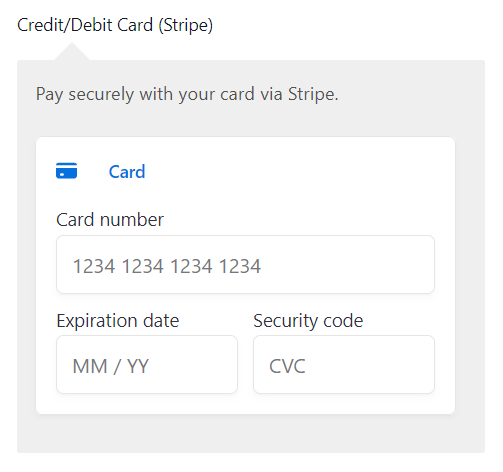
EasyPayment Payment Gateway for Stripe for WooCommerce adds a secure, modern credit/debit card field to your checkout. It supports Strong Customer Authentication (SCA), lets you authorize now and capture later, allows customers to save cards for next time, and automatically sets up the Stripe webhook for order updates.
Highlights
- Clean, secure card checkout
- Authorize now & capture later, or capture immediately
- Saved cards (tokenization) for returning customers
- Refunds from the WooCommerce order screen
- Automatic webhook creation & signing secret storage
- SCA-ready (3D Secure when required)
- Optional debug logging for troubleshooting
Supported Card Types
- Visa
- MasterCard
- American Express
- Discover
- JCB
- Diners Club
External Services
This plugin integrates with Stripe and uses the following external URLs:
-
https://js.stripe.com/v3/
Loads Stripe.js on checkout / payment screens when the gateway is active. -
https://dashboard.stripe.com/
Link to the Stripe Dashboard. -
https://dashboard.stripe.com/apikeys
Link to the Live API keys page. -
https://dashboard.stripe.com/test/apikeys
Link to the Test API keys page. -
https://dashboard.stripe.com/payments/%s
Deep link to a specific payment in Live mode. The “%s” placeholder is replaced at runtime with the Payment/PaymentIntent ID. -
https://dashboard.stripe.com/test/payments/%s
Deep link to a specific payment in Test mode. The “%s” placeholder is replaced at runtime with the Payment/PaymentIntent ID.
Notes:
– External resources are only requested when relevant screens are loaded (e.g., checkout, order admin, or plugin settings).
– The plugin itself does not send analytics; requests go directly to Stripe’s domains as part of payment processing or dashboard linking.
Stripe Terms of Service: https://stripe.com/legal
Stripe Privacy Policy: https://stripe.com/privacy
Privacy
When you take a payment, order details and payment tokens are sent to Stripe for processing. Saved cards store Stripe customer and payment method references in WooCommerce—never full card numbers. See Stripe’s privacy policy for how Stripe handles data.
Installation
- Upload and activate the plugin.
- Go to WooCommerce Settings Payments Stripe (EPSPGW).
- Enter your Test and Live Stripe keys (Publishable & Secret).
- Choose Environment (Sandbox or Production) and Charge Type (Authorize Only or Capture Immediately).
- Save changes. The webhook is set up automatically.
Frequently Asked Questions
No. Payments happen inline on your checkout page using Stripe’s secure card fields.
Yes. Set Charge Type to Authorize Only. You can capture later from your Stripe Dashboard.
Yes. Logged-in customers can securely save a card for faster checkout next time.
Make sure you’ve:
– Entered the correct Secret Key for the selected environment.
– Saved the gateway settings after entering your keys.
– Enabled HTTPS on your site.
If it still doesn’t show, enable Debug Log and check WooCommerce Status Logs (source epspgw) for details.
Go to WooCommerce Status Logs and pick a file with the source epspgw (and epspgw-actions for AJAX flows) if debug logging is enabled.
Review feed
Screenshots
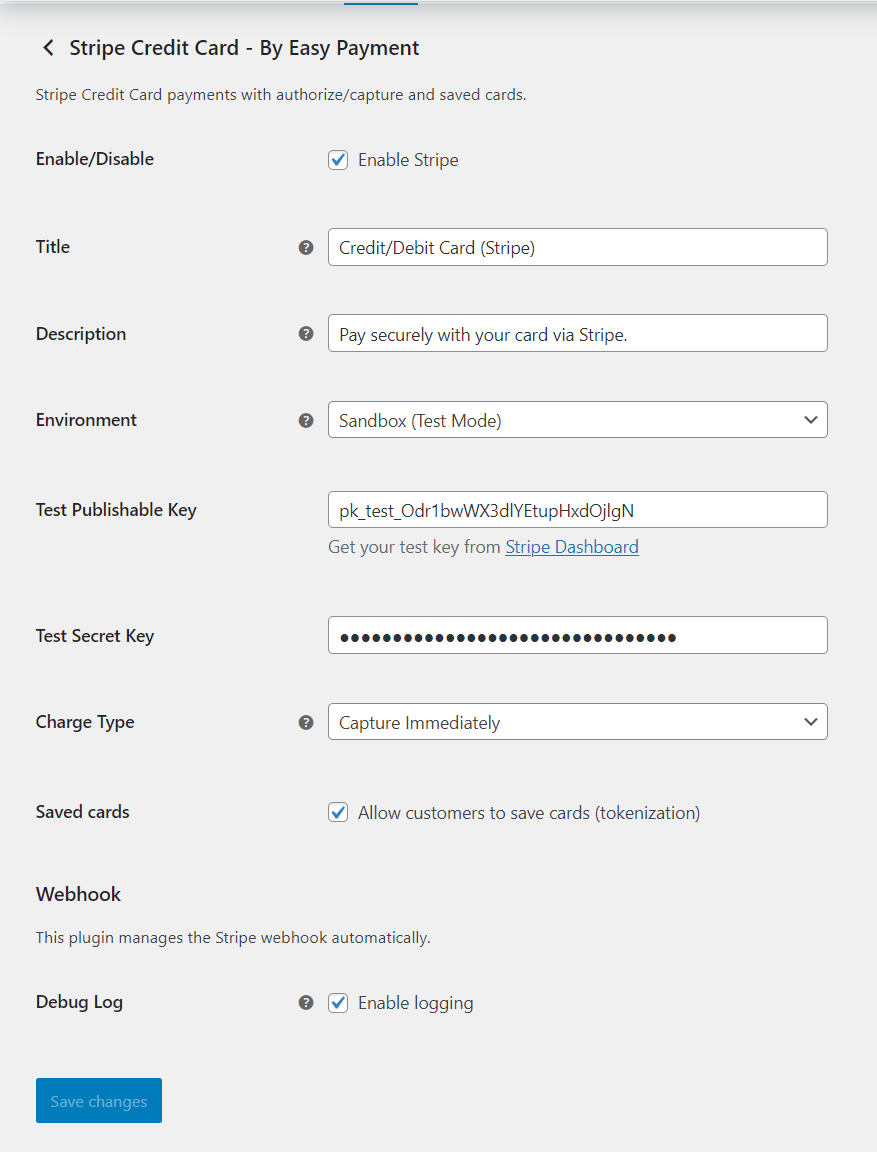
Card fields at checkout
Gateway settings screen
Saved cards in the customer account area
Changelog
1.0.3
- Added – Settings link and automatic redirect to the gateway settings after plugin activation.
1.0.0
- Initial stable release: Stripe Elements card payments, authorize/capture, saved cards, refunds, automatic webhook management, and logging.