

Plugin info
Maintenance & Compatibility
Maintenance score
Possibly abandoned • Last updated 3047 days ago • 6 reviews
Is Entry Views abandoned?
Possibly abandoned (last update 3047 days ago).
Compatibility
Similar & Alternatives
Explore plugins with similar tags, and compare key metrics like downloads, ratings, updates, support, and WP/PHP compatibility.
Description
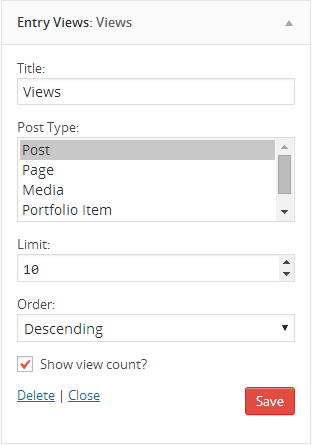
Entry Views keeps track of the number of views a post/page (or any post type) has. It comes handy with a widget for showing the most viewed posts, a shortcode for displaying a post’s view count, and handy template tags for use within theme template files.
Professional Support
If you need professional plugin support from me, the plugin author, you can access the support forums at Theme Hybrid, which is a professional WordPress help/support site where I handle support for all my plugins and themes for a community of 40,000+ users (and growing).
Plugin Development
If you’re a plugin author or just a code hobbyist, you can follow the development of this plugin on it’s GitHub repository.
Donations
Yes, I do accept donations. If you want to buy me a beer or whatever, you can do so from my donations page. I appreciate all donations, no matter the size. Further development of this plugin is not contingent on donations, but they are always a nice incentive.
Installation
- Uzip the
entry-views.zipfolder. - Upload the
entry-viewsfolder to your/wp-content/pluginsdirectory. - In your WordPress dashboard, head over to the Plugins section.
- Activate Entry Views.
Frequently Asked Questions
Installation Instructions
- Uzip the
entry-views.zipfolder. - Upload the
entry-viewsfolder to your/wp-content/pluginsdirectory. - In your WordPress dashboard, head over to the Plugins section.
- Activate Entry Views.
Why was this plugin created?
The plugin was originally created as a script for use with some of my themes. However, it’s not a good idea to package something like this with a theme because it’d stop working when switching between themes. Therefore, the script was ported over into a plugin for everyone to use, regardless of the theme they’re using.
How do I use the plugin?
As soon as you install and activate the plugin, it’ll start tracking post views immediately. From that point, you can use the “Entry Views” widget in one of your theme’s sidebars to display the most viewed posts.
Can I show the view count for each post?
Yes, you can certainly do this. It will require editing your theme’s templates and inserting a simple line of code within The Loop. You’ll need to enter the following:
<?php if ( function_exists( 'ev_post_views' ) ) ev_post_views(); ?>
What post types does this plugin support?
By default, it supports the following post types:
- Post
- Page
- Media/Attachment
- Portfolio Item – Custom Content Portfolio Plugin
- Restaurant Item – Restaurant Plugin
- Recipe – Upcoming recipe plugin
- Literature – Upcoming literature/writing plugin
Will you add support for other post types?
Yes, I definitely will. If you give me the name of the post type or of the plugin that you use, I will be more than happy to add support for it.
Can I add support for a custom post type?
Yes, you can absolutely do this. If you’re registering the post type yourself, simply add support for entry-views in your supports array.
If you’re adding support for a post type that you’re not registering, add the following code to your plugin file or theme’s functions.php:
add_action( 'init', 'my_register_post_type_support' );

function my_register_post_type_support() {
    add_post_type_support( 'your_post_type_name', 'entry-views' );
}
What features do you plan to add in the future?
One feature I’d like to add is to the admin area. It’d be neat to show each post’s views on the edit posts screen and even allow you to sort the posts by number of views.
Other features are really up to you all. If you have a feature request, please don’t hesitate to ask.
Can you help me?
Unfortunately, I cannot provide free support for this plugin to everyone. I honestly wish I could. My day job requires too much of my time for that, which is how I pay the bills and eat. However, you can sign up for my support forums for full support of this plugin, all my other plugins, and all my themes for one price.
Review feed
Screenshots

Changelog
Version 1.0.0
- Everything is new!