

WEB-T – eTranslation Multilingual
Make your site multilingual in few steps with WEB-T – eTranslation Multilingual WordPress plugin.
Plugin info
Maintenance & Compatibility
Maintenance score
Stale • Last updated 321 days ago • Support resolved 0% • 5 reviews
Is WEB-T – eTranslation Multilingual abandoned?
Likely maintained (last update 321 days ago).
Compatibility
Languages
Similar & Alternatives
Explore plugins with similar tags, and compare key metrics like downloads, ratings, updates, support, and WP/PHP compatibility.
Description
Creating multilingual websites has never been easier: the WEB-T – eTranslation Multilingual WordPress plug-in can automatedly translate your web content into 30+ languages – free, easy and secure as always.
WEB-T – eTranslation Multilingual allows full website content translation in any language supported by the eTranslation automated translation service provided by the EC. The automated translations are performed by eTranslation service API.
Features
- Translates your web content automatedly
- Easy to use
- East to integrate
- Visual translation editor
- Automated translation in 30+ languages via eTranslation integration
- Image translation support
- Translation caching for quick page load times
- Dynamic content translation
- Compatible with WooCommerce, Gutenberg and other plugins & themes
- Configurable language switcher
Automated translation
WEB-T enables seamless translation of your website’s entire content into any language supported by compatible automated translation services. You can integrate your preferred service using APIs or opt for the free eTranslation service provided by the European Commission (EC).
While WEB-T itself is free, access to the eTranslation service and API key is limited to organizations and individuals within the European Union (EU) and its associated countries.
If you’re located outside the EU and require translation services, you’ll need to find a machine translation (MT) service provider compatible with the WEB-T API. Instructions on how to ensure compatibility with WEB-T APIs can be found here.
More information
See how to configure & use this plugin and read more about the WEB-T project by European Commission on official WEB-T website.
Credits
WEB-T – eTranslation Multilingual is a fork of TranslatePress by Cozmoslabs. We thank TranslatePress developers (Cozmoslabs, Razvan Mocanu, Madalin Ungureanu, Cristophor Hurduban) for their work on the original plugin.
Installation
- Upload etranslation-multilingual.zip file from WordPress dashboard -> Plugins -> Add new -> Upload Plugin -> Choose file -> Install Now
1.1. Alternatively, upload unzipped etranslation-multilingual folder to the ‘/wp-content/plugins/’ directory - Activate installed plugin through ‘Plugins’ menu (Plugins -> WEB-T – eTranslation Multilingual -> Activate)
- Configure website source & target languages, eTranslation credentials for automated translation from plugin settings (Settings -> WEB-T – eTranslation Multilingual)
Detailed setup & usage tutorials and videos are available here.
Frequently Asked Questions
Review feed
Screenshots
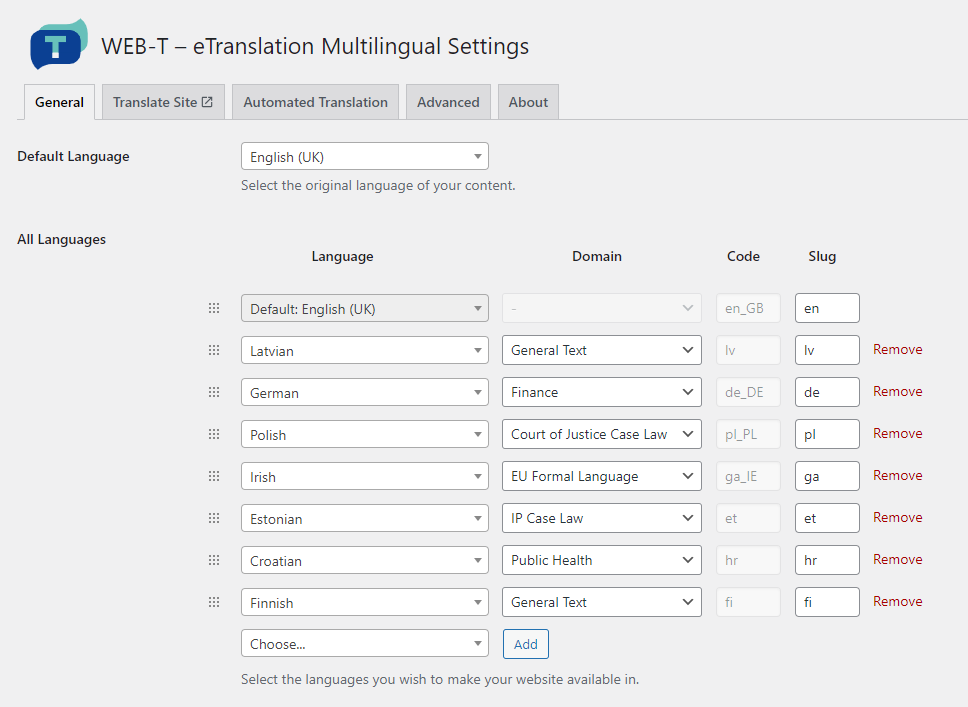
WEB-T – eTranslation Multilingual language and domain configuration

Automated translation configuration with eTranslation credentials

Floating Language Switcher

Selecting page language

Translated page, machine-translated content notice

Visual translation editor
Changelog
2.0.6
- Improved page loading performance and compatibility with WooCommerce
2.0.5
- Resolved eTranslation connection issue with OpenSSL 3.0 & cURL versions < 7.88.1
2.0.4
- Support for WooCommerce High-Performance Order Storage (HPOS)
2.0.3
- Plugin description improvements
2.0.2
- Accessibility improvements
- Pre-translation URL load fix
2.0.1
- Fixed invalid domain sent in MT request
- Small bugfixes related to ‘Translate Site’ tab
2.0.0
- Renamed to ‘WEB-T – eTranslation Multilingual’
- Custom MT provider support
- SEO support
1.0.0
- Initial release.