

Fixed Width Admin
Makes the admin area fixed-width instead of elastic. Easy to customize width.
Plugin info
Maintenance & Compatibility
Maintenance score
Possibly abandoned • Last updated 4203 days ago • 1 reviews
Is Fixed Width Admin abandoned?
Possibly abandoned (last update 4203 days ago).
Compatibility
Similar & Alternatives
Explore plugins with similar tags, and compare key metrics like downloads, ratings, updates, support, and WP/PHP compatibility.
Description
This plug-in makes your WordPress admin area fixed width instead of the default, elastic. This is perhaps of the most utility to users with larger monitors who enjoy rocking large browser windows, but do not enjoy trying to compose a post in an editor that has line-lengths of more than 200 characters. Why is this not an option in the default WordPress install? We have no fricking idea. But now, at least, there is an easy solution. http://ogilvi.es/fixed-width-admin/
Customization
You can easily adjust the width of your admin area, its alignment, and the page background color that appears to the left and right of it. Inside the plug-in folder is a file named wp-admin.css, simply open this file in a text editor, and make your changes. All the code has comments that explain the specific functions—don’t be intimidated, just experiment, and if you go too far you can always re-upload the original file.
Installation
- Download the plug-in.
- Unzip the file and upload the resulting directory fixed-width-admin to the /wp-content/plugins/ directory on your server.
- Activate the plugin via the ‘Plugins’ menu in WordPress
- Grab a root beer and enjoy! If you have a really good root beer in hand—like Iron Horse, for instance—then head to the customization section below and have some fun.
Frequently Asked Questions
Review feed
Screenshots
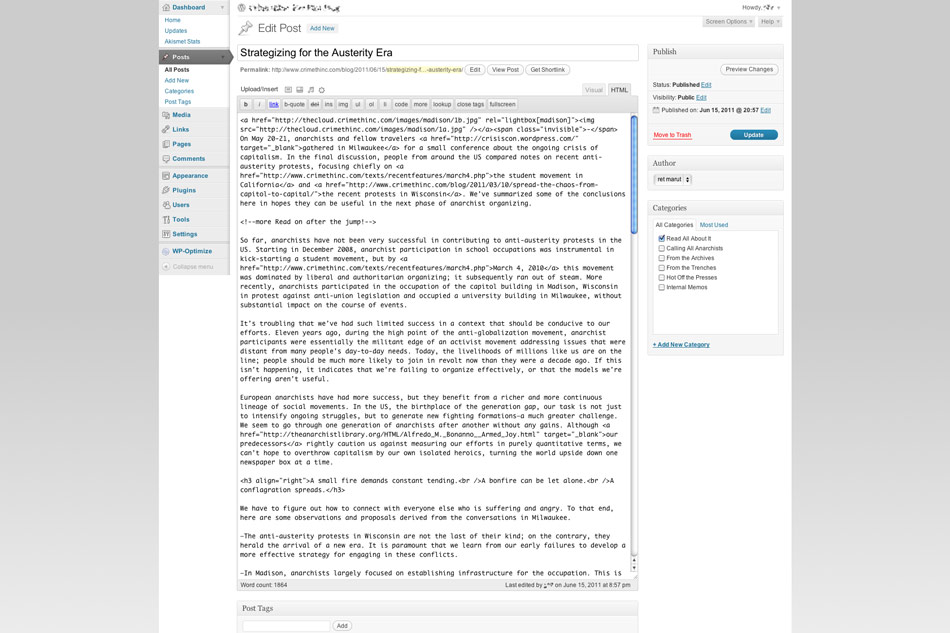
Composing a post, width set to 1300px

Dashboard with 3 panels, width set to 1300px

Width, alignment and background style are all easily adjustable in included CSS file
Changelog
1.0
- Initial release.
1.1
- Updated compatibility information and stable version number.
1.1.1
- Fixed world’s dumbest bug I caused with 1.1 release. Hopefully.