

Flexible Table Block
Flexible Table Block is a custom block plugin for the WordPress block editor that allows you to create tables in any configuration.
Plugin info
Maintenance & Compatibility
Maintenance score
Maintained • Last updated 143 days ago • Support resolved 100% • 30 reviews
Is Flexible Table Block abandoned?
Likely maintained (last update 143 days ago).
Compatibility
Similar & Alternatives
Explore plugins with similar tags, and compare key metrics like downloads, ratings, updates, support, and WP/PHP compatibility.
Description
Merge and Split Cells
You can merge or split cells from multiple selected cells.
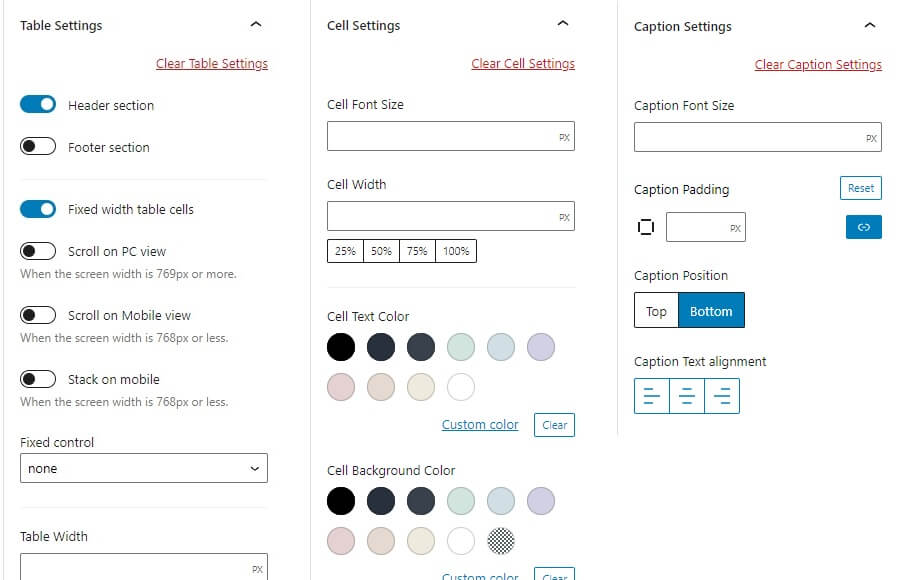
Flexible Styling
You can set various styles for each tag of table, cell, and caption individually.
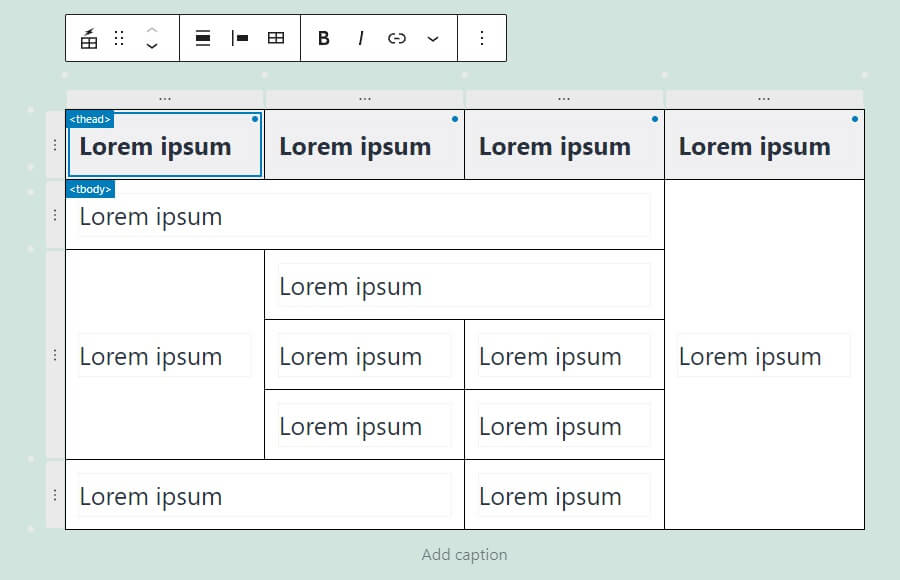
Advanced UI
You can easily select a batch of cells in a section, or select, add, or delete rows and columns with the buttons.
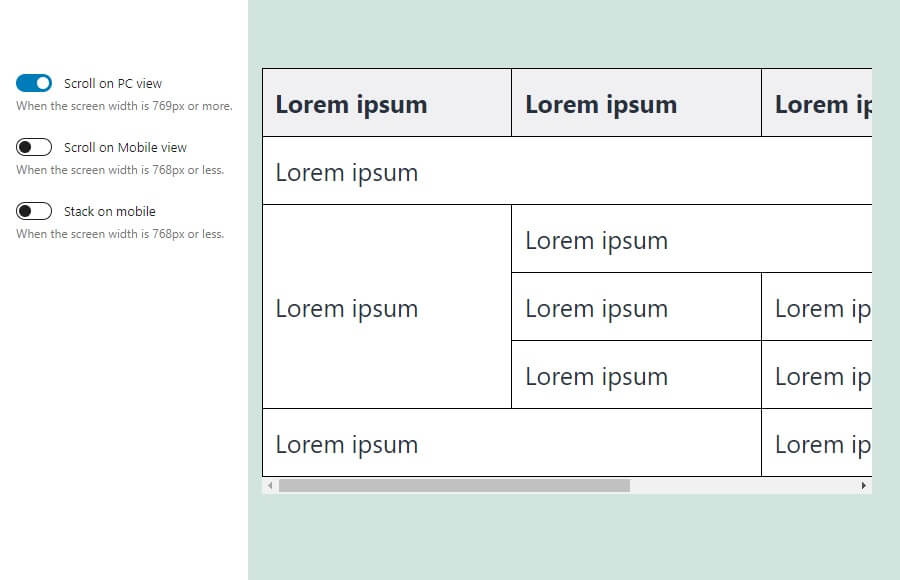
Responsive Support
You can set the table to scroll horizontally on both Desktop and mobile, and arrange cells vertically on mobile.
The breakpoints for switching between Desktop and mobile can be changed freely.
Installation
- Upload the
flexible-table-blockfolder to the/wp-content/plugins/directory. - Activate the plugin through the \’Plugins\’ menu in WordPress.
Frequently Asked Questions
Review feed
My standard plugin
All plugins should be like this
神プラグイン
Good Plugin
Tables done the right way!
Screenshots

Merge and Split Cells
Flexible Styling
Advanced UI
Responsive Support
Changelog
3.6.0
- Tested to WordPress 6.9
- Drop support for WP 6.6 and 6.7
- Enhancement: Remove reset buttons
- Enhancement: Improve accessibility of cell alignment setting
- Enhancement: Parse CSS values more accurately
- Enhancement: Add CSS classes to panels and sections
- Enhancement: Update icons
- Enhancement: Focus first cell when inserting or deleting row or column
- Enhancement: Show message when no cells selected
- Enhancement: Add table min height setting
- Enhancement: Make font size setting default control
- Fix: Clearing table settings does not change the “Fixed width table cells” setting to the default
- Fix: Deselection is not working correctly in border style control
- Fix: Input field order in border radius control
3.5.0
- Tested to WordPress 6.8
- Drop support for WP 6.5
- Enhancement: Replace deprecated UI with recommended UI
3.4.0
- Tested to WordPress 6.7
- Drop support for WordPress 6.4
- Add: Caption toolbar button
- Enhancement: Update icons
- Enhancement: Improve accessibility
- Enhancement: Improve hint text
- Enhancement: Add box-sizing
3.3.0
- Tested to WordPress 6.6
- Drop support for WordPress 6.3
- Enhancement: Support content only mode
- Enhancement: Update API version from 2 to 3
3.2.0
- Tested to WordPress 6.5
- Drop support for WordPress 6.2
- Enhancement: Polish block sidebar UI
- Enhancement: Polish UI in Global Setting modal
3.1.0
- Tested to WordPress 6.4
- Drop support for WordPress 6.1
- Enhancement: Use Snackbar component instead of window.alert
- Fix: Some block styles are not carried over when transforming the block
3.0.1
- Fix: Keyboard controls don’t work within the link control popover
- Fix: Tab key focus doesn’t work when cell text contains footnote links
- Enhancement: Release cell selection when the block is unselected
3.0.0
- Tested to WordPress 6.3
- Fix: Missing top border in the block sidebar
- Fix: Some grammatical errors
- Fix: Incorrect pixel value in description about breakpoint
- Fix: Popovers in Global Settings modal are not showing in the Site Editor
- Fix: Cursor style when mousing over RichText in the cell
- Clean: Remove link to wiki page in help modal
- Drop support for WordPress 5.9, 6.0
- Drop support for PHP7.3
2.9.1
- Enhancement: Adjust tab width in global setting modal
2.9.0
- Tested to WordPress 6.2
- Enhancement: Redesign global setting modal
- Enhancement: Keep rowspan and colspan attributes when converting to and from the core table block
- Enhancement: Apply stripe colors to tbody only
- Enhancement: Polish style for WordPress 6.2
- Fix: Link color is not applied
2.8.0
- Tested to WordPress 6.1
- Drop support for WordPress 5.8
- Enhancement: Polish block sidebar UI
- Enhancement: Polish UI in Global Setting modal
- Doc: Use code tags in some text
- Fix: Don’t apply typography support styles to the placeholder
- Fix: register_block_type path
2.7.3
- Add: Loading status to global settings button
- Clean: Use code tags for text in the options section
- Fix: Overflow of input field in placeholder
- Fix: Block toolbar doesn’t appear in HTML edit mode
2.7.2
- Change: Style to break lines in cells
2.7.1
- Change: Don’t update cell tag when cell settings are cleared
- Fix: Certain operations break the block
2.7.0
- Add: id, headers, scope attribute controls to cell settings
- Fix: Browser warning error
- Fix: Not transformed to core table block correctly
2.6.2
- Fix: Scrolli table doesn’t show edges
- Add: Help text about scroll table
- Add: Style to break lines in cells
2.6.1
- Tested to WordPress 6.0
- Fix: Clearing the table settings and then saving the post breaks the block
- Fix: Adjust indicator style
2.6.0
- Add: Margin support
- Fix: Cell CSS class is not cleared when cell settings are cleared
- Fix: Output of incorrect inline CSS
2.5.3
- Fix: Cell CSS class is reset
2.5.2
- Update: Block preview
- Fix: Error when installing from block directory
2.5.0
- Add: Option to move cells with the tab key
- Fix: Cell content is not updated under certain conditions
2.4.0
- Tested to WordPress 5.9
- Add: Block supports (link color, text-transform, font-style, font-weight, letter-spacing)
- Fix: Zero values are not saved correctly in global settings
- Fix: Changes to global settings are not reflected in iframe editor instances
2.3.1
- Fix: Table justify icon does not appear
- Fix: Incorrect indigator direction
2.3.0
- Enhancement: Support for individual values in cell padding of global settings
- Fix: Unable to deselect selected cells by clicking with the Ctrl key
- Fix: Cell width is not set to 100% when ‘Stack on mobile’ is enabled
- Fix: Accessibility support for controls
2.2.0
- Add: Option to merge content when merging cells
2.1.2
- Fix: Global settings options are not saved
2.1.1
- Fix: Adjust indicator style
- Fix: Cell Line Height setting is not cleared
2.1.0
- Add: Cell line-height control
2.0.9
- Doc: Add translate context
2.0.8
- Fix: Accessibility support for controls, fix typo
2.0.7
- Fix: Missing text translation
- Fix: Button text layout in popover is broken
- Fix: Text in JavaScript is not translated
2.0.6
- Fix: typo
2.0.5
- Fix: deploy action
2.0.4
- Fix: deploy action
2.0.3
- Fix: deploy action
2.0.2
- Fix: deploy action
2.0.1
- Doc: add LICENSE
- Clean: add deploy action
- Clean: refactoring: edit.js to edit.tsx
2.0.0
- Initial release