

Add-On for Microsoft Teams and Gravity Forms
Automatically send Gravity Form entries to a Microsoft Teams channel.
Plugin info
Maintenance & Compatibility
Maintenance score
Stale • Last updated 306 days ago • 3 reviews
Is Add-On for Microsoft Teams and Gravity Forms abandoned?
Likely maintained (last update 306 days ago).
Compatibility
Similar & Alternatives
Explore plugins with similar tags, and compare key metrics like downloads, ratings, updates, support, and WP/PHP compatibility.
Description
The “Add-On for Microsoft Teams and Gravity Forms” WordPress plugin is a powerful integration tool that connects your website’s forms with Microsoft Teams, a popular communication and collaboration platform. This plugin bridges the gap between Gravity Forms, a leading form builder plugin, and Microsoft Teams, enabling seamless communication and workflow automation.
With this add-on, you can:
- Automatically send form submissions to a designated Microsoft Teams channel
- Map form fields to Teams message cards, making it easy to display user-submitted data
- Trigger custom notifications and messages based on form responses
- Enhance team collaboration and response times
This plugin is ideal for:
- Businesses using Microsoft Teams for team communication and collaboration
- Developers seeking to streamline form data and notifications
- Site owners wanting to centralize form submissions and team discussions
- Those that have unreliable email systems
By integrating Gravity Forms and Microsoft Teams, this add-on simplifies communication, boosts team productivity, and enhances user experience! It’s a perfect solution for anyone looking to supercharge their team’s workflow and responsiveness!
** IMPORTANT 1.2.0 UPDATE ** If you installed the plugin prior to v1.1.0, you would have had to set up an Incoming Webhook app on MS Teams. If you still have it set up this way, you will need to remove the Incoming Webhook app on Teams and use a Workflow instead. See new instructions under the plugin settings.
Installation
- Install the plugin from your website’s plugin directory, or upload the plugin to your plugins folder.
- Activate it.
- Go to Gravity Forms > Settings > Microsoft Teams.
Where can I request features and get further support?
Join my Discord support server
Frequently Asked Questions
Review feed
Great Plugin, Amazing Support
Works as expected
Screenshots
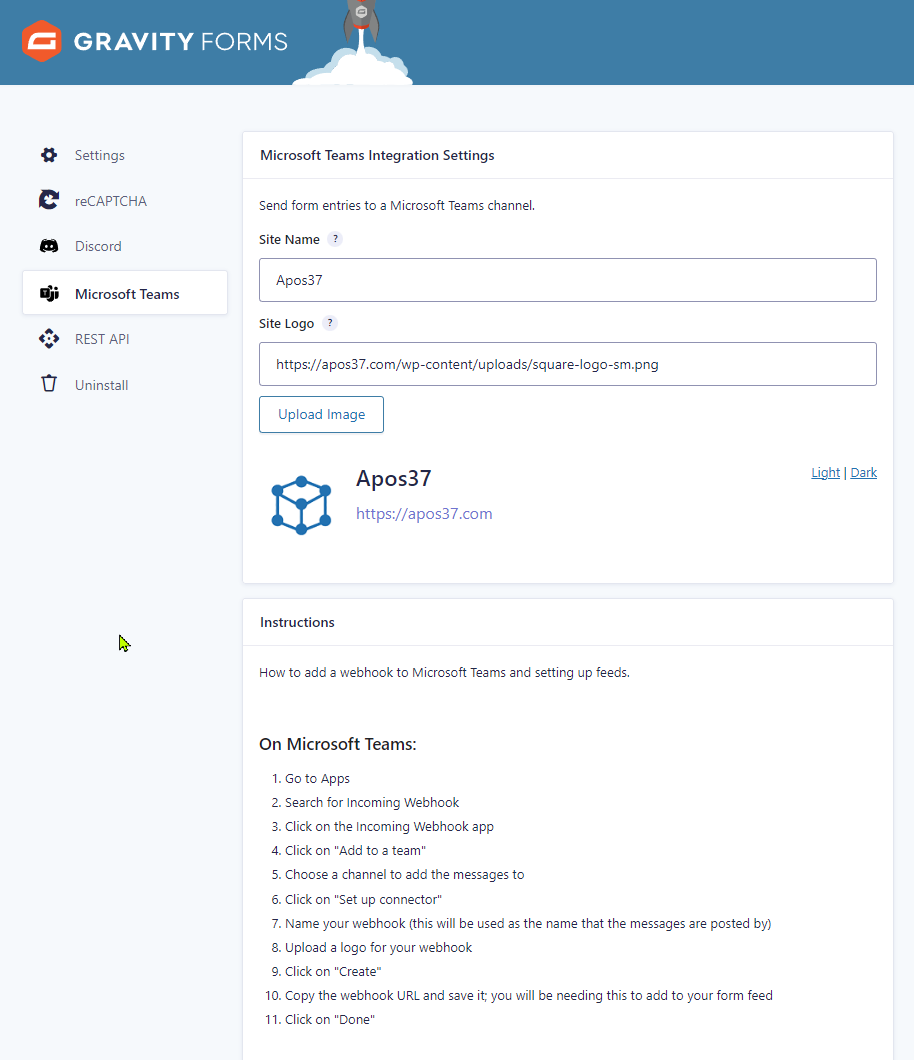
Plugin settings page

Form feed settings page

Form feed settings page continued

Entry page

Microsoft Teams channel post
Changelog
1.3.0
- Update: New support links
- Update: Added a hook to allow data args updates before sending the message to MS Teams
1.2.3
- Update: Updated author name and website again per WordPress trademark policy
1.2.2
- Update: Now handling file uploads that you can click to open with screenshots for images (thanks to Brian H for suggestion)
- Update: Now using admin labels if provided (thanks to @gluten_50178 for suggestion)
- Update: Removed required email field
1.2.1
- Update: Changed author name from Apos37 to WordPress Enhanced, new Author URI
- Tweak: Optimization
1.2.0
- Update: Removed old webhook method as it’s deprecated now
- Update: Added a notice on plugins page if GF is not activated
1.1.2
- Tweak: Verify compatibility with WP 6.6.2
- Tweak: Update Gravity Forms logo
1.1.1
- Fix: Warnings from Plugin Checker
1.1.0
- Update: New method for connecting to MS Teams
1.0.9
- Tweak: Removed some comments
1.0.8
- Tweak: Updated Discord link
1.0.7
- Fix: strpos() empty needle warning
- Tweak: Updated changelog to use commonly used prefixes (Fix, Tweak, and Update)
1.0.6
- Fix: User buttons not showing up on new entries
- Fix: Meta box bug on entry view when no feeds have been added
1.0.5
- Update: Added option to show custom button to account users only
- Fix: User ID field showing up even if deselected in feed settings
1.0.4
- Update: Added option for custom button with merge tag support
- Update: Added option for turning buttons on and off
- Update: Added message field with merge tag support
- Update: Added media uploader to site logo option
- Fix: Checkbox values not showing up properly
- Fix: Radio button results not showing values instead of text
- Update: Added support for
str_ends_with()for PHP < 8.0
1.0.3
- Update: Added option to hide fields on Teams message that have empty values
- Fix: Form fields not showing on new feed settings until saved
- Tweak: Animated light/dark mode preview on plugin settings
- Tweak: Limited character count for site name to prevent issues
- Update: Added feed name and channel to entry notes
- Tweak: Removed colons from labels if they already end with colons or question marks
1.0.2
- Fix: Name field not showing up for account users
1.0.1
- Created plugin on March 14, 2023