

Handle External Links
Handle External Links gives you the power to add rel="nofollow" based on header status (i.e. 404), PageRank of destination URL and many more …
Plugin info
Maintenance & Compatibility
Maintenance score
Possibly abandoned • Last updated 4850 days ago • 3 reviews
Is Handle External Links abandoned?
Possibly abandoned (last update 4850 days ago).
Compatibility
Similar & Alternatives
Explore plugins with similar tags, and compare key metrics like downloads, ratings, updates, support, and WP/PHP compatibility.
Description
Handle External Links helps you to control when to set rel=”nofollow” on external links in WordPress. You can set nofollow depending on the PageRank, 404 status, whether the URL is blacklisted or not, and many more flexible criterias! Visit getwebinspiration.com for more Plugin details.
Support
Donations
Donations are very much appreciated and will be used to dedicate time to support and updates.
Installation
- Upload the directory
handle-external-linksto the/wp-content/plugins/directory. - Activate the plugin through the ‘Plugins’ menu in WordPress.
- Choose settings by clicking on the ‘Settings’ tab in WordPress and navigate to ‘Handle External Links’.
Frequently Asked Questions
How to set a “best before date” for my posts?
In your admin panel, click on the ‘Settings’ menu tab and navigate to ‘Handle External Links’. Here you can pick a date that will affect all posts/pages older than this value.
How does “Set Nofollow on 404’s” work?
This feature will automatically ping the URLs to check whether the page returns a 404 status or not. If there’s a 404 it will set the link to rel=”nofollow”.
How do I set nofollow based on PageRank?
Navigate to the Settings page and select a PageRank from the dropdown. Note: If you select PR 9 it will result in setting nofollow on all your external links because it’s practically impossible to have a greater PR.
Will my whitelisted links ever have a rel=”nofollow” attached?
No.
Review feed
Screenshots
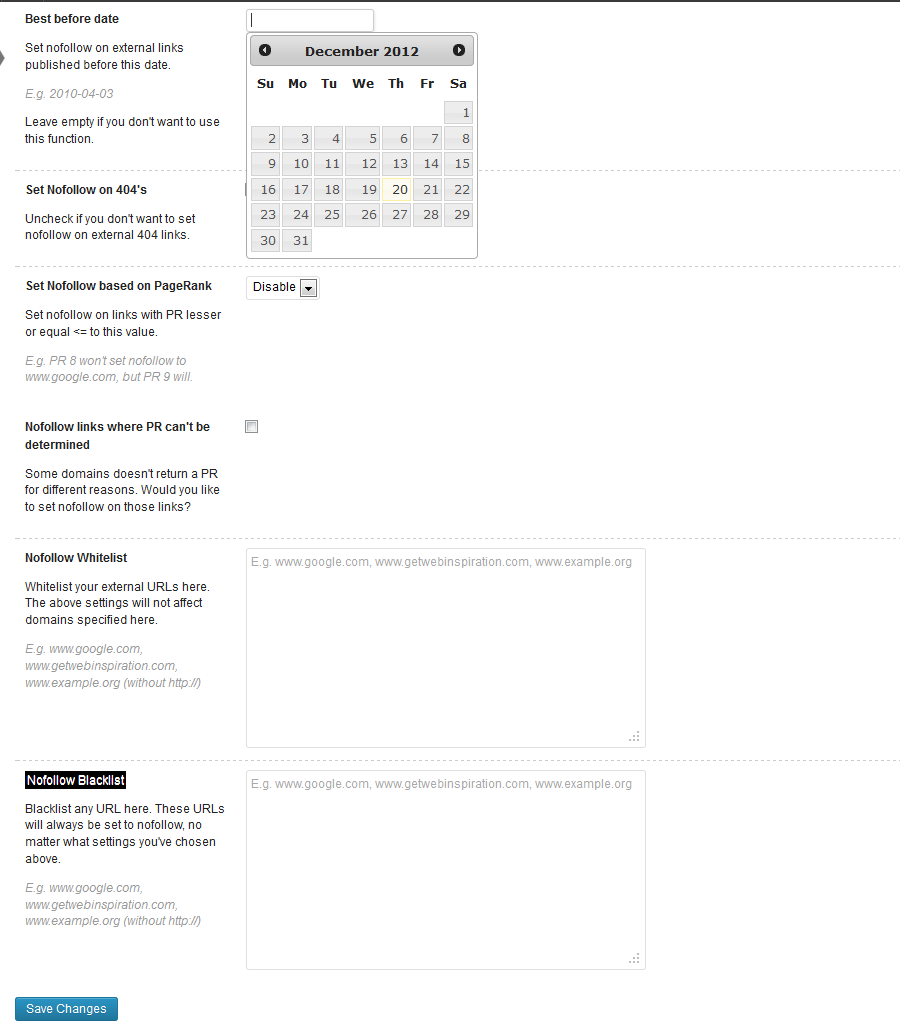
Options page from the Dashboard.

Sample post with settings applied.
Changelog
1.1.5
- Added a whitelist and blacklist to improve the filter
- It’s now possible to add target=”_blank” to external URLs
- Option to set nofollow on URLs that doesn’t return a PageRank value
- Now echos a warning if the cURL extension isn’t installed on the server (required)
1.1
- Minor code improvements – changed the way the plugin handles internal links
1.0
- First version was released with three different settings.