

HeadSpace2 SEO
Controls almost every aspect of your site's meta-data, including advanced tagging, Analytics, and dozens of plugins. The best WordPress SEO solu …
Plugin info
Maintenance & Compatibility
Maintenance score
Possibly abandoned • Last updated 3047 days ago • 9 reviews
Is HeadSpace2 SEO abandoned?
Possibly abandoned (last update 3047 days ago).
Compatibility
Similar & Alternatives
Explore plugins with similar tags, and compare key metrics like downloads, ratings, updates, support, and WP/PHP compatibility.
Description
HeadSpace2 is an all-in-one meta-data manager that allows you to fine-tune the SEO potential of your site. Visit the HeadSpace page for a video demonstration.
You can configure meta-data for:
- Posts
- Pages
- Categories
- Home page
- Author pages
- Search pages
- 404 page
You can define:
- Tags/keywords, with suggested keywords
- Descriptions
- Page titles
- Custom ‘more text’
- Site name and site description
- Custom themes – change your theme on each page!
- Custom plugins – load a plugin only on specific pages
- Additional CSS and JavaScript files
- Noindex and nofollow meta tags
- Follow/follow on archive, category, page, tag, and comment links
It also allows you to add:
- Google Analytics
- Google Webmaster
- Google section targeting
- Mint statistic
- 103bees
- Statcounter
- CrazyEgg heat map
- Feedburner Stats Pro
- Apture
- Yahoo! Site Explorer
- Microsoft Live Verification
- HitTail
- Piwik tracking
- AWStats tracking
You can also:
- Disable visual editing
- Disable widgets
- Configure first-time visitor messages
- Add frame-breaker code
- Disable WordPress auto-formatting (wpautop and wptexturize)
- Configure memory limits, error reporting, and system timeouts
This is all included in a single plugin. Because of the large number of other meta-data plugins, HeadSpace provides an import function for the following plugins:
- Ultimate Tag Warrior
- All-in-one SEO
- HeadMeta Decription
- Jerome’s Keywords
- lud.icro.us Head Meta
- SEO Title Tags
- Simple tagging
HeadSpace is available in:
- English
- Français thanks to Serge
- Polska thanks to Jacek Tyc
- Deutsch thanks to Mario
- Italiano thanks to Gianni Diurno
- Bulgarian thanks to Alexander Dichev
- Spanish thanks to Juanpa Manson
- Russian thanks to Sergey Ryvkin
- Danish thanks to Strang Skov and Georg S. Adamsen
- Japanese thanks to Yoichi Kinoshita
- Brazilian Portuguese thanks to Vinicius Pinto
- Dutch thanks to Matthias Houwelin
- Simplified Chinese thanks to Rick
- Indonesian thanks to Hendry Lee
- Romanian thanks to Dragoş Nicolae
- Turkish thanks to Omer Faruk
- Belorussian thanks to Marcis Gasuns
- Ukrainian thanks to Kirin
- Estonian thanks to Lembit Kivisik
- Farsi thanks to Amir Heydari
- Arabic thanks to Mouad
If you can provide a language translation then please get in contact with the author. A PO file is provided with the
plugin and can be used in translating with poEdit.
Documentation
Full documentation can be found on the HeadSpace2 page.
Installation
The plugin is simple to install:
- Download
headspace2.zip - Unzip
- Upload
headspace2directory to your/wp-content/pluginsdirectory - Go to the plugin management page and enable the plugin
- Configure the plugin from
Options/HeadSpace
You can find full details of installing a plugin on the plugin installation page.
Frequently Asked Questions
Installation Instructions
The plugin is simple to install:
- Download
headspace2.zip - Unzip
- Upload
headspace2directory to your/wp-content/pluginsdirectory - Go to the plugin management page and enable the plugin
- Configure the plugin from
Options/HeadSpace
You can find full details of installing a plugin on the plugin installation page.
Review feed
Screenshots

Drag-and-drop module configuration
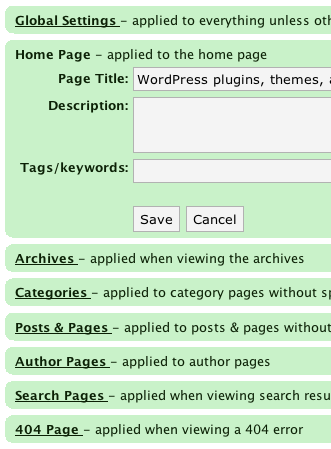
Configure every aspect of your site's meta-data

Configure meta data for posts and pages, including custom plugins and themes that only load on that post
Changelog
3.6.42
- Fix drag and drop problem with WP 3.5
3.6.41
- Fix problem with ‘plugins’ module causing post edit page to stop loading fully
3.6.40
- Fix HS not appearing on post edit page
3.6.39
- Update some old crufty code
- Remove mass editor
3.6.38
- Updated to AIOSEO importer, thanks to Joan
3.6.37
- Fix bug with site modules not saving
3.6.36
- Minor fix to stop error message appearing when using page specific plugin module
- Update to Italian translation thanks to Gianni Diurno
3.6.35
- WordPress 3.2 compat – meta data is now saving again
- Czech translation, thanks to Jan Macek
- Prevent nested script tags with Google Analytics outbound tracking (thanks Rick Overman)
3.6.34
- Fix PHP warnings
- Fix category settings, remove duplicate save button
- WP 3.0+ only
- Async Google Analytics
- Farsi translation thanks to Amir Heydari
- Arabic thanks to Mouad
- Update to Italian translation thanks to Gianni Diurno
3.6.33
- Add Estonian
- Fix #772, #770, #754, #767
- Fixes for WP 3.0
3.6.32
- Support for taxonomy pages
- Fix #703
3.6.31
- Fix #685, #726
3.6.30
- Fix #626
3.6.29
- Fix #613
3.6.28
- Don’t display follow on links
- Add relative links module
- Add page links module
3.6.27
- Fix missing keyword module.
- More PHP notice messages
3.6.26
- Fix JS errors.
- Add compat with Ozh admin menu.
- Add Ukrainian
3.6.25
- Fix PHP notice messages
3.6.24
- Fix more link
- Prevent Ajax caching in IE
3.6.23
- Ajax error message.
- Fix #555.
- Add #514, #572
3.6.22
- Fix JS error
- improve CSS contrast
3.6.21
- Fix #512
- WP 2.3/2.5/2.8 compatibility
- Add #453
3.6.20
- Add Belorussian translation
3.6.19
- Fix #485, #480, #498
- Add #487
3.6.18
- Fix #473
- Add #465, #456
- Add meta-data for attachment pages
- Separate posts and pages
- Expand page numbering
3.6.17
- Add #450, #446
3.6.16
- Try to fix unauthorised access error
3.6.15
- Fix #433
3.6.14
- Update Analytics module
- Explicit follow
- %%excerpt_only%% tag
- Follow Links module
3.6.13
- Fix #402, #405
3.6.12
- Add #401
- AWstats tracking
- Support for non UTF-8 encodings
3.6.11
- Fix module save bug introduced by 3.6.10
3.6.10
- Fix system module error reporting
- Fix error on page editing for some users.
- Fix #375, #377, #384.
- Add #330.
- Reduce memory usage
3.6.9
- Remove error introduced by 3.6.8
3.6.8
- Option to prevent plugins modifying excerpts
- Turkish translation
- Nonces
3.6.7
- Updated French translation
- Tags on pages (again)
3.6.6
- WP 2.7 styling
3.6.5
- Fix problem with category description in 2.7
3.6.4
- Added #348, #343
3.6.3
- Romanian translation.
- Fix #334
3.6.2
- Minor fixes for WP2.7.
- Fix bug #324.
- Add #325
3.6.1
- Metabox workaround
3.6
- WordPress 2.7 quick/bulk edit functions
- Piwik bug (#306).
- Check theme files.
- Fix auto description