

Block: Icons Font Awesome
The Block Plugin: Icon Font Awesome allows you to easily add a Gutenberg block to select icons from the Font Awesome collection.
Plugin info
Maintenance & Compatibility
Maintenance score
Stale • Last updated 348 days ago
Is Block: Icons Font Awesome abandoned?
Likely maintained (last update 348 days ago).
Compatibility
Similar & Alternatives
Explore plugins with similar tags, and compare key metrics like downloads, ratings, updates, support, and WP/PHP compatibility.
Description
Block: Icon Font Awesome is a Gutenberg plugin specifically designed to simplify the user experience in displaying the Font Awesome icon collection. With this plugin, you can easily add and customize Font Awesome icons directly through the Gutenberg block.
The main advantage of Block: Icon Font Awesome is its ease of integrating Font Awesome icons into your WordPress pages or posts. Without the need for deep coding knowledge, you can choose from a variety of available icons and tailor them to fit your site’s design.
Not only that, what makes Block: Icon Font Awesome even more appealing is the very small font file size, approximately only around 100KB. This means that using the plugin will not burden the loading speed of your site. With a lightweight load, you can be sure your site remains responsive and fast, while still taking advantage of the wealth of Font Awesome icons.
Usage instructions
- Enter the Gutenberg Editor
- Go to the Gutenberg Block Category Media and then select Font Awesome
- Click the Icon Library button
- Once the popup appears, please choose one of the icons and click on it
Contribute
Contributions are always open to those who wish to participate in the further development of this plugin. Github.
Installation
- Open WordPress Dashboard:
– Log in to your WordPress dashboard.
2. Access Plugin Menu:
On the left panel, click “Plugins” and select “Add New.”
3. Search for “Block: Icon Font Awesome”:
-On the Add Plugin page, locate the search box in the top right corner.
-Type “Block: Icon Font Awesome” in the search box.
4.Install the Plugin:
-After finding the “Block: Icon Font Awesome” plugin, click the “Install” button below it.
5. Activate the Plugin:
Once the installation is complete, click the “Activate” button that appears.
Frequently Asked Questions
No, this plugin is entirely free, and there is no paid version.
Yes, this plugin works only in the Gutenberg editor.
Review feed
Screenshots
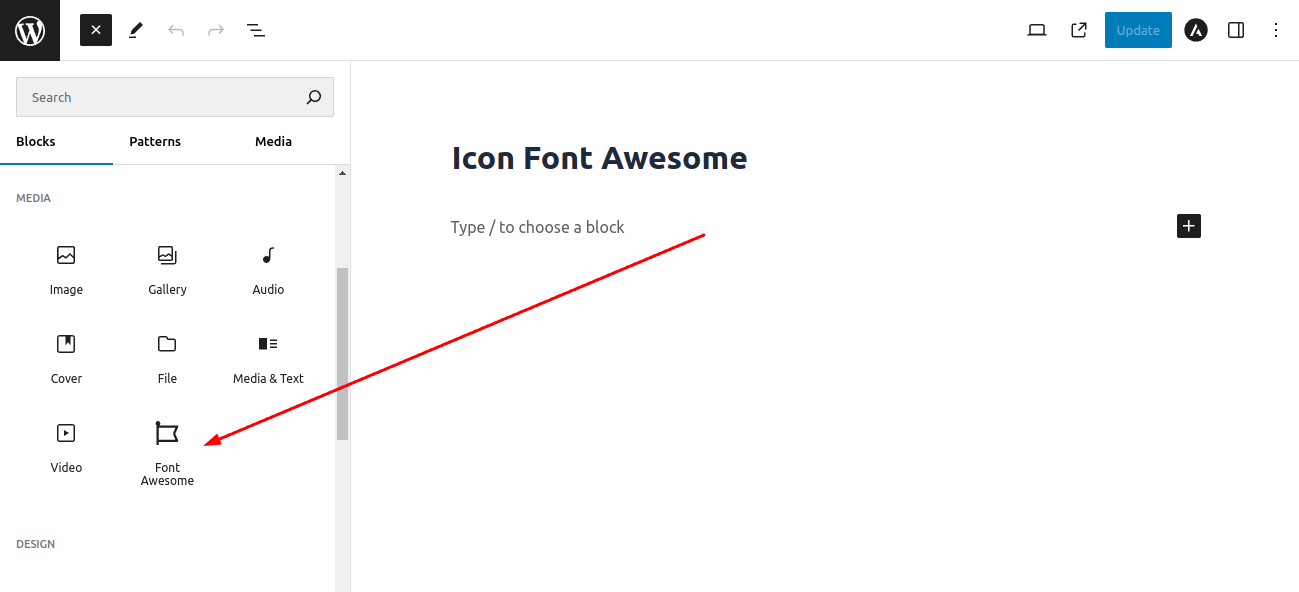
Step 1: Please select the Font Awesome block in the Gutenberg Editor.

Step 2: Click on the Icon Library icon.

Step 3: Choose one of the icons.
Changelog
- Initial release