

Instant Featured Image
Set an image as the featured image at the same time as you insert it into the post content.
Plugin info
Maintenance & Compatibility
Maintenance score
Possibly abandoned • Last updated 2674 days ago • 10 reviews
Is Instant Featured Image abandoned?
Possibly abandoned (last update 2674 days ago).
Compatibility
Similar & Alternatives
Explore plugins with similar tags, and compare key metrics like downloads, ratings, updates, support, and WP/PHP compatibility.
Description
Sick of adding a image to your post content then also setting it as the featured image in a separate action? Of course you are!
This plugin solves this problem by adding a new button alongside the “Insert into post” button in the media manager modal. When clicked, this button will insert your selected media and then, if you have selected an image, set that image as the post’s featured image.
It is possible to select multiple media items to insert, so this plugin will set the last image in the selected set as the featured image. The button will appear in the media manager modal for all post types.
This plugin works with WordPress 5.0+, but it will only work with Classic block or in the Classic Editor. It does not currently work with the Image block (or any other similar ones).
Want to contribute? Fork the GitHub repository.
Got some great ideas? Post on the support forum.
Installation
Installing “Instant Featured Image” can be done either by searching for “Instant Featured Image” via the “Plugins > Add New” screen in your WordPress dashboard, or by using the following steps:
- Download the plugin via WordPress.org
- Upload the ZIP file through the ‘Plugins > Add New > Upload’ screen in your WordPress dashboard
- Activate the plugin through the ‘Plugins’ menu in WordPress
Frequently Asked Questions
Can I localise the text on the button?
Yes – the plugin includes a pot file to make this easy.
How can I contribute to this plugin?
You can fork the GitHub repository here.
Review feed
Screenshots
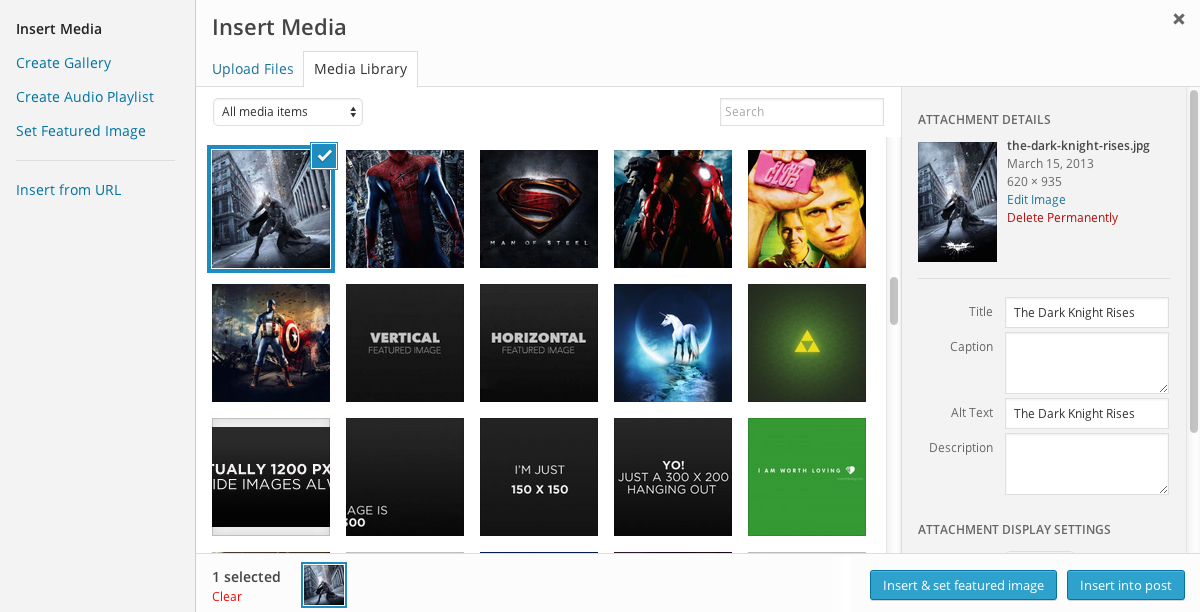
The new 'Insert & set featured image' button in the media manager modal
Changelog
1.0.1
- 2014-08-04
- Fix – Making sure that button appears for all post types
1.0
- 2014-07-01
- Initial release #boom