

Instock Email Alert for Woocommerce
Handy plugin to create an input field if the product is out of stock. The user will be alerted with a custom email, when the product stock changed.
Plugin info
Maintenance & Compatibility
Maintenance score
Possibly abandoned • Last updated 1330 days ago • 9 reviews
Is Instock Email Alert for Woocommerce abandoned?
Possibly abandoned (last update 1330 days ago).
Compatibility
Similar & Alternatives
Explore plugins with similar tags, and compare key metrics like downloads, ratings, updates, support, and WP/PHP compatibility.
Description
This plugin creates an input field on the single product page, if the product is out of stock under the summary. The user can enter an email address to subscribe for the product alert.
This email address is saved to the database within a new table. If the product stock changed from out of stock, the user will get an email with a custom message. This message can be edited on the option page.
Warning: The plugin doesn’t work 100% with variable products.
- Custom Email Sender / Subject / Email address
- Custom Email Message with tags (%product_name%, %product_link%)
- Custom Placeholder & Submit button value for the form
- Custom Error / Success message
- Disable default CSS
- Use shortcode instead of the default form
- List of subscribers with filters
Logo and Banner design by Andressa Lombardo
Installation
- Woocommerce Plugin is a must have to use this
- Download Plugin
- Activate
- Go to “Settings” -> “Instock Alert” options to customize
Frequently Asked Questions
Sure you can! Go to the options page and use the tags to customize it.
Sure you can! Go to the options page.
Sure you can! Go to the options page.
You must use the Woocommerce single template file to display the form.
In this case, you should install a plugin to handle the emails. I recommend the “WP Better Emails” plugin.
Review feed
Simple, Clean and works perfect.
Screenshots
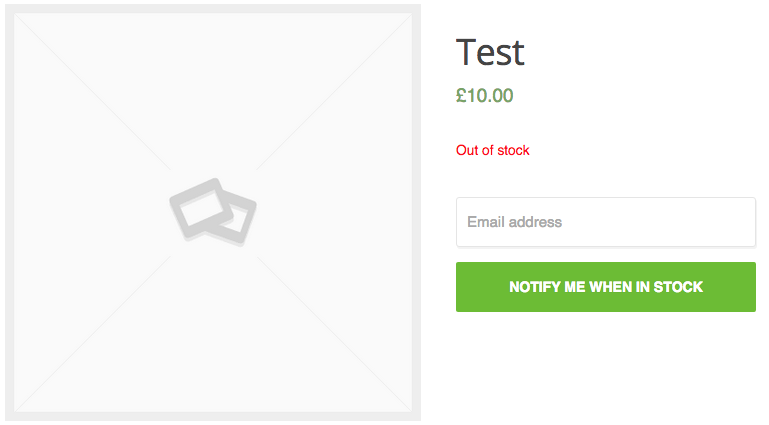
The input field when the product is out of stock.

After the email address entered.

Options page
Changelog
1.1.4
- Small fixes to make it compatible with the latest version of WordPress (6.0)
1.1.3
- Quick fixes
1.1.2
- Quick fixes
1.1.1
- Database prefix fix
1.1
- List of subscribers with filters
- Delete any subscription
- New option to change the sender name and email address
- Settings link on the plugins page
- Fix: default placeholders
- Fix: table creation for database
1.0
- Ability to disable the default form
- Shortcode added for custom positioning
- Admin area styling
- Custom placeholder and submit button value text
0.3
- Ability to disable CSS
- Menu reorder
- Input / Textarea default texts
0.2
- Minor fixes
- Screenshots
0.1
- First release