

Integrate Firebase
Integrate Firebase is a plugin that helps to integrate Firebase features to WordPress
Plugin info
Maintenance & Compatibility
Maintenance score
Possibly abandoned • Last updated 484 days ago • 20 reviews
Is Integrate Firebase abandoned?
Possibly abandoned (last update 484 days ago).
Compatibility
Similar & Alternatives
Explore plugins with similar tags, and compare key metrics like downloads, ratings, updates, support, and WP/PHP compatibility.
Description
The Firebase for WordPress Plugin will help a Firebase user to login to your WordPress interface – not to WordPress dashboard – from Firebase authentication. You can show user info and display data that is only available to your Firebase users.
If you want a secured implementation, with much more features, check the Interate Firebase PRO version.
Links
Installation
If installing the plugin from wordpress.org:
- Upload the entire
/integrate-firebasedirectory to the/wp-content/plugins/directory. - Activate Integrate Firebase Plugin through the ‘Plugins’ menu in WordPress.
- Profit.
Frequently Asked Questions
At version 0.6.1, the user can integrate Firebase authentication to WordPress. That means you can:
- Log in, log out and show custom data only to logged in users.
- Get Real Time and Firestore database in Dashboard
- Show realtime database on frontend after users log in
The example in this guide only shows you how to put in a PHP file. If you want to put the shortcode inside a widget or editor. You can simply do this:
[firebase_login][/firebase_login]
After adding Firebase credentials from Settings > Firebase. You can add login form through shortcodes:
echo do_shortcode(“[firebase_login]”);
If you want to create your own form. Please start with *
<
form id=’login-form’>*. For submit button, you have to add ‘firebase-form-submit’ as an ID.
You can add a shortcode to show user’s info
echo do_shortcode(“[firebase_greetings]”);
You can show error message when a user cannot login by using a shortcode
echo do_shortcode(“[firebase_login_error class=”your-optional-CSS-class-name”][/firebase_login_error]”);
You can put your data as an HTML code inside a shortcode
echo do_shortcode(“[firebase_show_not_login class=”your-optional-CSS-class-name”]YOUR HTML CODE[/firebase_show_not_login]”);
You can put your data as an HTML code inside a shortcode
echo do_shortcode(“[firebase_show class=”your-optional-CSS-class-name”]YOUR HTML CODE[/firebase_show]”);
You can put your data as an HTML code inside a shortcode. Realtime data will be shown as a table with an id #if-realtime.
echo do_shortcode(“[realtime class=”your-optional-CSS-class-name” collection_name=”string” document_name=”string”]”);
This is a shortcode for log out button.
echo do_shortcode(“[firebase_logout]”);
Review feed
Easy to use and amazing support
Screenshots
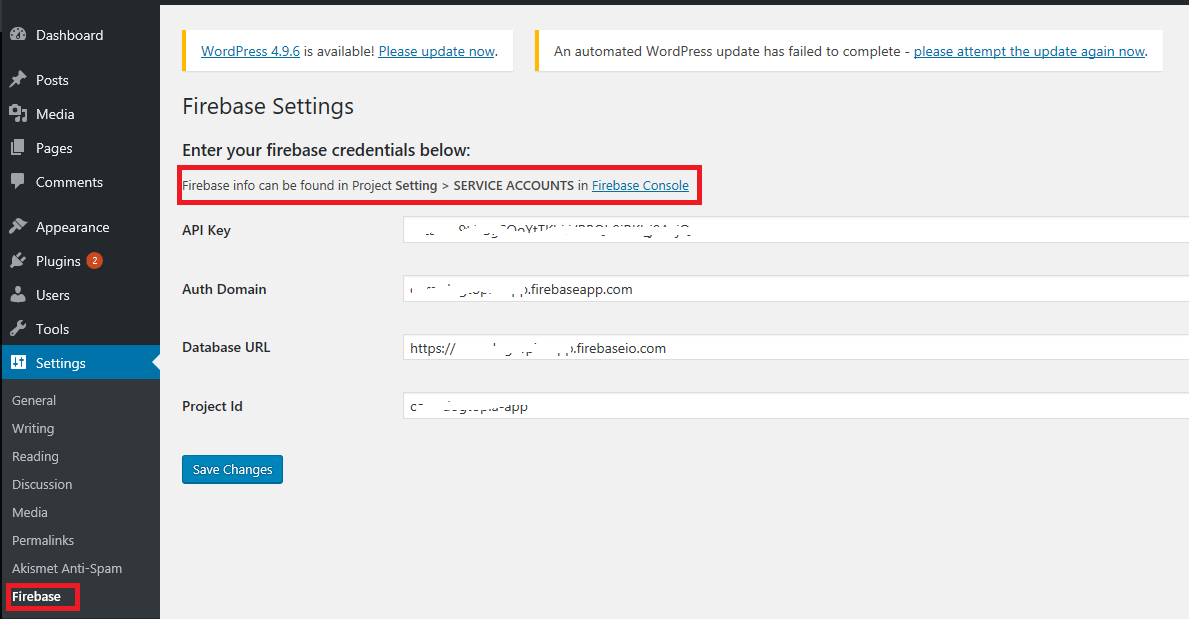
After activating the plugin, you need enter Firebase credentials under Setting > Firebase.

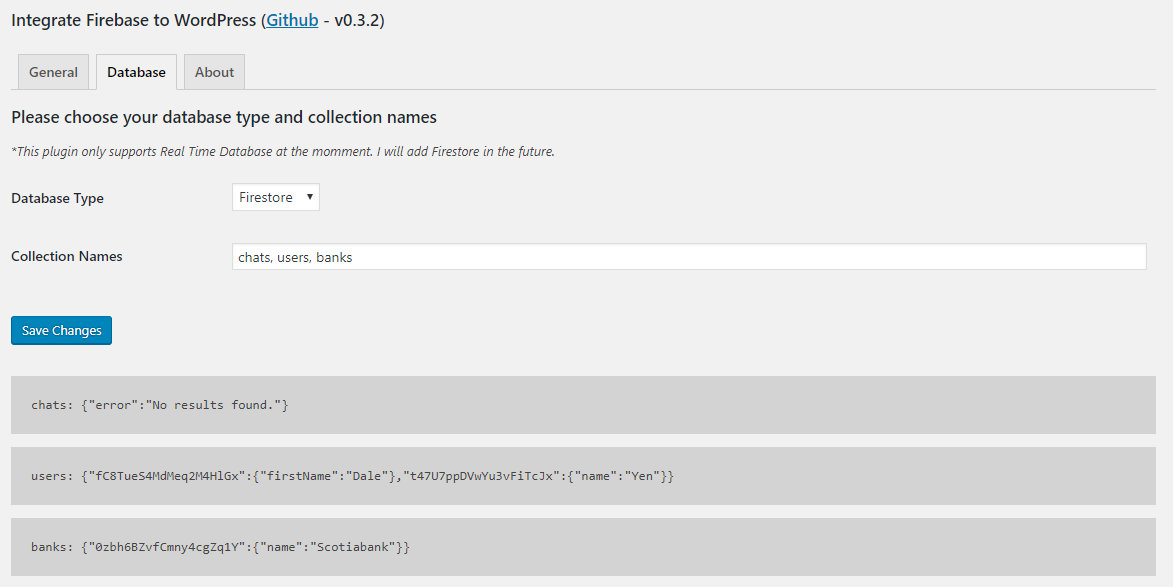
Please enter collection names in order to show the data from Real Time Database
Changelog
0.10.0
- update tested version
- feedback from wordfence
0.9.3
- update css wording
0.9.2
- test support for WP v6.5.2
0.9.1
- Fix support WP version
0.9.0
- Bump support version to WordPress v5.9
0.8.0
- Updated firebase packages to 8.2.5
- Moved scripts to the end of body tag
0.7.0
- Fixed add_options_page error
- Preformated data before showing in dashboard
- Delegated button style to WordPress
- Updated firebase package to 7.18.0
0.6.1
- Removed hide realtime table script
0.6.0
- Show realtime data publicly
0.5.3
- Update firebase scripts
0.5.2
- Show realtime database after login
0.5.1
- Hide login form after logging in
0.5.0
- Add shortcode to display when not login
- Add error handling shortcode
0.4.0
- Added Firestore database support in Dashboard
0.3.2
- Fixed firebase show shortcode
0.3.1
- Fixed get firebase credentials
0.3.0
- Added about information
- Added Real Time database support in Dashboard
0.2.2
- Fixed readme typos
0.2.1
- Change plugin name
- Update logout shortcode
0.2.0
- Add scripts & styles
- Allow to show and hide data after login
0.1.0
- Started the project and add authentication method