

IPLocationTools
Widget to display visitors’ geolocation information, such as country, region and city, in real-time.
Plugin info
Maintenance & Compatibility
Maintenance score
Stale • Last updated 265 days ago • 1 reviews
Is IPLocationTools abandoned?
Likely maintained (last update 265 days ago).
Compatibility
Similar & Alternatives
Explore plugins with similar tags, and compare key metrics like downloads, ratings, updates, support, and WP/PHP compatibility.
Description
This widget displays the geolocation information of the current visitors who are visiting your websites. This useful library makes it easy to conveniently find website visitors location and displays the geo location information of country, region, city and time of their visit by using the geolocation technology powered by IP2Location.
This plugin frees you from the hassle to setup the database for geolocation information retrieval, as the information will be retrieved from the hosted server.
This plugin comes with several variation of themes for selection. In addition, you can also modify and design the appearance of this widget for the size, the color and much more, to ensure seamless integration with your existing WordPress themes.
More Information
Please visit us at https://www.ip2location.com
Installation
Using the WordPress dashboard
- Login to your wordpress
- Go to Plugins
- Select Add New
- Search for IPLocationTools
- Select Install
- Select Install Now
- Select Activate Plugin
- Go to Widgets
- Drag IPLocationTools to sidebar
Manual
- Download and unzip the plugin
- Upload the entire IPLocationTools/ directory to the /wp-content/plugins/ directory
- Activate the plugin through the Plugins menu in WordPress
- Go to Widgets
- Drag IPLocationTools to sidebar
Frequently Asked Questions
For more information, please visit https://www.iplocationtools.com
Review feed
Screenshots
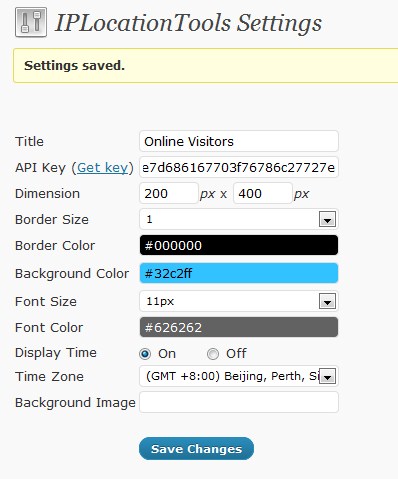
Setting page
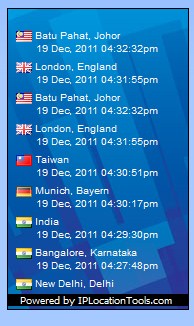
IPLocationTools sidebar widget