

Feedback Button – Jotform
Display a beautiful feedback button on the side of your blog. When a reader clicks on it a feedback form pops up. Completely customizable.
Plugin info
Maintenance & Compatibility
Maintenance score
Maintained • Last updated 133 days ago • 3 reviews
Is Feedback Button – Jotform abandoned?
Likely maintained (last update 133 days ago).
Compatibility
Similar & Alternatives
Explore plugins with similar tags, and compare key metrics like downloads, ratings, updates, support, and WP/PHP compatibility.
Description
Feedback buttons are great to get feedback from your website visitors. Since it is easy to send a message to you without leaving the page they will improve the quality and the quantity of the feedback you receive from your visitors.
Feedback button plugin is powered by Jotform. Jotform is the first web based WYSIWYG form builder. Its intuitive drag and drop user interface makes form building a breeze. Using Jotform, you can create forms, integrate them to your site and receive responses by email.
Get feedback from your visitors using Jotform Feedback Button. If you are not aware of the problems on your website you can’t fix them. Feedback button is a great way to help you improve your website.
External Services
This plugin connects to external services to provide functionality and improve user experience. Below are the details of the external services used:
Jotform Feedback Button
– Privacy Policy
– Terms of Use
Service usage
– The plugin makes external requests on the following domain to render feedback form functionalities:
https://www.jotform.com
– The plugin uses the domain [https://www.jotform.com] as a service to deliver and render the feedback form.
Asset usage
– The plugin makes external asset requests on the following domain to enable feedback button functionalities:
https://js.jotform.com
– The plugin uses the domain [https://js.jotform.com] as a asset service to deliver and render the embedded feedback button.
Installation
- Download repo’s tarball/zip and extract it to your WordPress’s Plugins folder ({wordpress-folder}/wp-content/plugins)
- Enter your WordPress Administrator panel (http://my-wordpress.url/wp-admin)
- Activate plugin under Plugins section
- Go to settings page of plugin (Settings -> Jotform Feedback Button)
- Enter your form ID (or select with magnifier icon from your Jotform account)
- Customize if you need anything (colors, position, button title etc)
- Save your settings
- Hola, your feedback button is ready on all pages 🙂
Frequently Asked Questions
Feedback button is a small button that shows up on the side of web pages. They usually display a “Feedback” or “Contact Us” text on it. When you click on the button, a pop-up window launches with a form inside. Once the visitors complete the form and submit, they can close the window and continue from where they left off.
Let’s say one of your visitors saw a typo on your website. They can contact you and let you know about it. But here is the problem: They have to stop what they are doing, go to your contact page, write a message, submit the form, and then they have to come back to the same page. Feedback buttons can be used without ever leaving the web page. They click on the button, enter their message, submit the form and continue their task.
Feedback buttons will increase the quantity and the quality of feedback you receive.
Jotform is an online form builder with over 25 million users. Jotform provides the most customizable feedback buttons available anywhere. You will be able to take advantage of Jotform’s experience with feedback buttons.
You can customize both the feedback button and the form inside. On the button you can customize button colors, font colors, location of the button. The form inside is also completely customizable. You can customize the title of the form, questions on the form and even the thank you page shown after the form submission.
Jotform Feedback Buttons are free up to 100 form submissions per month. If you go over that limit you will need to upgrade to a Premium plan.
Yes, when you enable the feedback button, it will be shown on all of the pages on your site. The more coverage you have the better. Your visitors will be able to report any problem to you quickly.
Jotform Feedback Button is a simple button that pulls up a feedback form from your Jotform account. It runs on Jotform servers so it will never cause security or performance problems on your web site.
Review feed
Screenshots
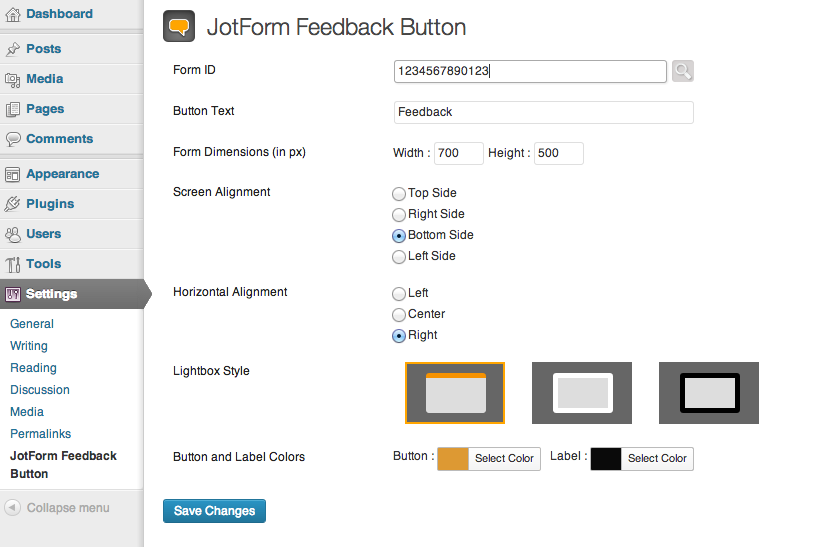
Customize your feedback button

Select your forms from your Jotform account

Feedback Button on Page

Feedback Form in Action
Changelog
1.1.0
- Update: plugin name updated
1.0.9
- Fix: codebase refactor
1.0.8
- Fix: codebase refactor
1.0.7
- Fix: codebase refactor
1.0.6
- docs: update description
1.0
- Form picker added to select your forms from your Jotform account.
- Button settings added.