

KissMyUpTime
Helps you easily integrate KissMyUpTime's completely free uptime monitoring service with your WordPress site.
Plugin info
Maintenance & Compatibility
Maintenance score
Stale • Last updated 303 days ago
Is KissMyUpTime abandoned?
Likely maintained (last update 303 days ago).
Compatibility
Similar & Alternatives
Explore plugins with similar tags, and compare key metrics like downloads, ratings, updates, support, and WP/PHP compatibility.
Description
This plugin publishes a simple endpoint at /kmut.txt on your site to expose your account identifier for seamless integration with KissMyUpTime’s completely free uptime monitoring service.
A KissMyUpTime account is required, and you can create one for free – no personal data required.
KissMyUpTime offers a real-time interface and instant notifications across all your devices, along with precise uptime percentage calculations, an unlimited number of checks, boostable intervals, and multiple nodes around the world.
Installation
- Upload the plugin files to the
/wp-content/plugins/kissmyuptimedirectory, or install the plugin through the WordPress plugins screen directly. - Activate the plugin through the ‘Plugins’ screen in WordPress.
- Go to Settings > KissMyUpTime and enter your account identifier.
- Visit
https://www.yoursite.tld/kmut.txtto verify it is working.
Frequently Asked Questions
It allows KissMyUpTime to validate your WordPress site for uptime monitoring by accessing your unique account identifier at a fixed location.
Yes. It’s a public-facing identifier used for hostname or IP address verification – not a password or secret token.
No, it must remain at this fixed, hard-coded location.
Review feed
Screenshots
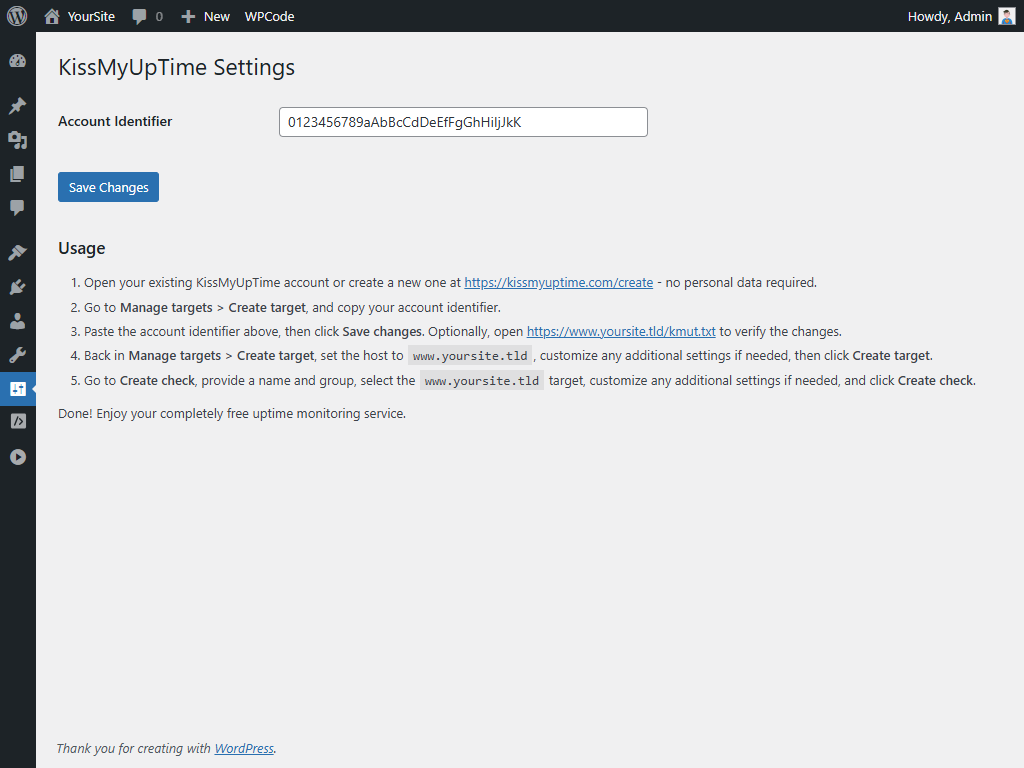
Settings page for entering your KissMyUpTime account identifier.
Changelog
1.0.0
- Initial release.