

Leaving Notice Popup For External Links
Show a customizable popup notice when visitors click on external links, with options to continue or stay on your site.
Plugin info
Maintenance & Compatibility
Maintenance score
Actively maintained • Last updated 74 days ago • Support resolved 0% • 1 reviews
Is Leaving Notice Popup For External Links abandoned?
Likely maintained (last update 74 days ago).
Compatibility
Similar & Alternatives
Explore plugins with similar tags, and compare key metrics like downloads, ratings, updates, support, and WP/PHP compatibility.
Description
Leaving Notice Popup For External Links is a simple, lightweight plugin that displays a customizable modal popup when users click on links that lead away from your website. The plugin helps you inform visitors that they are about to leave your site and allows them to decide whether to continue to the external website or stay on your site. When clicking on the external link we show a message “You are leaving our website for the external link” and you can change the text based on your preference within the settings page.
Key Features
- Fully Customizable Notice: Change the title, message, and button text according to your preferences
- Button Customization: Choose colors for both “Continue” and “Stay” buttons
- Domain Whitelist: Exclude specific domains from triggering the notice
- URL Whitelist: Exclude specific URLs from triggering the notice
- Responsive Design: Works perfectly on all devices and screen sizes
- Lightweight: Minimal impact on page load time
- Easy Setup: No coding required, just activate and customize
Use Cases
- Inform visitors when they are leaving your site
- Provide disclaimer for external websites you don’t control
- Prevent accidental navigation away from important processes
- Meet legal requirements for certain jurisdictions
- Increase awareness of external link navigation
Privacy
This plugin does not collect or store any personal data from your visitors.
My other small free plugins projects on WordPress
- Super Web Share – For Native social sharing
- Copy Link to Heading – quickly add a copy icon near to your headings
- Social Profile Frame Generator – Custom Social Media Frames Creator
Installation
- Upload the
leaving-notice-popup-for-external-linksfolder to the/wp-content/plugins/directory - Activate the plugin through the ‘Plugins’ menu in WordPress
- Go to Settings > Leaving Notice Popup to configure the plugin
Frequently Asked Questions
Yes, Leaving Notice Popup is designed to be compatible with all WordPress themes. The popup is added to the page dynamically and does not interfere with your theme’s design.
The plugin works for all standard links that lead to external domains. It will not trigger for special links like mailto:, tel:, javascript: or anchor (#) links.
Yes, in the plugin settings you can add domains to a whitelist. Links to these domains will not trigger the leaving notice popup.
Yes, you can add specific URLs to a whitelist in the plugin settings. These exact URLs will not trigger the leaving notice popup.
No, the popup only appears when users click on links that lead to domains other than your own website.
Yes, the plugin does not collect, store, or process any personal data.
Review feed
Screenshots
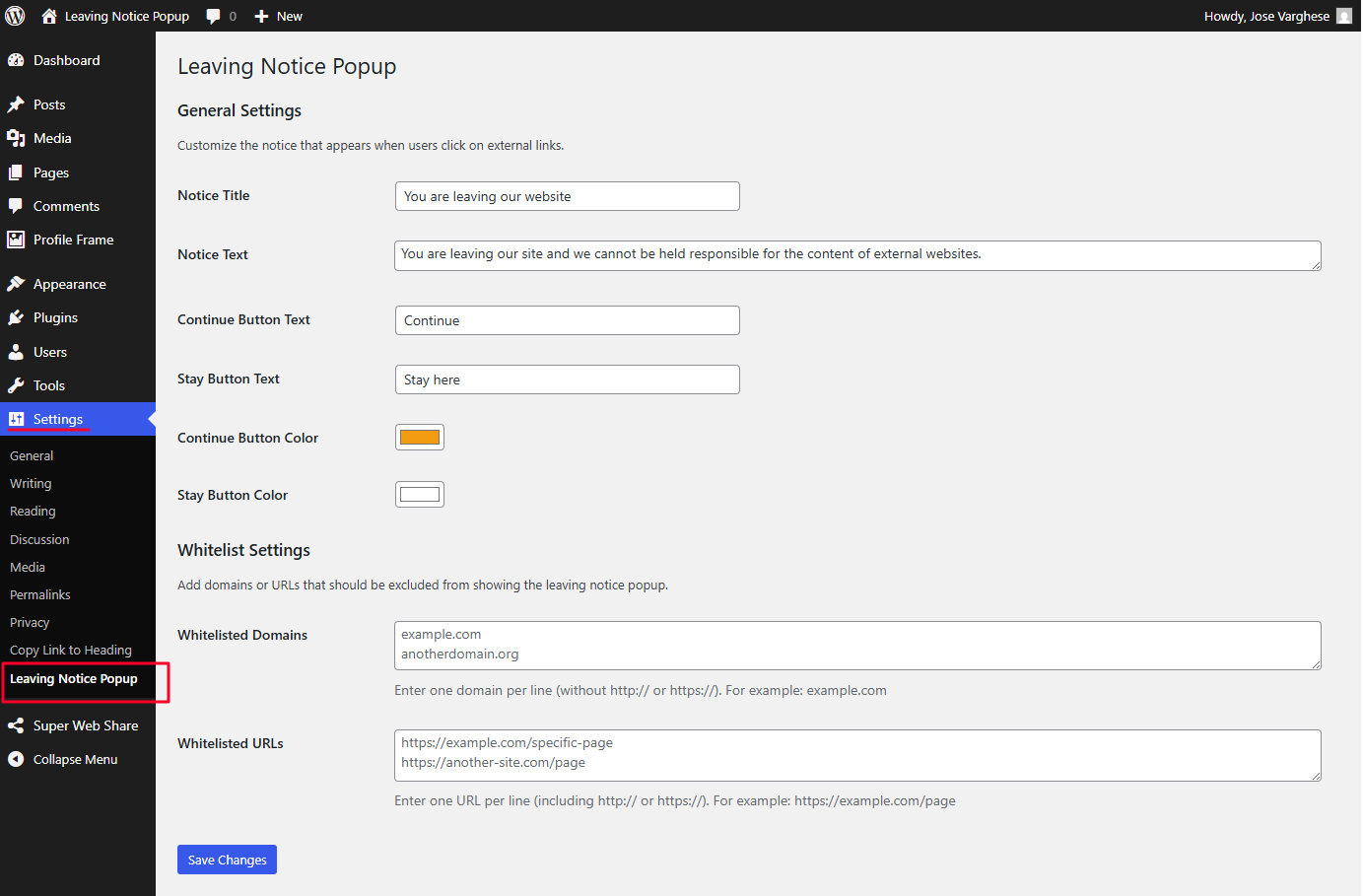
Plugin settings page with option to customize the button color, text and whitelist configuration
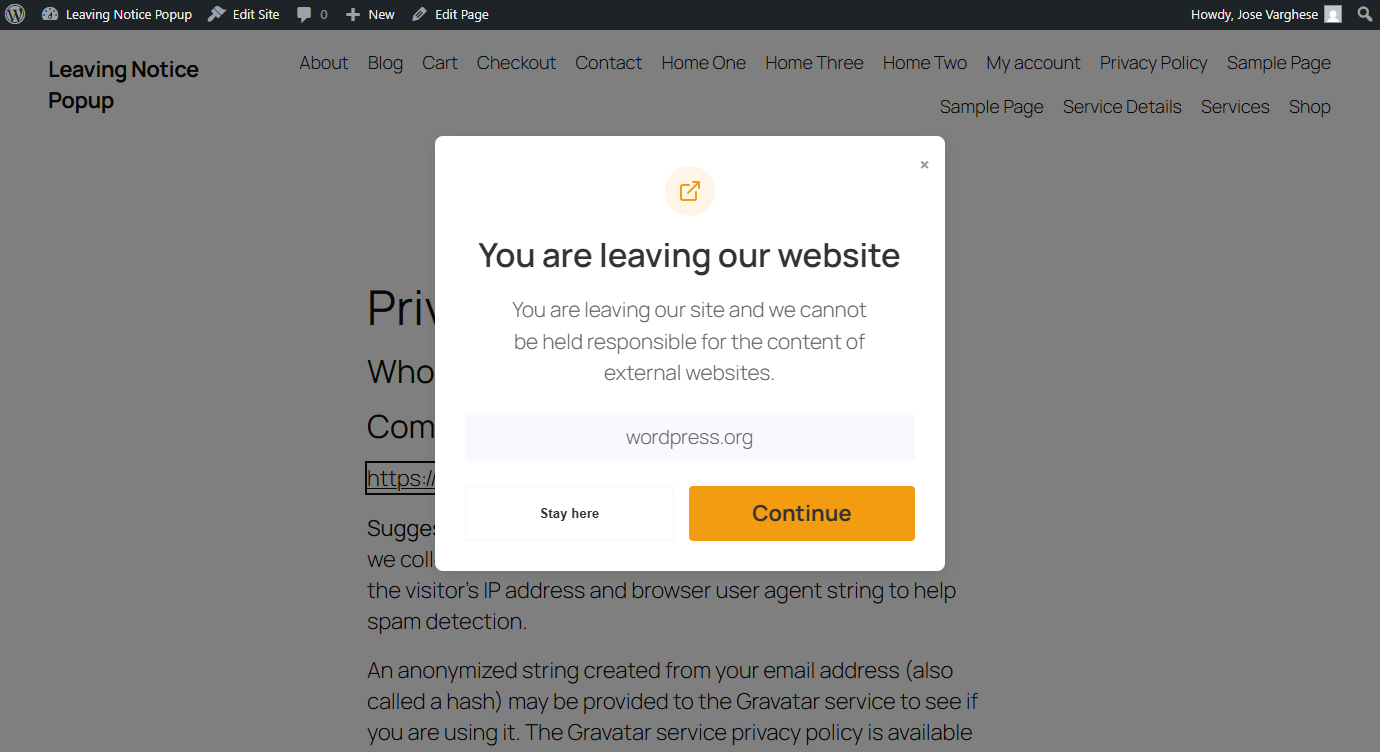
Frontend popup when an external link is clicked

Screenshot of the SEO and security attributes settings for the external links like nofollow, noopener and noreferrer
Changelog
1.1
10th June 2025
* Added accessibility (Learned this from the WCEU live website review session)
* Added option to configure the external links with SEO and security attributes like nofollow, noopener and noreferrer
* Already existing “rel” attributes for the external links will now be passed to the Continue button rel atttributes within the popup modal window.
1.0.1
9th June 2025
* Minor enhancements to the settings page
1.0
2nd June 2025
* Initial release