

AI Chatbot – ChatGPT, Gemini 2.5 & WordPress Chat
AI chatbot with ChatGPT, Gemini 2.5, RAG technology, WooCommerce integration, live agent, and unlimited knowledge training.
Plugin info
Maintenance & Compatibility
Maintenance score
Maintained • Last updated 121 days ago • Support resolved 100% • 4 reviews
Is AI Chatbot – ChatGPT, Gemini 2.5 & WordPress Chat abandoned?
Likely maintained (last update 121 days ago).
Compatibility
Languages
Similar & Alternatives
Explore plugins with similar tags, and compare key metrics like downloads, ratings, updates, support, and WP/PHP compatibility.
Description
Transform your WordPress site with an AI chatbot that understands your content and takes action. Train on unlimited website data using advanced RAG technology, trigger intelligent actions with agentic AI, seamlessly hand off to live agents when needed, choose from 15+ leading AI models, and customize everything to match your brand—no coding required.
Why Choose AI Chatbot?
⭐ Experience True Quality — Intuitive and 100% WordPress Native.
Professional-grade AI chatbot with clean code, polished UI, and extensible architecture built with industry best practices.
What You Get:
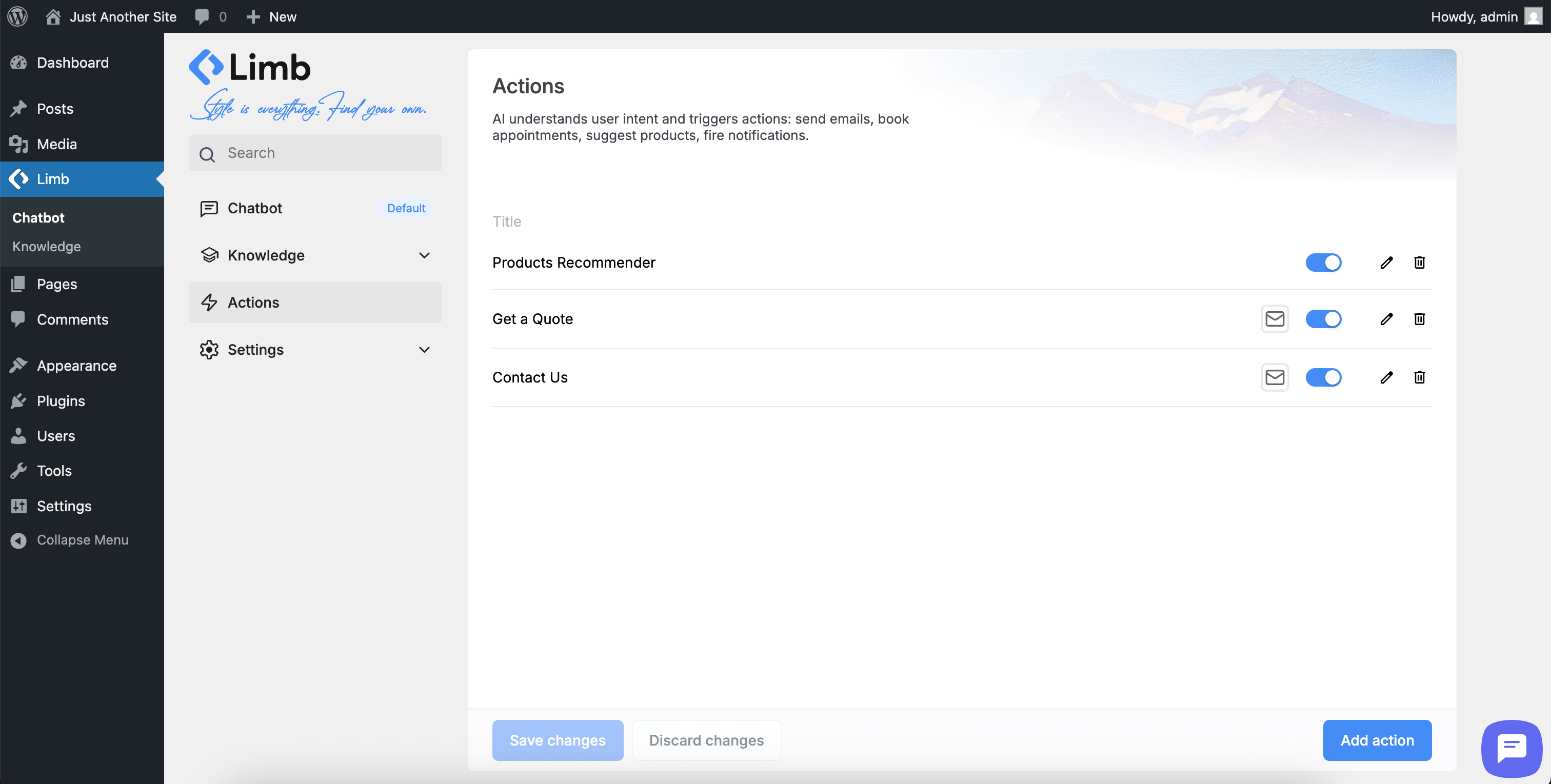
✅ Agentic AI Actions – Trigger actions (email, Slack notifications) based on user intent. Collect unlimited parameters conversationally and include in action execution
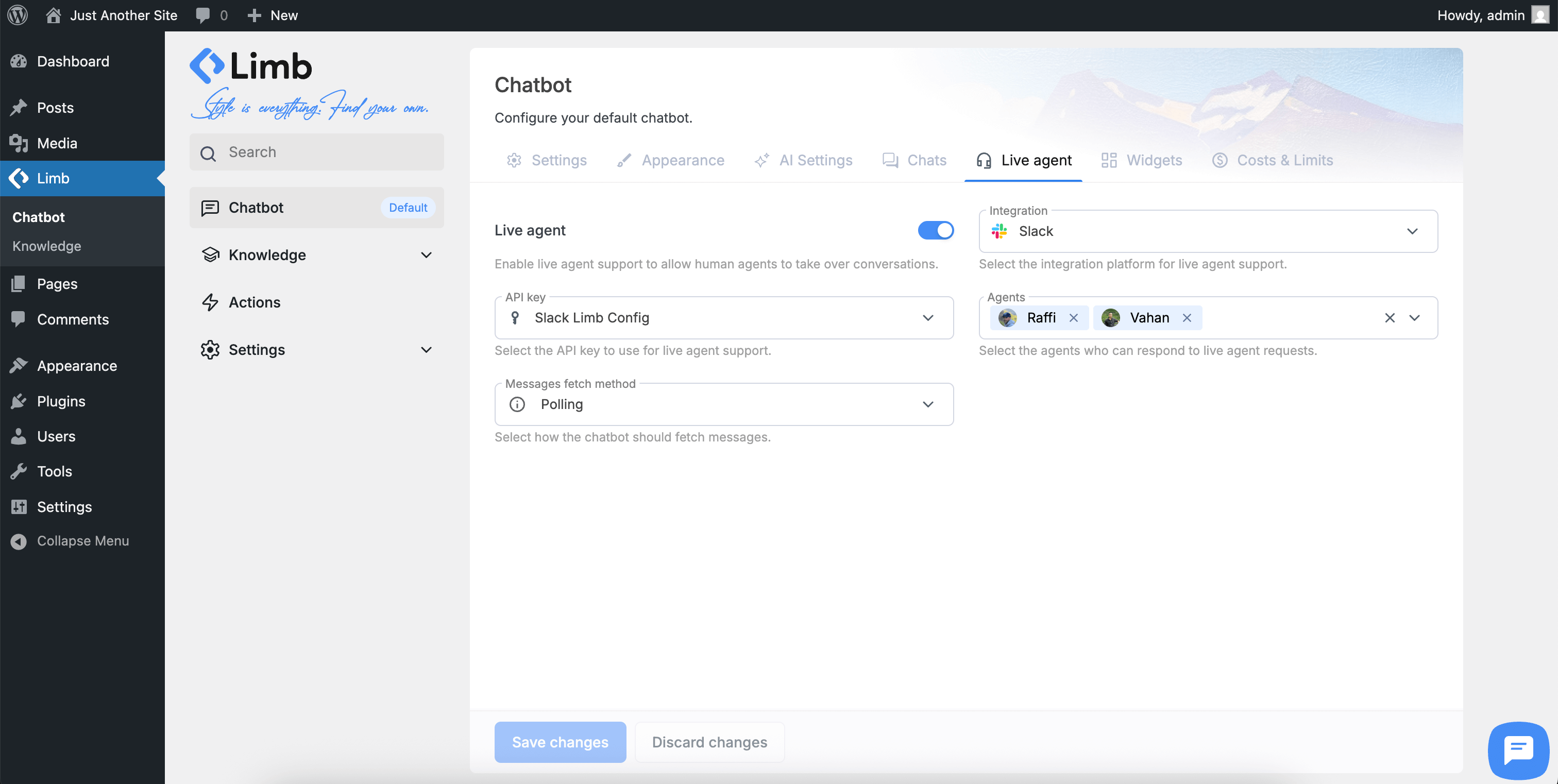
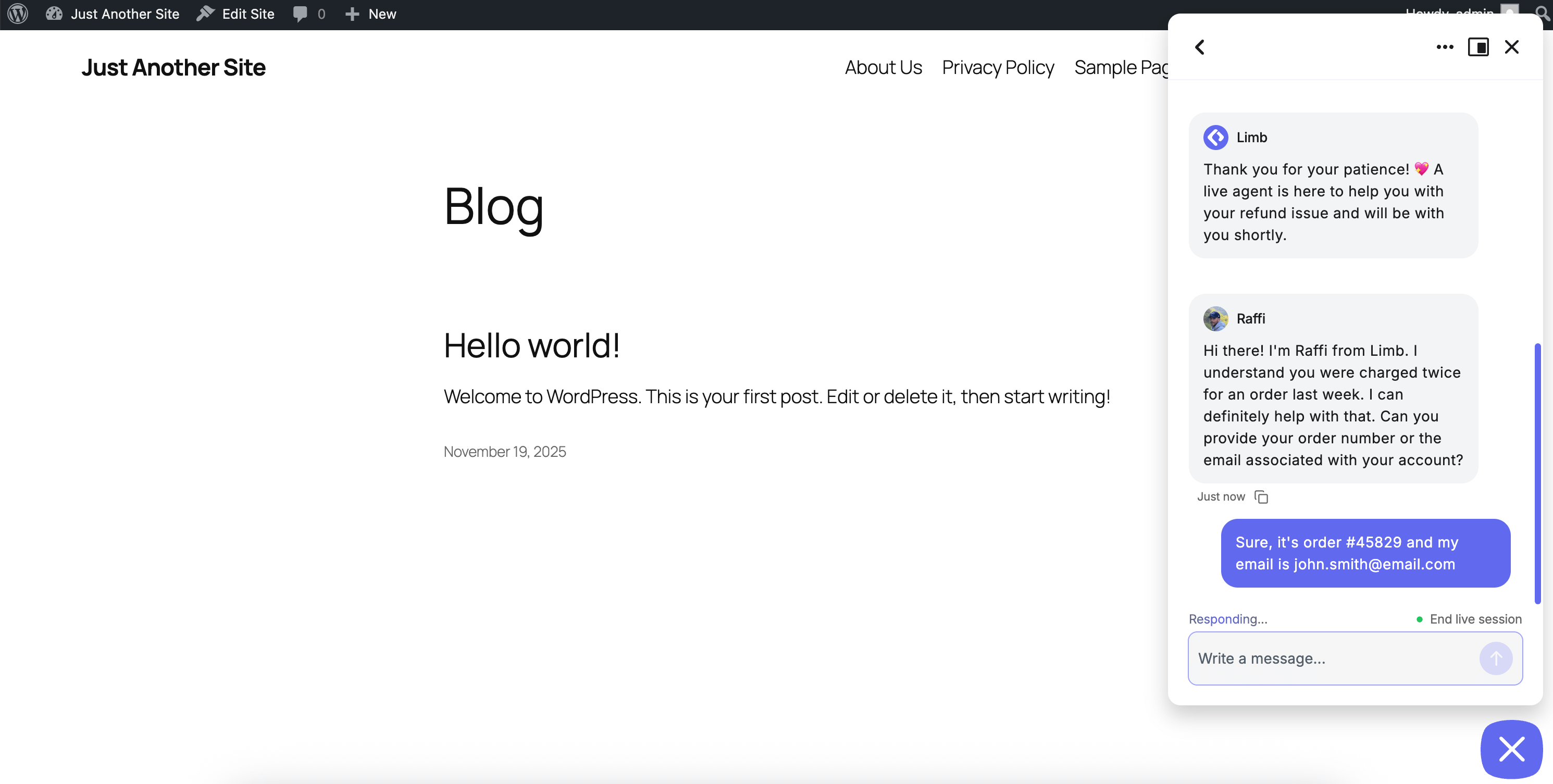
✅ Live Agent Handoff – Seamless transition to human support via Slack channel (WhatsApp, Telegram coming soon)
✅ 15+ AI Models – GPT-5, GPT-5 Mini, Gemini 2.5 Flash, Gemini 2.5 Pro, GPT-4.1, GPT-4o, and more
✅ Advanced RAG Technology – Intelligent retrieval for accurate, contextually relevant responses
✅ Cost-Optimized Usage – Smart token management minimizes API charges
✅ Knowledge Transparency – See exactly which content AI used for each response
✅ Unlimited Knowledge Base – Train on pages, posts, PDFs, text files, or Q&A entries
✅ Conversations Dashboard – Complete chat history with AI source visibility
✅ 3-Step Setup Wizard – Live in under 5 minutes with guided onboarding
✅ Rate Limiting – Control usage for guests and logged-in users
✅ Theme Support – Light mode, dark mode, and system theme options
✅ True WordPress Native – Real platform integration, not an iframe
🚀 Designed to Scale
Flexible architecture that grows with your business. Start simple, expand seamlessly.
Core Features
Your AI chatbot includes everything you need for intelligent customer engagement:
✅ Agentic AI Actions System
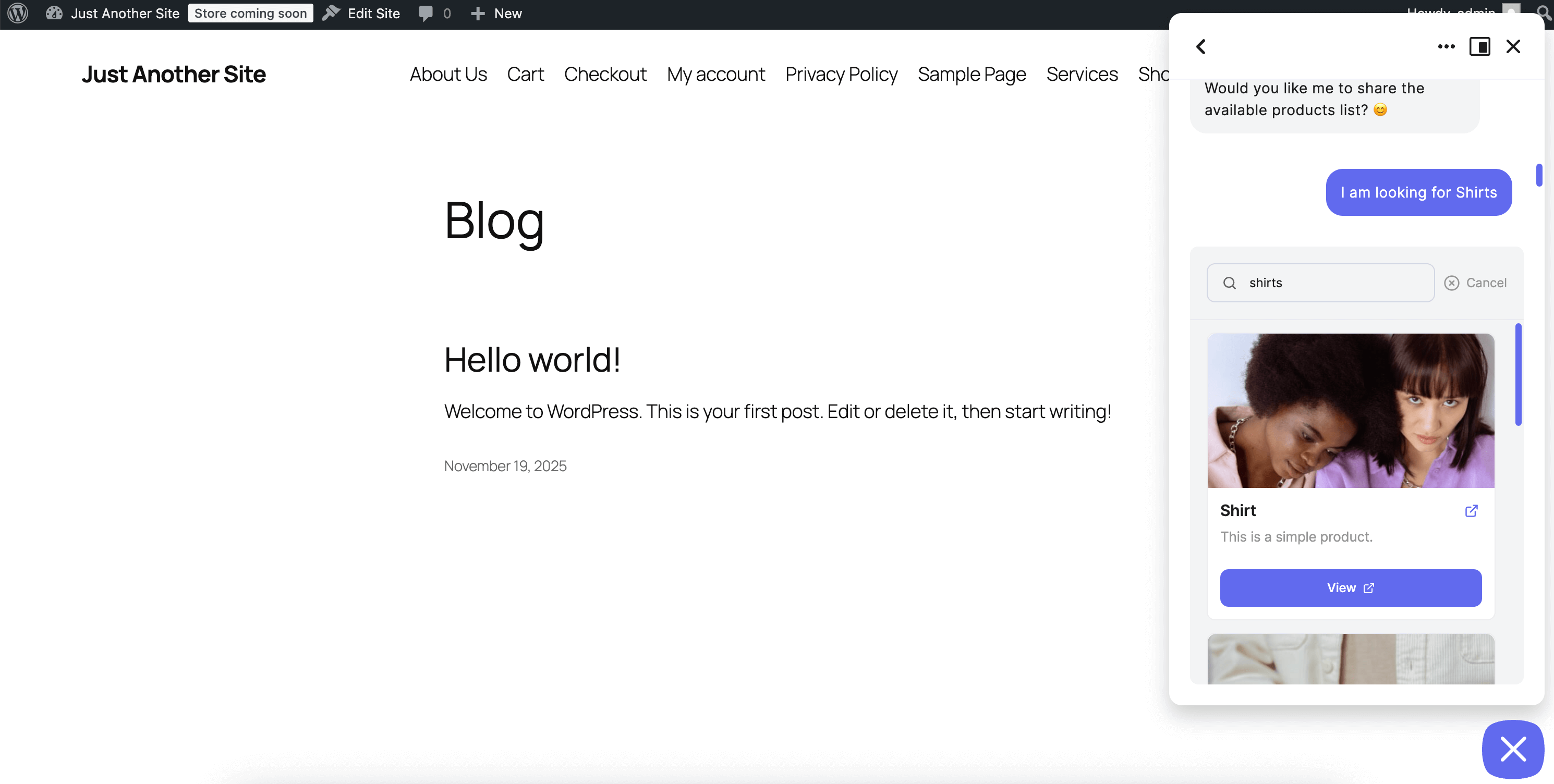
Your AI doesn’t just answer questions—it takes action. Detects user intent and triggers real actions: send emails, fire Slack notifications. Conversationally collects unlimited custom parameters including smart recommendations (vector-searched WordPress CPTs—products, services, any custom post type) and includes them in action execution. No static forms needed—just natural conversation that gets things done.
✅ Live Agent Handoff via Slack
Seamless AI-to-human transition when needed. When your AI can’t help, conversations transfer directly to your team via Slack channel with full context. Human agents see entire chat history and can respond in real-time. WhatsApp and Telegram support coming soon.
✅ Quick 3-Step AI Chatbot Setup
Guided wizard launches after activation. Connect your AI provider, configure personality, add knowledge sources, and customize appearance—live in under 5 minutes.
✅ Advanced AI Chatbot RAG Technology
Train on unlimited WordPress content using Retrieval-Augmented Generation. Supports pages, posts, custom post types, PDFs, text files, rich text input, and Q&A entries. Intelligent intent recognition retrieves the most relevant knowledge for accurate responses.
✅ Chat Discussions Dashboard
Complete conversation management with detailed insights. View all transcripts, see which knowledge sources AI used, add missing Q&A entries directly, and track user information including guest/logged-in status and IP addresses.
✅ Cost-Optimized AI Usage
Smart token management minimizes API charges. Intelligent request optimization ensures you pay only for what you need. Configure rate limits to control expenses.
✅ Customizable Chat Experience
Unlimited widgets including Message Starters, Message Prompts, Chat History, Links, and custom announcements. Fully customizable greetings with emoji support.
✅ Flexible Vector Storage
Choose local WordPress database (free, unlimited) or Pinecone for enterprise-scale knowledge bases. Vector embeddings enable fast, contextually relevant retrieval.
✅ Complete Customization
Customize colors, chatbot icon, AI avatar, chat box size, themes (light/dark/system), positioning, emojis, and greeting messages. Adapts seamlessly to all devices.
✅ Multi-Language Support
Conversations in multiple languages with RTL compatibility. The AI chatbot responds in your visitors’ language.
✅ GDPR Compliant
All conversation data stored locally on your WordPress site. You control data retention, export, and deletion policies.
Supported AI Models
Google Gemini
– Gemini 2.5 Flash, Gemini 2.5 Flash Lite, Gemini 2.5 Pro
– Gemini 2.0 Flash
– Gemini Embedding 001 (for knowledge base)
OpenAI GPT
– GPT-5, GPT-5 Mini, GPT-5 Nano
– GPT-4.1, GPT-4.1 Mini, GPT-4.1 Nano
– GPT-4o, GPT-4o Mini
– GPT-4 Turbo, GPT-4
– Text Embedding 3 Small, Text Embedding 3 Large, Text Embedding ada 002 (for knowledge base)
🔜 Claude (Anthropic), Grok (X.AI), and DeepSeek coming soon.
Knowledge Sources
Train your AI chatbot on multiple content types:
- WordPress Pages & Posts
- Custom Post Types
- PDF Documents
- Text Files (.txt)
- Rich Text Editor (unlimited input)
- Simple Q&A Entries
Content is processed using vector embeddings and stored in your WordPress database or Pinecone for fast, contextually relevant retrieval.
Coming Soon
🛒 WooCommerce Integration – Product recommendations, add-to-cart, order status tracking, and inventory questions
⚡ Streaming Responses – Real-time word-by-word AI replies for faster conversations
🎓 OpenAI Fine-Tuning – Train custom models on your Q&A dataset for domain-specific conversations
Quick Setup
Your AI chatbot launches in 3 simple steps:
1️⃣ Activate Plugin – Setup wizard appears automatically
2️⃣ Connect AI Provider – Enter your API key and configure AI agent personality
3️⃣ Add Knowledge – Import pages, posts, or upload documents for RAG training
Live in under 5 minutes with no technical knowledge required.
External Services
This plugin connects to third-party AI services to generate chatbot responses. You must provide your own API keys and comply with each provider’s terms of service.
AI Service Providers:
-
OpenAI – Chat completions, embeddings, image generation
- API Endpoint: https://api.openai.com
- Terms of Use
- Privacy Policy
-
Google Gemini – Chat completions, embeddings, image generation
- API Endpoint: https://generativelanguage.googleapis.com
- Terms of Service
- Privacy Policy
-
Pinecone (Optional) – Vector database for knowledge storage
- API Endpoint: https://api.pinecone.io
- Terms of Service
- Privacy Policy
-
DeepSeek (Coming Soon) – Chat completions and embeddings
- API Endpoint: https://api.deepseek.com
- Terms of Service
- Privacy Policy
You are responsible for:
– Obtaining and managing your own API keys
– Monitoring your API usage and costs
– Complying with each service provider’s terms and policies
– Ensuring your use case meets provider requirements
Libraries & Credits
Third-Party Libraries:
* WP Background Processing by Delicious Brains – Efficient asynchronous job management
– Repository: github.com/deliciousbrains/wp-background-processing
– License: GPLv2 or later
Development Team:
AI Chatbot is developed and maintained by the team at wpaichatbot.com.
Support & Documentation
Need Help?
* 📚 Full Documentation
* 💬 Community Forum
* 🌐 Official Website
* 📧 Email Support
Privacy & Data
Your Data, Your Control:
– All chat conversations are stored locally in your WordPress database
– No data is sent to external services except AI providers (OpenAI, Gemini) for response generation
– You have complete control over data retention and deletion policies
– GDPR-compliant data handling with export and erasure capabilities
– User data is handled according to WordPress privacy standards
Roadmap
Launching Soon:
🛒 WooCommerce & SureCart Integration – Shopping assistance and order tracking
⚡ Streaming Responses – Real-time word-by-word AI replies
Coming Later:
🤖 Claude (Anthropic) AI models
⚡ Grok (X.AI) AI models
🧠 DeepSeek AI models
🎓 OpenAI fine-tuning support
🔗 Additional integrations
Upgrade to Pro
⭐ The Pro version includes advanced features:
- 🤖 Multi-Agent Publishing – Deploy multiple AI agents across different sites
- 🎨 White Label Branding (Coming Soon) – Custom logos and icons for chatbot and AI agent
- ⚡ Advanced Smart Actions (Coming Soon) – Multiple callbacks per action, premium parameters
- 🧩 Chatbot & Prompt Blocks – Gutenberg integration for inline chat and prompt inputs
- 🎯 Premium Widgets – Advanced UI components and interactive elements
Installation
Automatic Installation
- Go to your WordPress dashboard
- Navigate to Plugins > Add New
- Search for “AI Chatbot” or “Limb Chatbot”
- Click Install Now, then Activate
- Follow the setup wizard to configure your chatbot
Manual Installation
- Download the plugin ZIP file
- Upload to
/wp-content/plugins/directory - Extract the files
- Activate through the Plugins menu in WordPress
- Follow the setup wizard to configure your chatbot
Getting Your API Keys
OpenAI:
Visit platform.openai.com, sign up, navigate to API keys, create a new key, and paste into the plugin setup wizard.
Google Gemini:
Visit ai.google.dev, get started with Gemini API, generate your key, and paste into the plugin setup wizard.
Pinecone (Optional):
Visit pinecone.io, sign up for free, create a new index, copy your API key, and paste into plugin settings.
Frequently Asked Questions
The AI chatbot supports 15+ models including GPT-5, GPT-5 Mini, Gemini 2.5 Flash, Gemini 2.5 Pro, GPT-4.1, GPT-4o, GPT-4 Turbo, and various embedding models. Claude, Grok, and DeepSeek coming soon.
For OpenAI, visit platform.openai.com and create an account. For Google Gemini, visit ai.google.dev and follow the setup process.
Yes. The AI chatbot supports unlimited knowledge training using RAG technology from WordPress pages, posts, custom post types, PDFs, text files, and manual Q&A entries.
RAG (Retrieval-Augmented Generation) retrieves relevant information from your knowledge base before generating responses, ensuring accurate, contextually appropriate answers based on your actual content.
Yes. A guided 3-step setup wizard appears automatically after activation, walking you through AI provider connection, personality configuration, knowledge sources, and customization.
Most users complete setup in under 5 minutes. The wizard guides you through each step with clear instructions.
The AI chatbot uses intelligent token management to minimize API charges through optimized requests and efficient caching. Configure rate limits for guests and logged-in users to control costs.
A comprehensive conversation management interface showing all chat transcripts with detailed conversation views. See which knowledge sources AI used for each response, add missing Q&A entries directly, and track user information.
Yes. The Chat Discussions Dashboard shows knowledge source transparency—you can see exactly which pages, posts, or Q&A entries the AI chatbot used to generate each response.
No. The AI chatbot includes free, unlimited local vector storage in your WordPress database. Pinecone is optional for enterprise-scale knowledge bases with 10,000+ entries.
Yes. The AI chatbot stores conversation data locally on your WordPress site, giving you complete control. Configure data retention policies and export or delete conversations as needed.
Yes. Customize colors, chatbot icon, AI agent avatar, chat box size, themes (light/dark/system), positioning, emojis, greeting messages, and widget layouts without coding.
Yes. The AI chatbot supports multi-language conversations and right-to-left (RTL) languages, responding in the language your visitors use.
API usage depends on your chosen provider and models. OpenAI and Google Gemini charge based on token usage with rates varying by model. Gemini offers generous free tiers. The AI chatbot’s intelligent cost optimization minimizes charges by reducing unnecessary calls and optimizing token usage. Check current pricing: platform.openai.com and ai.google.dev
Yes. Configure rate limits for guests and logged-in users. The AI chatbot’s intelligent token management minimizes costs automatically.
Yes. The Chat Discussions Dashboard includes comprehensive chat transcripts with conversation history, user context, knowledge sources used, and detailed analytics.
WooCommerce integration, Slack integration, and streaming responses are launching soon as free updates.
Review feed
Excellent and Competitive AI Chatbot Plugin
Screenshots
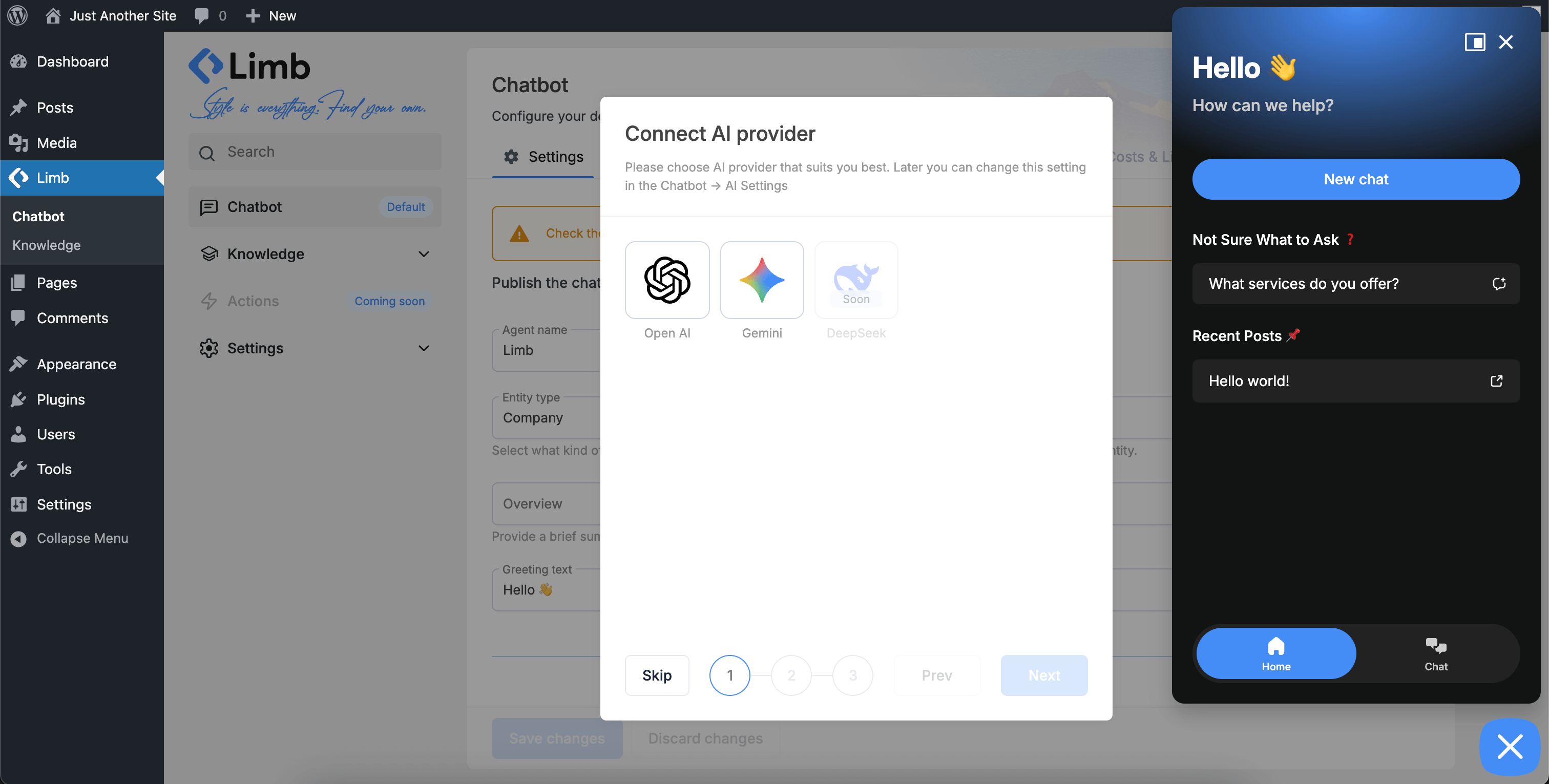
Setup Wizard Step 1 - Connect your AI provider by entering API key. Choose from ChatGPT, Gemini 2.5, and 15+ models
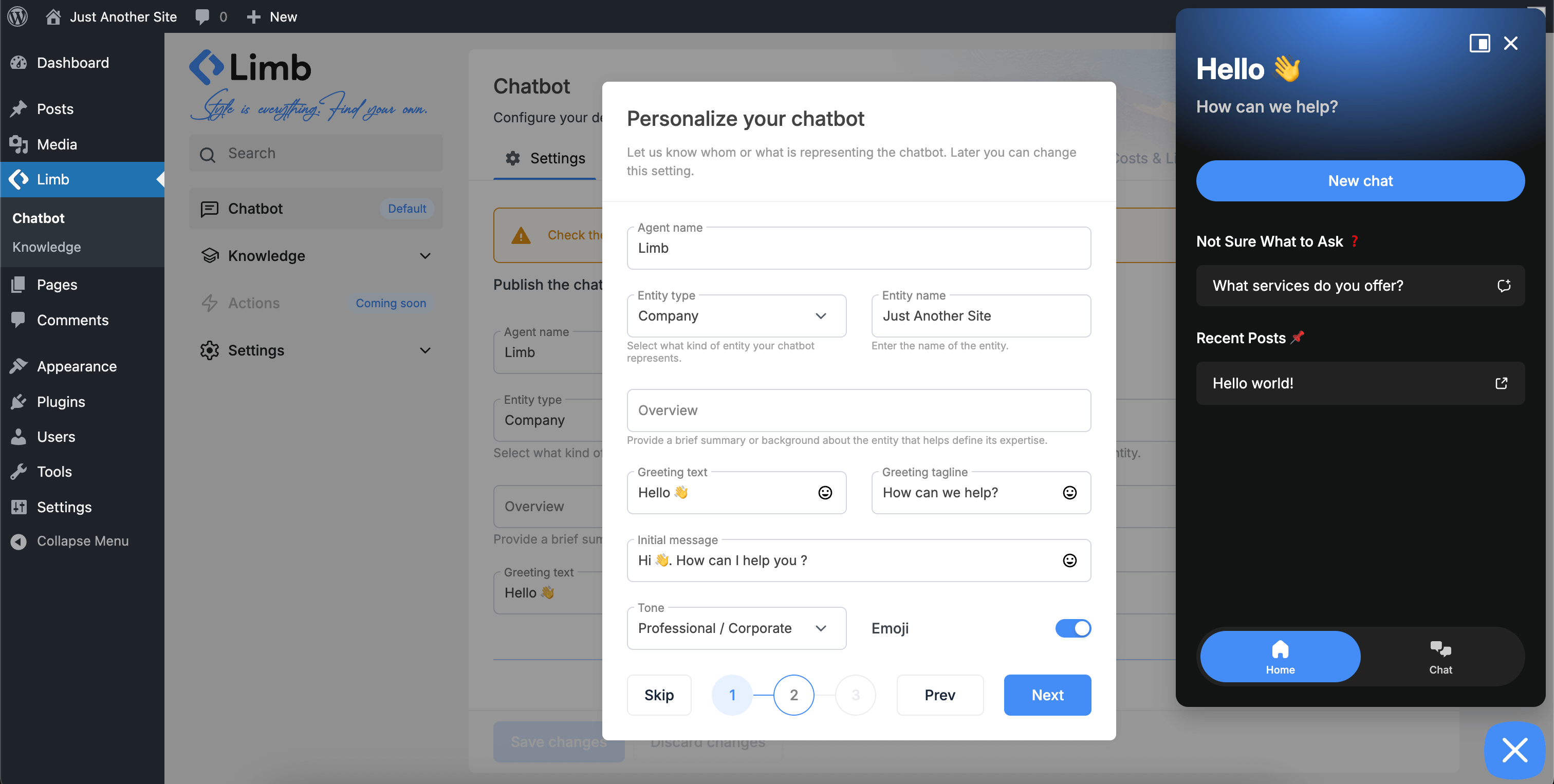
Setup Wizard Step 2 - Set agent name, entity type, greeting messages, tone, and overview to define chatbot identity
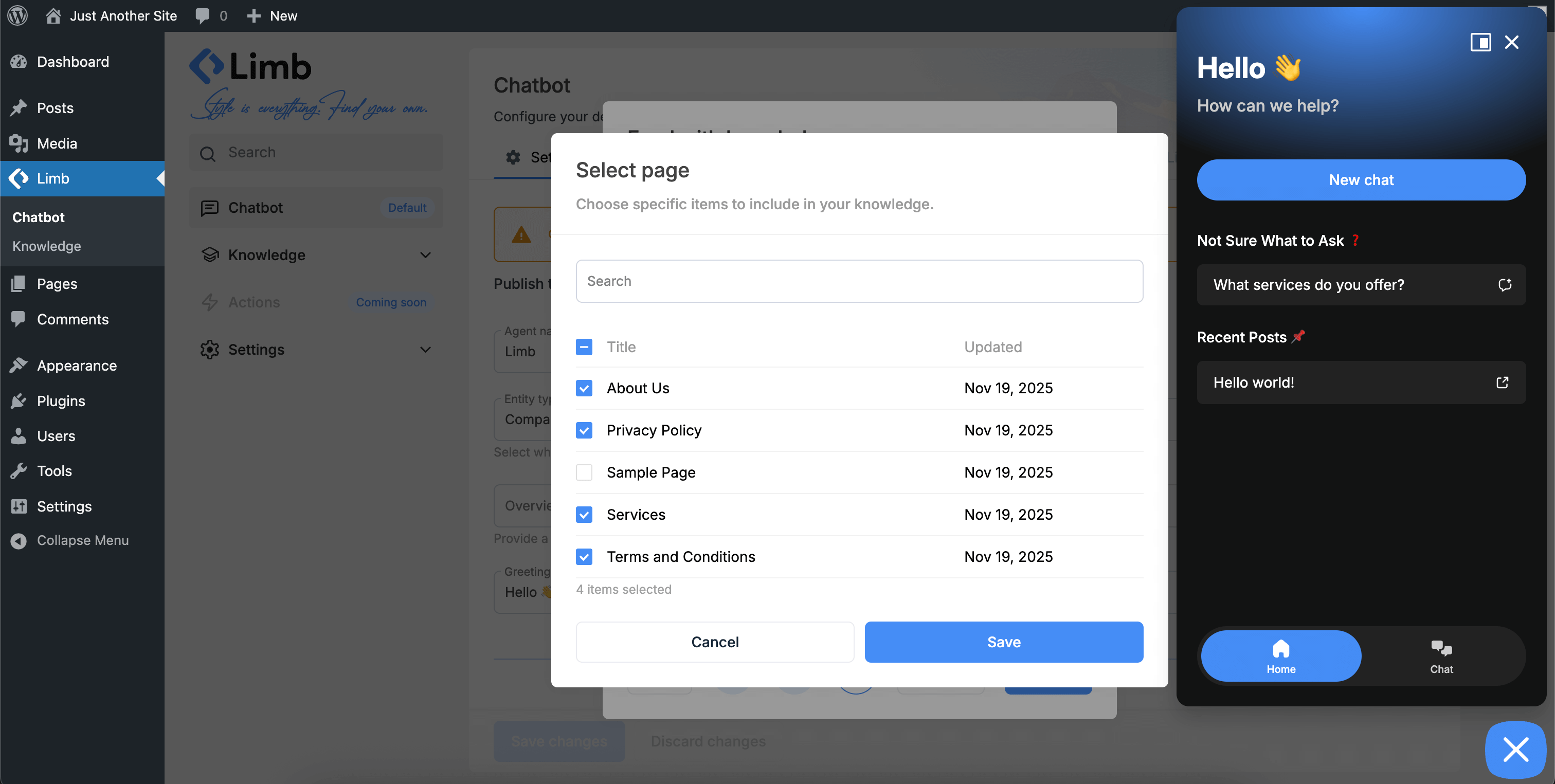
Setup Wizard Step 3 - Train chatbot on WordPress pages, posts, and content with RAG knowledge base technology
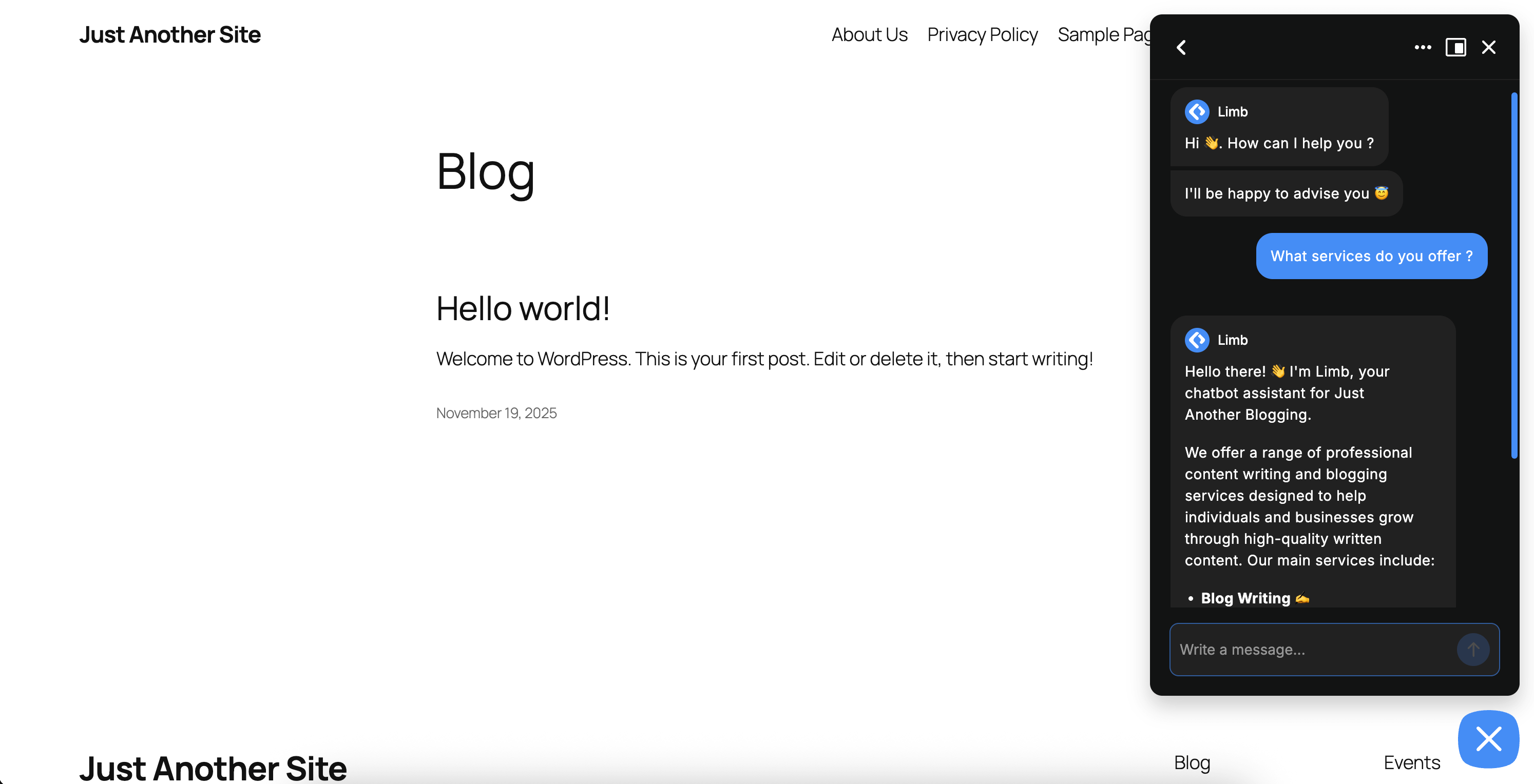
Live Chatbot Widget - Responsive AI chatbot with ChatGPT/Gemini on website frontend. Light/dark themes, mobile-optimized
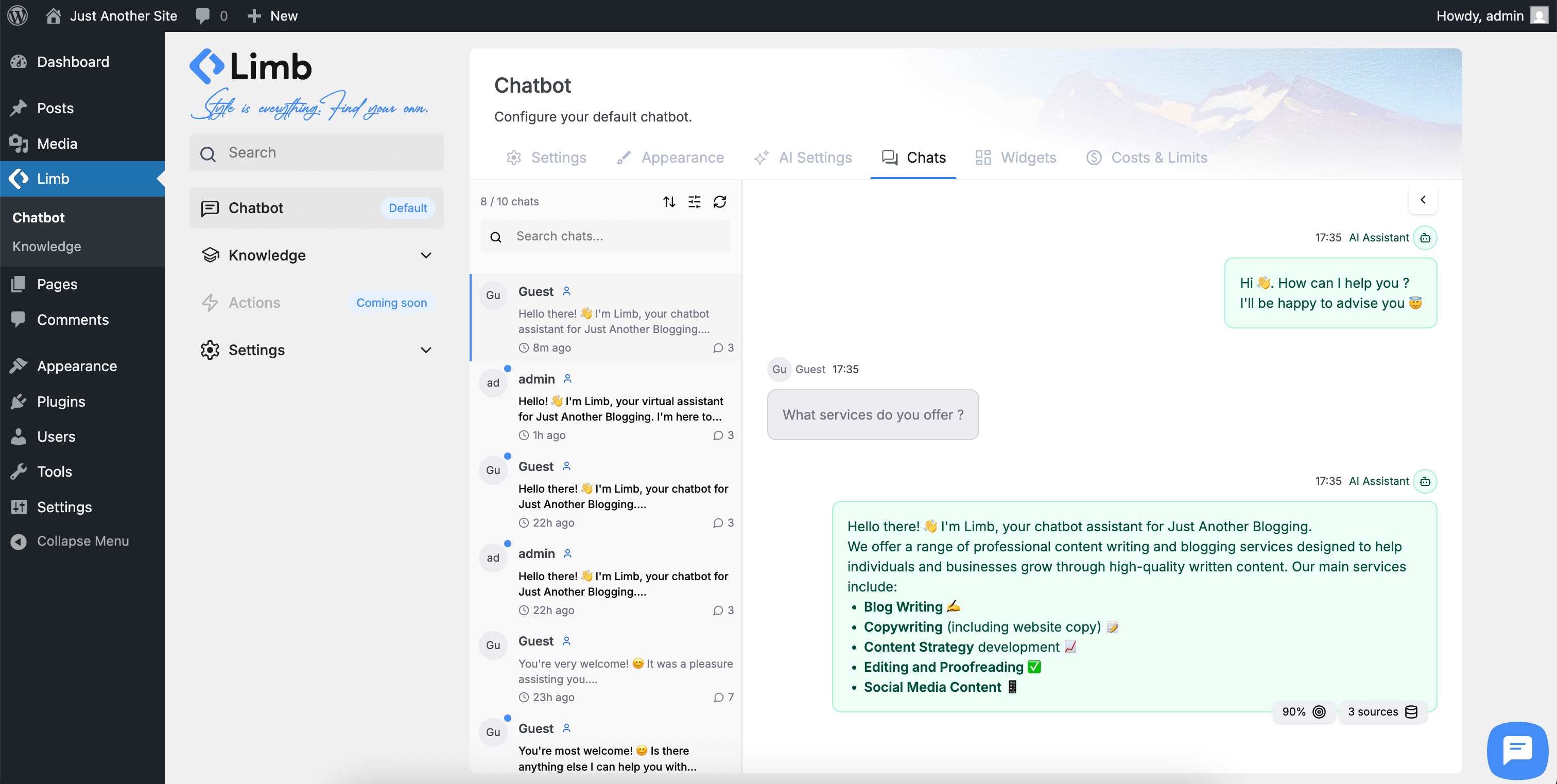
Chat Logs Dashboard - View conversation history with AI knowledge source transparency, RAG insights, and analytics
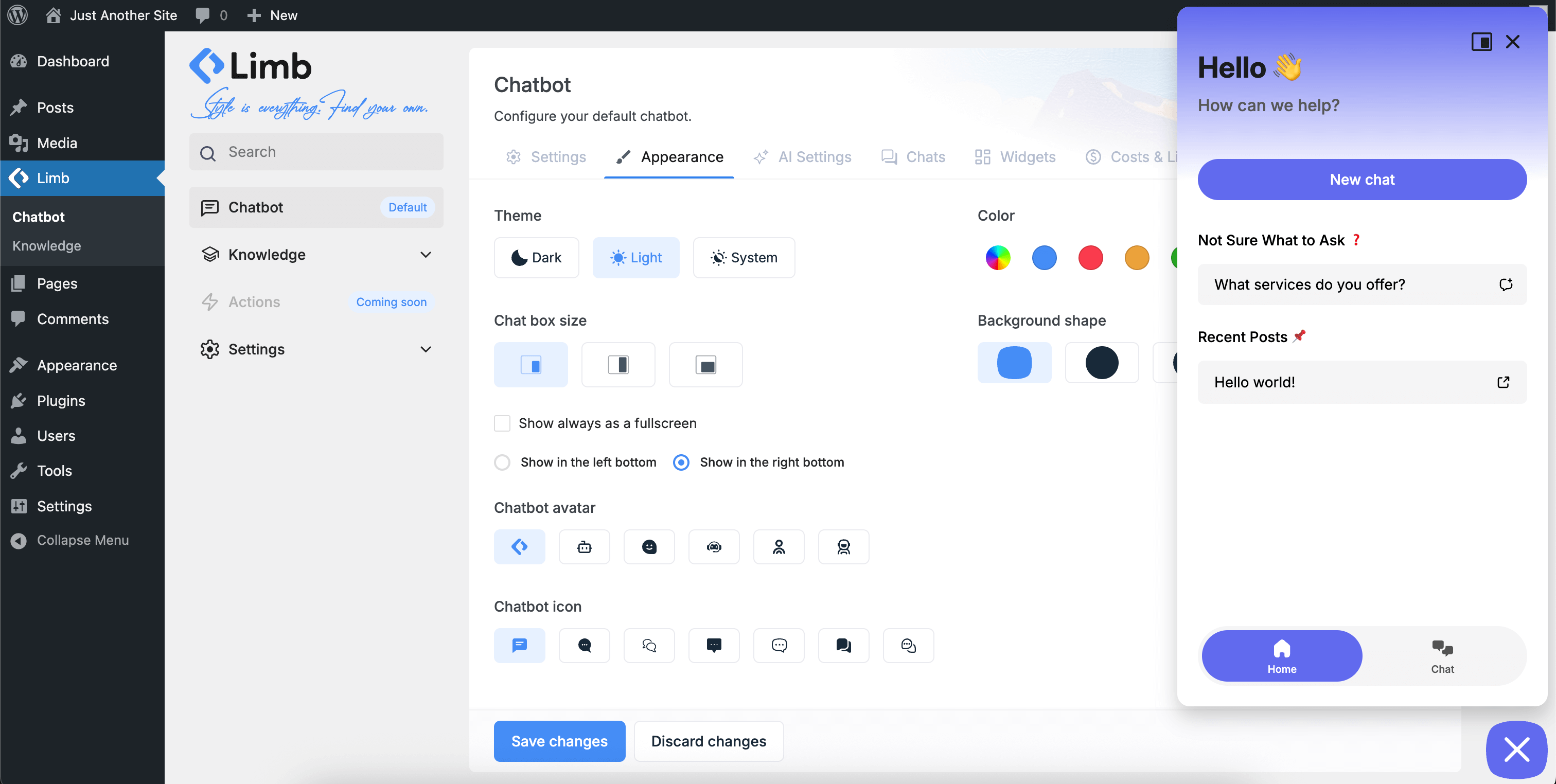
Appearance Settings - Customize chatbot colors, icons, AI avatars, themes, positioning, and visual style
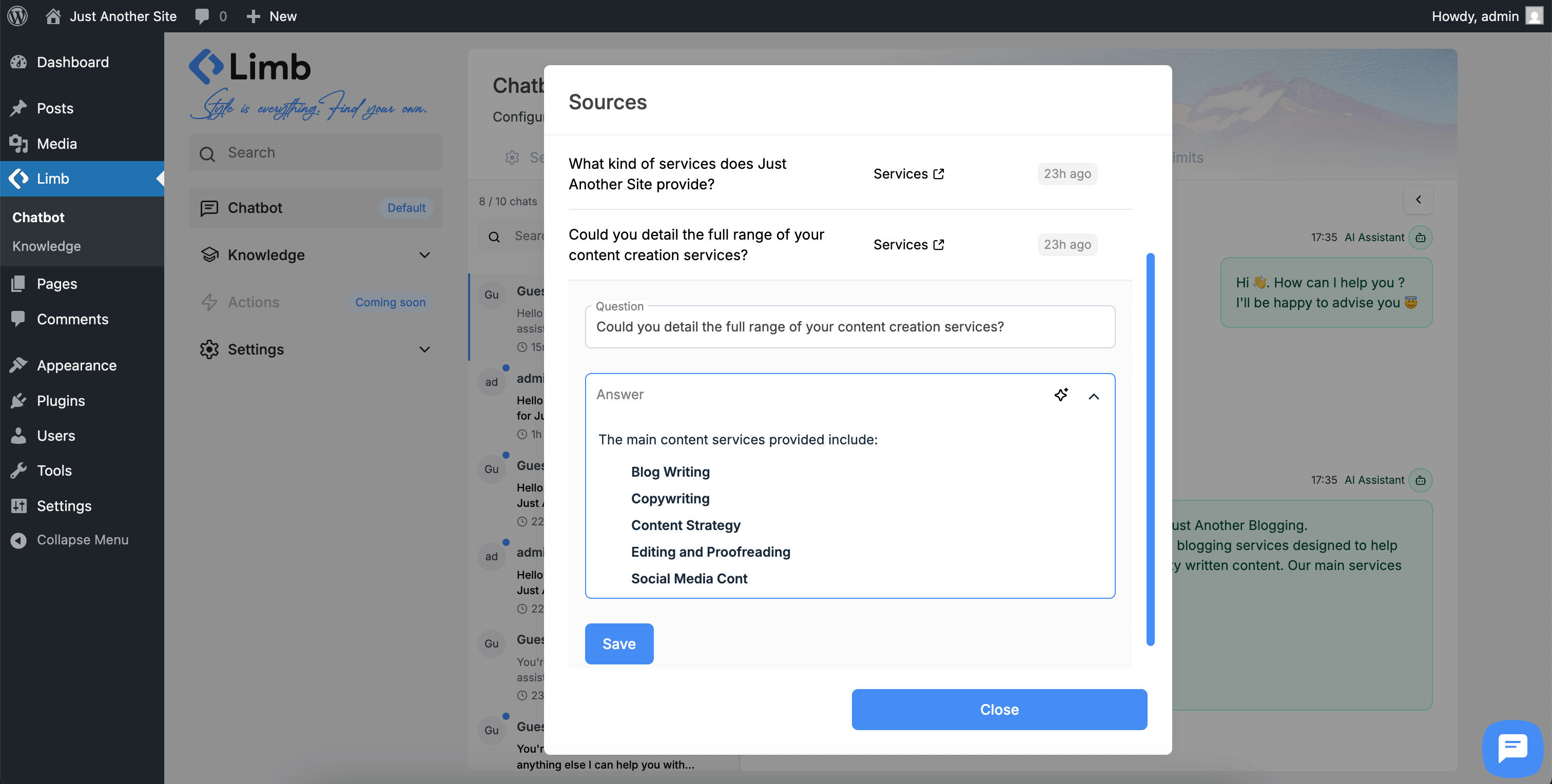
Knowledge Source View - See which knowledge sources powered each answer and edit responses with RAG insights
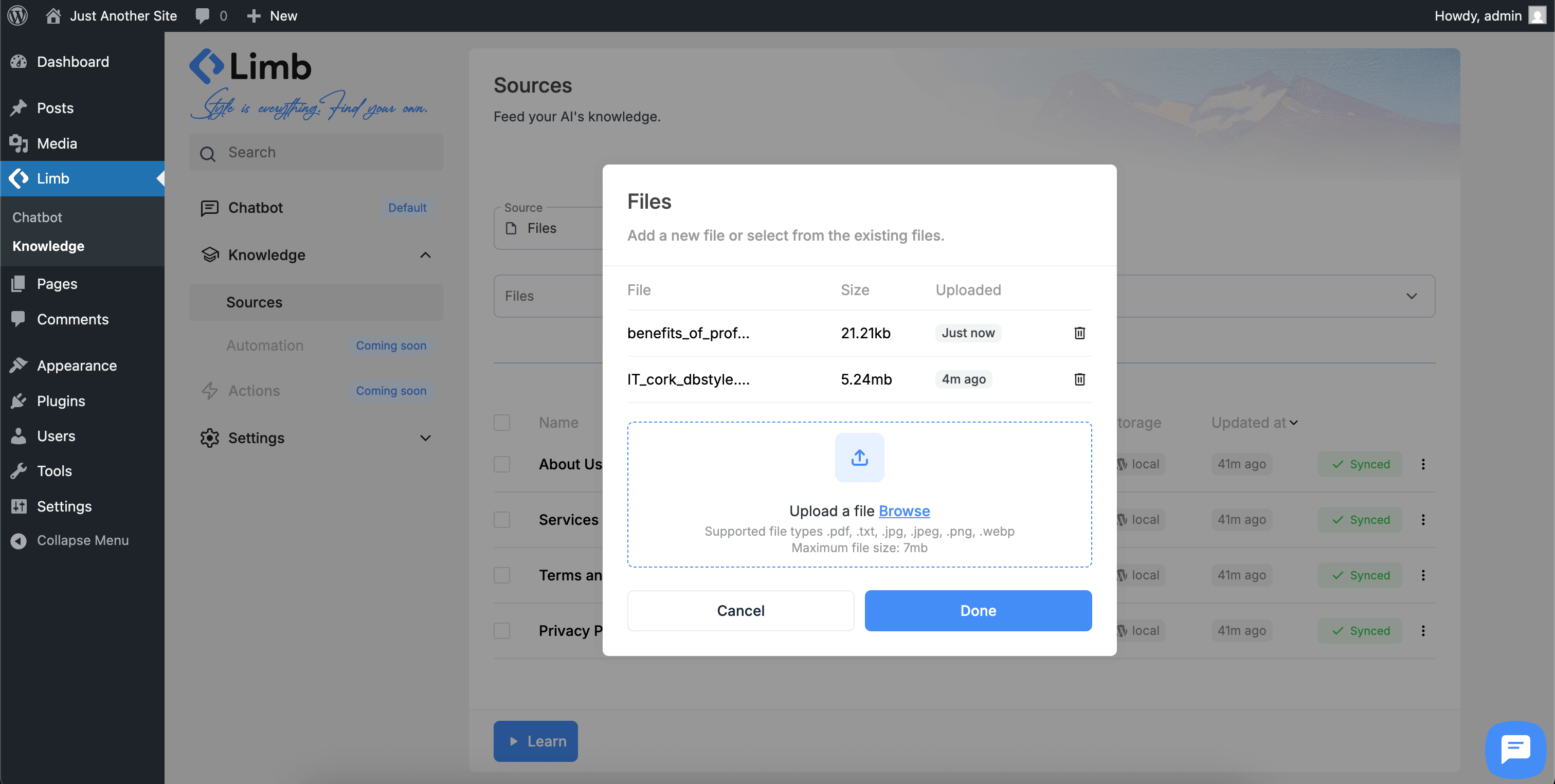
Import Knowledge Files - Upload PDFs, documents, and text files to train chatbot with vector embeddings
Changelog
1.0.8 – December 2, 2025
- Fixed: Knowledge base sources pagination issue
- Fixed: Chatbot temporary permission issue for guest users
- Improved: CPT recommendations interface inside the chatbot
- Improved: Admin interface
1.0.7
- Fixed: Admin interface display issue when using en_GB locale
- Fixed: Storage provider visibility issue during recommendation collection
- Improved: Locale compatibility across all language settings
1.0.6
- Fixed: Permission errors inside chatbot
- Fixed: WordPress search issue upon onboarding or knowledge collecting
- Added: Slack notification Action handler
- Added: Live agent support through Slack channel
- Added: Collecting WordPress custom post types as Recommendations and using them inside Actions as parameter
- Improved: Actions admin UI
1.0.5
- Fixed: Critical error fixed
1.0.4
- Fixed: AI Agent replies with users language
- Added: Actions support. Do actions based on user intent. Collect parameters and pass them to handlers
- Added: AI reply’s knowledge sources now are visible under the message
- Changed: UI changes related to ai-providers
- Improved: Knowledge collecting
1.0.3
- Fixed: PDF knowledge collecting timeout issue
- Fixed: Assets caching issue
- Fixed: Chatbot buttons hover bg-color issue
- Added: AI reply reload button
- Added: OpenAI GPT-5 support
- Changed: Chatbot admin menu ordering
- Improved: Knowledge collecting
1.0.2
- Fixed: UI/UX issues on iOS Safari with latest update
- Added: “Text” knowledge source type for flexible content input (old “Manual” is now “Q&A”)
- Added: Uninstall page for clean plugin removal
- Changed: Removed “Storage” page from menu (consolidated into settings)
- Changed: “Informational” page renamed to “Sources” for clarity
- Changed: Training page temporarily marked as “Coming Soon” while we refine features
- Improved: Overall admin interface clarity and navigation
- Improved: Cost optimization for API token usage
1.0.1
- Fixed: Hub theme custom post type fetching issue resolved
- Changed: Redesigned message layout for better readability
- Added: Feature preview with upcoming launches
- Added: Knowledge source transparency in chat logs
1.0.0
- Initial release of AI Chatbot
- Feature: Multi-provider AI support (OpenAI GPT, Google Gemini)
- Feature: Unlimited knowledge base with RAG technology
- Feature: Customizable widgets (Message Starters, Prompts, Links, Chat History)
- Feature: Chat Discussions Dashboard with knowledge source visibility
- Feature: Full appearance customization with theme support
- Feature: Cost-optimized API usage
- Feature: Conversation logging and chat transcripts
- Feature: GDPR-compliant data handling
- Feature: Multi-language and RTL support
- Feature: Responsive mobile-first design
- Feature: Rate limiting and cost control