

Link Shortcut
Make TinyURL-like URLs (you.com/33ks8s) that redirect to pages inside / outside your blog. Can also create human-readable aliases (you.com/facebook).
Plugin info
Maintenance & Compatibility
Maintenance score
Possibly abandoned • Last updated 6188 days ago
Is Link Shortcut abandoned?
Possibly abandoned (last update 6188 days ago).
Compatibility
Similar & Alternatives
Explore plugins with similar tags, and compare key metrics like downloads, ratings, updates, support, and WP/PHP compatibility.
Description
Ever want your own shortcuts without mucking about with permalink structures? The Link Shortcut plugin allows you to create short (random numbers and letters, or short words) URLs under your blog’s domain that redirect (301 or 302, your choice) a user to other pages, either in your site or on another site.
In other words, instead of sending this url to the author’s plugin page:
http://www.husani.com/ventures/wordpress-plugins/linkshortcut/
This shortcut could be created simply by installing this plugin and adding a link, via the same traditional WordPress UI we all know and love:
http://www.husani.com/link123
You can also specify a specific “subdirectory” to be present in all Link Shortcut URLs: yourblog/go/STRING, for example.
YOU MUST USE NON-UGLY PERMALINKS FOR THIS PLUGIN TO WORK. Your permalink structure cannot be yourblog.com?p=84, it must be date-based, name-based, etc.
IMPORTANT: Link Shortcut creates a table inside your database. Upon deactivation, the plugin creates a backup table and copies records to it before removing the main table. If you decide to activate the plugin again — or have installed an upgrade — it automatically copies your backed up links to the newly created table. You can also delete the backup table if you remove Link Shortcut permanently.
Changelog:
- 1.4:
- Added configurable Redirect-Type (301, 302)
- 1.3:
- Added ability to set default length
- Added ability to set directory name inside URL (yourblog.com/go/993ldx)
- Added data backup on plugin deactivation (read Installation for more details)
- Using _SERVER instead of WP_Query to account for WP version differences
- 1.2:
- Fixed WP 2.7 vs 2.7.1 bug
- 1.1:
- Fixed directory name bug
Link Shortcut is released to the WordPress community under the GPL. Please feel free to modify as you see fit, and if you find this plugin useful, donate to the author. All feedback is welcome at [email protected], and you can visit Husani’s website at http://www.husani.com.
Installation
- Upload the Link Shortcut plugin to your blog (YOURBLOG/wp-content/plugins) and activate it using the WordPress plugin admin screen.
- Click “Link Shortcuts” in the left-hand menu and manage your links.
IMPORTANT: Deactivating 1.2 and lower before upgrading to 1.3 will result in loss of any links you’ve created with this plugin. If you’d like to keep that data, simply replace the plugin files with the new version — but be aware of the following: There has been a database change to enable you to set a longer character length. If you want that new functionality, you’ll need to make manual edits to your DB structure to enable this (change wp_linkshortcut.ident’s field type to VARCHAR(255)). If you don’t want to make manual edits but would like the new features, you’ll have to bite the bullet and deactivate / unzip / re-activate. Sorry.
Frequently Asked Questions
How does Link Shortcut work?
The Link Shortcut plugin attaches itself to various core WordPress methods and waits for a request to be made for a shortcut URL saved to the database. When one is, it simply does a redirect to the saved URL. The redirect type can be changed (301 or 302) inside the options panel.
I installed the plugin but it doesn’t work.
You must have non-ugly permalink settings. If there are variables in your URLs, you’ll have to use WordPress admin to change that.
Does Link Shortcut use the WordPress database?
Yes. Upon activation, Link Shortcut creates a table and stores all links in that table, so your existing structure does not change. If you decide to deactivate the plugin, it removes this table but creates a backup table for your convenience.
Review feed
Screenshots
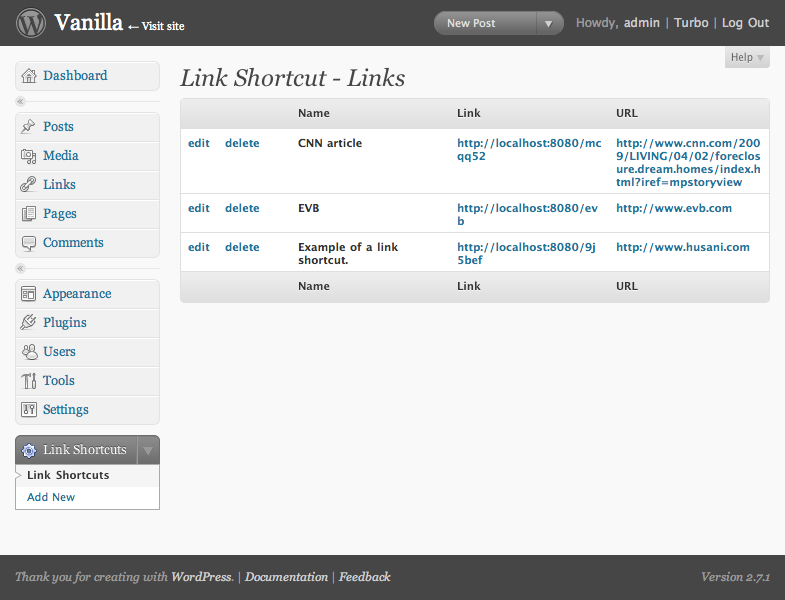
List of links

Add new link

Edit link