
Login for Stripe Customer Portal | Create an Account Login Page for the Stripe Customer Portal
Create a customer login page for the Stripe Customer Portal directly from your WordPress site.
Plugin info
Maintenance & Compatibility
Maintenance score
Stale • Last updated 346 days ago • 2 reviews
Is Login for Stripe Customer Portal | Create an Account Login Page for the Stripe Customer Portal abandoned?
Likely maintained (last update 346 days ago).
Compatibility
Languages
Similar & Alternatives
Explore plugins with similar tags, and compare key metrics like downloads, ratings, updates, support, and WP/PHP compatibility.
Description
The Login for Stripe Customer Portal plugin simplifies the process for Stripe businesses to integrate the Stripe Customer Portal into their WordPress website. By offering a customizable login endpoint or embeddable form, the plugin makes it easy for customers to log in and access and manage their Stripe billing information securely.
Upon entering their email address, customers receive a secure login link, which is only valid for 1 hour. You can optionally restrict access only to your existing customers or allow new customers to register and add their information.
The Customer Portal is still hosted on Stripe, but the Login page is on your website, giving you more control over professionally branding the experience customers have on your site.
Key Features:
- Stripe API Integration: Allows WordPress site admins to connect their Stripe account via API and provide customer access to the Stripe Customer Portal.
- Customizable Endpoint: Admins can define a custom slug for the customer portal login page (e.g.,
yourwebsite.com/customer-portal/). - Shortcode Embeddable Form: Use the shortcode
[login-stripe-customer-portal]to put the login form anywhere on your site. - Secure Authentication: Users enter their email and are sent a secure login link to get access to the Stripe Customer Portal.
- Redirect URL: After logging out of the portal, customers are redirected back to a specified URL, which can be customized in the plugin settings.
Third-Party Service Disclaimer
This plugin integrates with Stripe to provide the customer portal functionality. It uses Stripe’s API to connect with and manage customer data securely. By using this plugin, you are consenting to the transmission of data to Stripe’s services.
Service Terms: Stripe Terms of Use
Privacy Policy: Stripe Privacy Policy
Installation
- Upload the plugin files to the
/wp-content/plugins/directory or install the plugin through the WordPress plugins screen. - Activate the plugin through the ‘Plugins’ screen in WordPress.
- Navigate to “Stripe Portal” in the WordPress admin menu to configure the plugin settings.
- Enter your Stripe Secret API Key, customize the endpoint slug, and set your desired redirect URL.
Frequently Asked Questions
This plugin allows you to provide a customer login page for Stripe’s Customer Portal directly from your WordPress site. It enables customers to access and manage their Stripe account details securely.
Log into your Stripe Dashboard, and under “Developers” > “API keys”, you will find the option to copy your Secret API key.
Yes, the plugin allows you to customize the endpoint URL for the login page. You can define this under the settings. Styling settings are coming soon, but for now you can use custom CSS.
Review feed
Full transparency – I’m the creator of this plugin and it is great 😇
Screenshots

Settings page to configure Stripe API key, redirect URL, and customer portal slug

Login form example - users can enter email and generate a login link
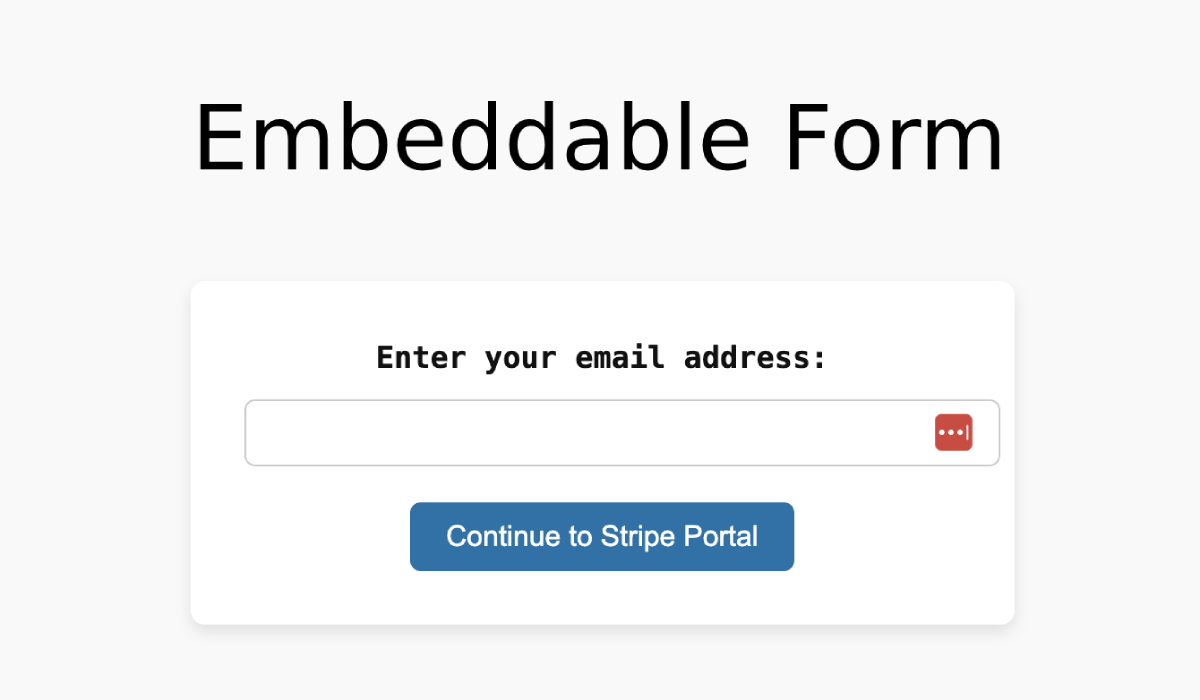
Embeddable Stripe Customer Portal login form based on shortcode

Confirmation message after submitting the email form

Email including temporary login link for Stripe Customer Portal