

MailChimp Campaign Archive
Adds a [mailchimp_campaigns] shortcode that lists your latest MailChimp email campaigns
Plugin info
Maintenance & Compatibility
Maintenance score
Possibly abandoned • Last updated 4857 days ago • 8 reviews
Is MailChimp Campaign Archive abandoned?
Possibly abandoned (last update 4857 days ago).
Compatibility
Similar & Alternatives
Explore plugins with similar tags, and compare key metrics like downloads, ratings, updates, support, and WP/PHP compatibility.
Description
MailChimp Campaign Archive adds a [mailchimp_campaigns] shortcode to WordPress. This shortcode lists your latest MailChimp email campaigns as an unordered list with links to view the HTML version of each email.
Usage
The only required parameter is apikey which you must generate from MailChimp: https://admin.mailchimp.com/account/api/
Example usage: [mailchimp_campaigns apikey="xxxxxxxxxx" limit="10" order="ASC" link_text="title"]
apikey
Generated from https://admin.mailchimp.com/account/api/
limit
Specify how many campaigns to list. Can be any integer between 1 and 1000.
offset
If offset is non-negative, the archive list will start at that offset in the list. If offset is negative, the archive list will start that far from the end of the list. For example, set this to 10 to omit the first ten email campaigns from the list, or set it to -2 to omit every campaign that comes before the second to last campaign.
order
Can be either ASC or DESC (ascending or descending)
link_text
Specify where to get link text. Can be either “subject” or “title”
status
Only show campaigns of a specific status. Can be: “sent”, “save”, “paused”, “schedule”, or “sending”
from_name
Only show campaigns that have this “From Name”
from_email
Only show campaigns that have this “Reply-to Email”
list_id
Only show campaigns sent to this list ID. The ID for a given list can be found by navigating to the Lists page, clicking the Gear drop down, and selecting List Settings and Unique ID.
folder_id
Only show campaigns from this folder ID. The folder ID can be found in the “fid” parameter in the “Folder Archive Code”
organize_by
Organize campaign list by date. Can be either “year” or “month”
heading_tag
HTML element to use for month/year titles. Only needed if “organize_by” is set. Should be one of: h1, h2, h3, h4, h5, h6
Installation
Extract the zip file and drop the contents in the wp-content/plugins/ directory of your WordPress installation and then activate the plugin from the “Plugins” page.
Frequently Asked Questions
Review feed
Screenshots
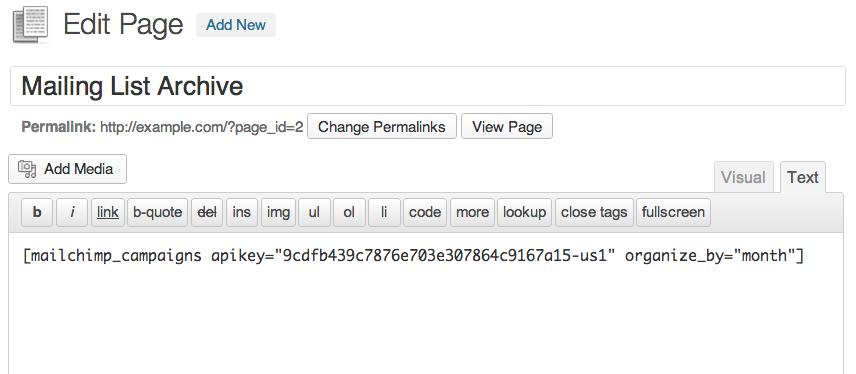
Paste the shortcode into a post or page. The API key is the only required parameter.

A list of sent emails is generated, complete with links to view the HTML version of each one.
Changelog
1.0.3
- First public release