

MaxtDesign Role-Based Pricing for WooCommerce
Free role-based pricing for WooCommerce. Create customer groups and apply simple percentage or fixed discounts across your catalog.
Plugin info
Maintenance & Compatibility
Maintenance score
Maintained • Last updated 153 days ago
Is MaxtDesign Role-Based Pricing for WooCommerce abandoned?
Likely maintained (last update 153 days ago).
Compatibility
Similar & Alternatives
Explore plugins with similar tags, and compare key metrics like downloads, ratings, updates, support, and WP/PHP compatibility.
Description
Transform your WooCommerce store with role-based pricing. This free plugin lets you create price rules for different customer groups using percentage or fixed discounts — no subscriptions, no upsells, and no complex setup.
Perfect for:
* Wholesale and B2B businesses with volume pricing
* Membership sites with tier pricing levels
* Multi-tier customer loyalty programs
* Professional service pricing structures
* Stores offering bulk discounts and group rates
Why Choose This Plugin:
* Completely Free – No subscriptions, upsells, or hidden limits
* Flexible Pricing Rules – Percentage or fixed discounts per role
* Built-in Performance Optimization – Advanced caching prevents slowdowns
* No External Dependencies – Self-contained with no API requirements
* Professional Grade – Enterprise-level features without enterprise costs
Key Features:
* Role-Based Pricing Rules – Set global rules; product-level overrides supported
* Two Discount Types – Percentage or fixed amount reductions
* Customer Group Management – Create up to 3 custom user roles
* Optimized Performance – Built-in caching with automatic optimization
* WooCommerce HPOS Compatible – Full support for High-Performance Order Storage
How Membership Pricing Works:
1. Create customer groups or use existing WordPress roles
2. Set global pricing rules that apply to all products
3. Override global rules with product-specific tier pricing when needed
4. Customers see their group pricing automatically when logged in
5. Original prices shown with strikethrough for transparency
Professional Performance Features:
* Smart Caching System – Automatic cache detection with object cache and transient fallbacks
* Performance Monitoring – Optional detailed tracking for optimization (developer tool)
* Database Optimization – Indexed tables for lightning-fast queries
* Security First Design – Comprehensive input validation and sanitization
* Error-Proof Operation – Graceful handling ensures pricing never breaks
* Multisite Ready – Works seamlessly in WordPress multisite environments
Competitive Advantages:
Free alternative to paid pricing plugins. No subscriptions, no usage caps, and no external API dependencies.
Installation
- Upload the plugin files to the
/wp-content/plugins/woocommerce-role-based-pricingdirectory, or install through the WordPress plugins screen - Activate the plugin through the ‘Plugins’ screen in WordPress
- Ensure WooCommerce is installed and activated (required)
- Navigate to WooCommerce > Role-Based Pricing to configure your pricing rules
- Create customer groups or use existing WordPress roles
- Set up global pricing rules or optional product-specific overrides
System Requirements:
* WordPress 5.0 or higher
* WooCommerce 5.0 or higher
* PHP 7.4 or higher
* MySQL 5.6 or higher
Frequently Asked Questions
Navigate to WooCommerce > Role-Based Pricing, create custom roles for each tier (Bronze, Silver, Gold), then set percentage or fixed discounts for each membership level. Members automatically see their tier pricing when logged in.
Yes. Create a role (e.g., Wholesale) and assign a percentage or fixed discount. You can also set product-specific overrides when needed.
Yes. You can use existing WordPress roles or create up to 3 custom roles. Each role can have its own discount, and product-level overrides are supported.
Create a “Wholesale” customer group, assign a discount percentage (e.g., 25% off), and assign wholesale customers to this role. They’ll automatically see discounted prices on all products.
The plugin is optimized for high performance with advanced caching, indexed database queries, and smart hook loading. Most stores see no noticeable impact, and some see improvements due to efficient pricing calculations.
Yes, it works with all WooCommerce product types including simple products, variable products, grouped products, and individual variations. Each variation can have role-specific pricing.
Absolutely. Product-specific pricing rules always override global rules, giving you complete flexibility to set special pricing while maintaining global defaults.
Yes, it’s designed for maximum compatibility using standard WooCommerce hooks and WordPress coding standards. Works alongside most WooCommerce extensions.
Yes! By default, member prices use your theme’s color. To customize, go to Appearance > Customize > Additional CSS and add: .maxtdesign-rbp-price .maxtdesign-rbp-member { color: #your-color !important; }. See CUSTOMIZATION-GUIDE.md for examples.
This plugin is completely free, with no recurring fees and no external API requirements.
Community support is available through the WordPress.org forums.
Review feed
Screenshots

Admin Dashboard - Role management and pricing rules overview

Shop Page - Frontend display showing member pricing

Product Page - Single product with role-based pricing

Variable Product - Variations with role-based pricing
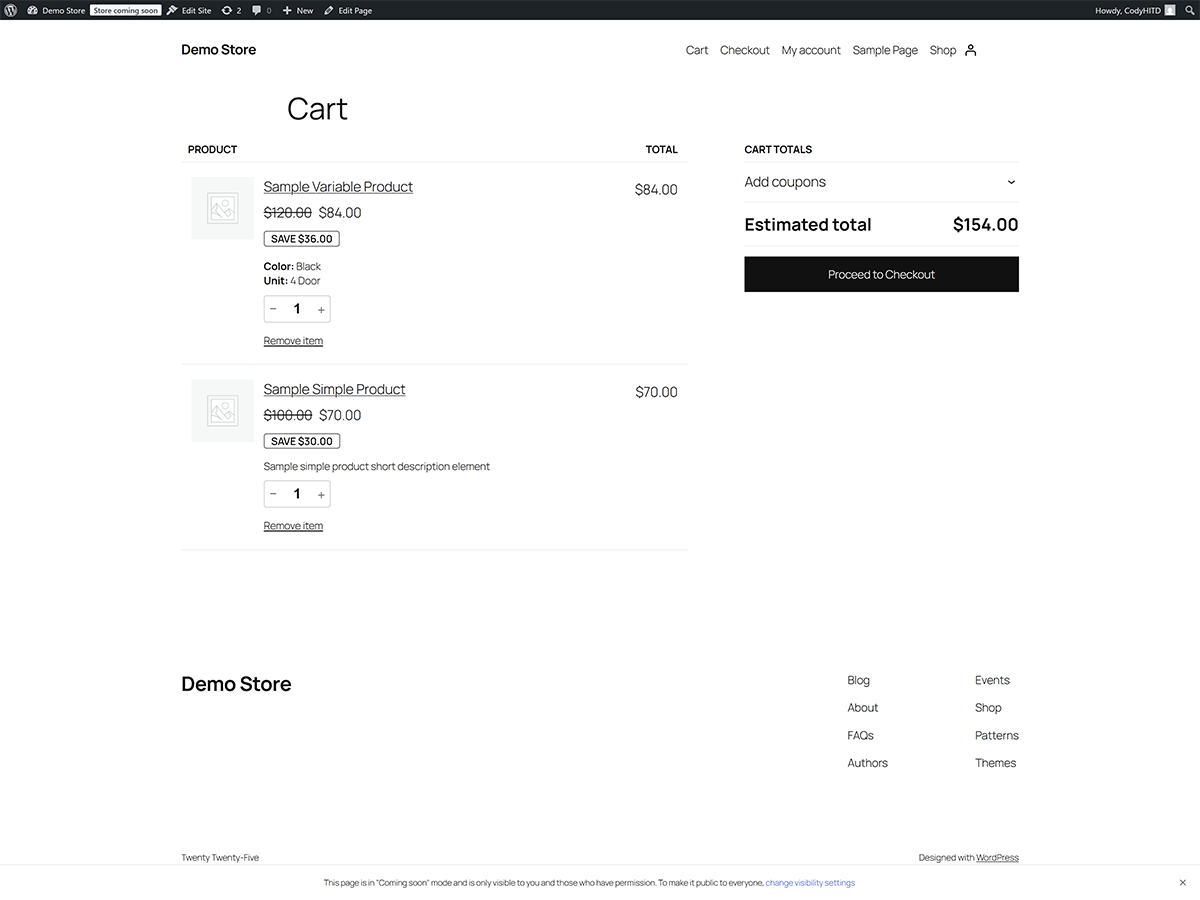
Cart Page - Cart totals reflecting role-based discounts
Changelog
1.0.0
- Initial release (free)
- Global and product-specific pricing rules
- Create up to 3 custom user roles
- Advanced caching system with automatic optimization
- WooCommerce HPOS compatibility
- Multisite compatible
- Zero external dependencies