

Media Expirator
Media Expirator plugin allows users to set expiration dates for media library items.
Plugin info
Maintenance & Compatibility
Maintenance score
Possibly abandoned • Last updated 3818 days ago • 1 reviews
Is Media Expirator abandoned?
Possibly abandoned (last update 3818 days ago).
Compatibility
Similar & Alternatives
Explore plugins with similar tags, and compare key metrics like downloads, ratings, updates, support, and WP/PHP compatibility.
Description
The Media Expirator plugin allows users to set expiration dates for media library items. When the date is reached, the file will be automatically delete from the media library.
User can enable/disable expiration date for each media items directly in media editor.
This plugin is translatable.
Note
How to:
Enable/Disable and set an expiration date for each items directly in WordPress media editor.
Goals:
√ add enable/disable option
√ plugin translatable
√ add translations
• create option page
• enable time
• time zone option
• media types option
• optimize code
• ..add other ideas
Installation
This section describes how to install the plugin and get it working.
Media Expirator can be found and installed via the Plugin menu within WordPress administration. Alternatively, it can be downloaded and installed manually…
- Unzip the plugin contents to the /wp-content/plugins/peakweb-media-expirator/ directory
- Activate the plugin through the ‘Plugins’ menu in WordPress.
- That’s all.
Frequently Asked Questions
A question that someone might have
An answer to that question.
Review feed
It works!
Screenshots
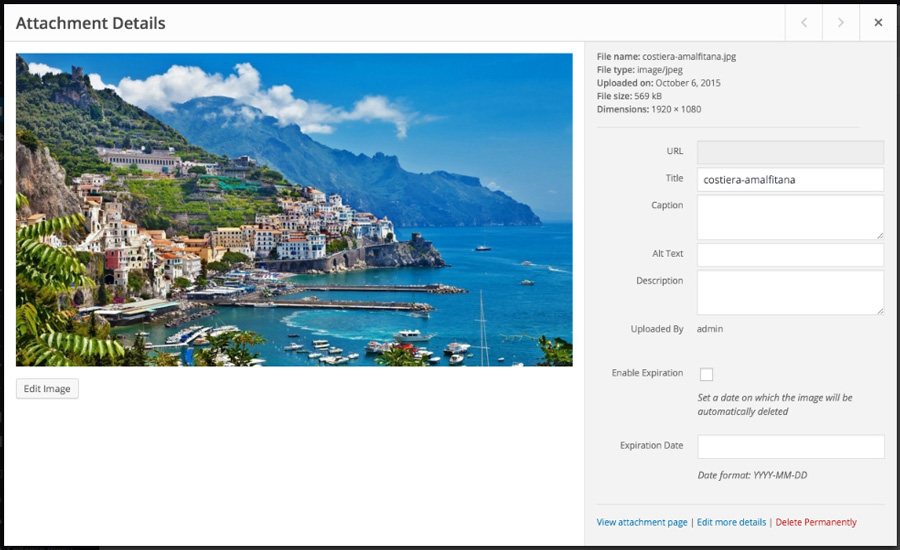
Media editor with Media Expirator plugin.

Focus on Media Expirator options.
Changelog
0.1
- Initial Release
0.2
- Add .pot file
- Add Italian translation