

Simple Post Expiration
A simple plugin that allows you to set an expiration date on posts. Once a post is expired, "Expired" will be prefixed to the post title.
Plugin info
Maintenance & Compatibility
Maintenance score
Possibly abandoned • Last updated 3461 days ago • 7 reviews
Is Simple Post Expiration abandoned?
Possibly abandoned (last update 3461 days ago).
Compatibility
Languages
Similar & Alternatives
Explore plugins with similar tags, and compare key metrics like downloads, ratings, updates, support, and WP/PHP compatibility.
Description
A simple plugin that allows you to set an expiration date on posts. Once a post is expired, “Expired” will be prefixed to the post title.
You can show the expiration status of a post using the [expires] short code.
The [expires] short code accepts 5 optional parameters:
-
expires_on – The text to be shown when a post has not yet expired. Default:
This item expires on: %s -
expired – The text to be shown when a post is expired. Default:
This item expired on: %s -
date_format – The format the expiration date should be displayed in
-
class – The class or classes given to the DIV element
-
id – The ID given to the DIV element
The %s will be replaced with the expiration date.
Have you found a bug or have a suggestion or improvement you’d like to submit? This plugin is available on Github and pull requests are welcome!
Installation
- Activate the plugin
- Go to Settings > Reading and set the expired prefix
- Add an expiration date to any post item that you wish to expire at a certain point in time
- Optionally add the [expires] short code to the post content
Frequently Asked Questions
Review feed
Screenshots
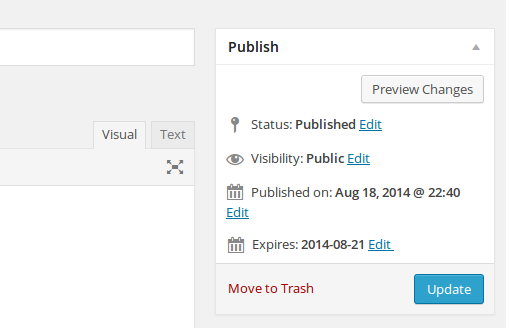
Metabox added to each post / custom post type

Metabox with calendar showing

Expired post with modified title

Expired / Expiring Posts widget
Changelog
1.0.1
- Fix: Notice with PHP 7
- New: Translation files for pt_PT
1.0
- First release!