

Menu Visibility Control
Easily control who can see each WordPress menu item — everyone, logged-in users, logged-out users, or specific user roles.
Plugin info
Maintenance & Compatibility
Maintenance score
Maintained • Last updated 117 days ago • 1 reviews
Is Menu Visibility Control abandoned?
Likely maintained (last update 117 days ago).
Compatibility
Similar & Alternatives
Explore plugins with similar tags, and compare key metrics like downloads, ratings, updates, support, and WP/PHP compatibility.
Description
Menu Visibility Control is a lightweight and reliable WordPress plugin that lets you manage menu visibility based on login status or user roles — directly inside the menu editor.
Choose who sees each menu item:
* 👥 Everyone
* 🔒 Logged-in users only
* 🚪 Logged-out users only
* 🧩 Specific user roles (Administrator, Editor, Subscriber, etc.)
No extra pages, no complicated setup — just open Appearance Menus, edit a menu item, and select the visibility option.
💡 Perfect For
- Membership and community sites
- Client dashboards and intranets
- Multi-role WordPress sites
- Blogs that need different menus for visitors vs. members
🔧 Key Features
- Seamlessly integrates with Appearance Menus
- Works with any theme or page builder using
wp_nav_menu() - Role-based visibility support
- Secure and performance-optimized (nonces, sanitization, minimal footprint)
- 100 % free and open-source
🧠 Why Use It
Unlike heavier plugins, Menu Visibility Control uses core WordPress filters only — keeping your site fast, secure, and fully compatible with caching or multilingual setups.
Support
Need help or want to share feedback?
Visit the support forum or leave a review.
If you love this plugin, consider donating to support ongoing development.
License
This plugin is licensed under the GPL v2 or later.
You are free to use, modify, and redistribute it under the same license.
Installation
- Upload the plugin folder to
/wp-content/plugins/menu-visibility-control/, or install it directly from the WordPress plugin installer. - Activate it through Plugins Installed Plugins.
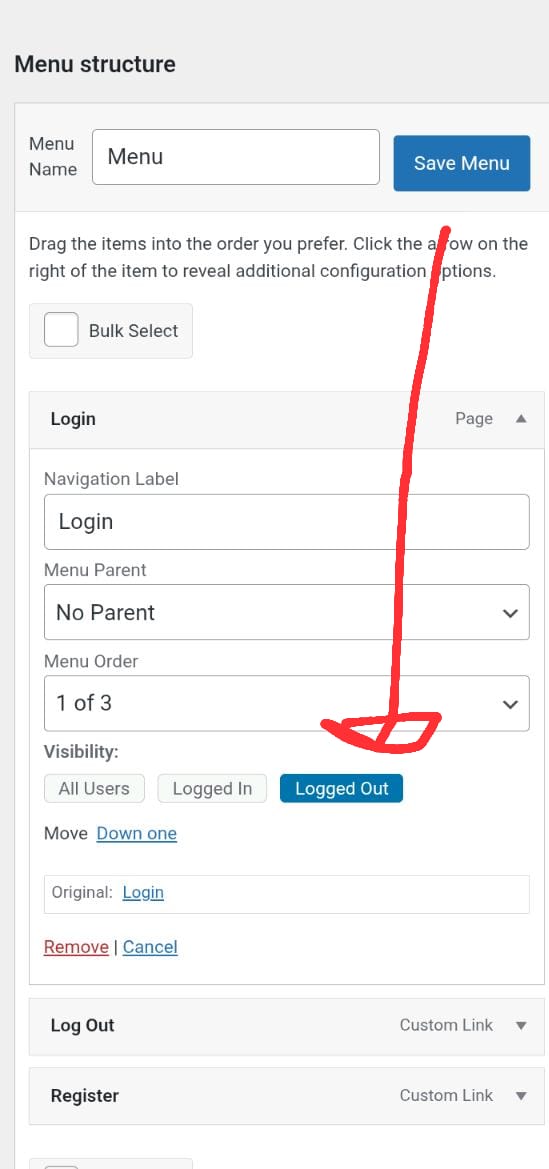
- Go to Appearance Menus, expand a menu item, and set the Visibility dropdown to:
- Everyone
- Logged In Users
- Logged Out Users
- User Roles (then tick which roles can view it)
That’s all — no configuration required.
Frequently Asked Questions
There’s no separate settings page. All visibility controls appear directly in Appearance Menus when editing menu items.
Yes. Choose User Roles as the visibility option, then select the specific roles allowed to see that menu item.
Yes. It works with any properly coded theme or builder that uses WordPress’ native wp_nav_menu() function, including Elementor, Divi, and Block themes.
No. The plugin is extremely lightweight and only runs on menu rendering.
Yes. It’s fully ready for translation using the text domain menu-visibility-control.
Absolutely. It follows WordPress coding standards, uses nonces and sanitization, and stores only simple metadata in each menu item.
Review feed
Screenshots
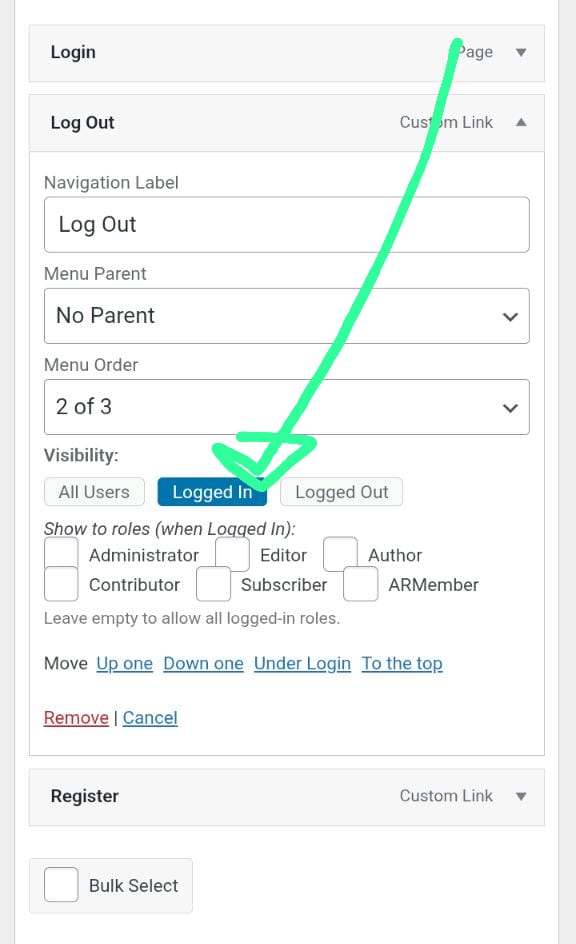
Visibility options in the WordPress menu editor.
Role selection checkboxes for “User Roles.”
Changelog
1.0.3
- Minor performance improvements and code cleanup.
- Confirmed compatibility with WordPress 6.8 and PHP 8+.
- Updated admin notice and translations.
1.0.2
- Added role-based visibility.
- Improved data sanitization and security checks.
1.0.1
- Initial public release.