

Plugin info
Maintenance & Compatibility
Maintenance score
Possibly abandoned • Last updated 3150 days ago
Is MK Table of Contents abandoned?
Possibly abandoned (last update 3150 days ago).
Compatibility
Similar & Alternatives
Explore plugins with similar tags, and compare key metrics like downloads, ratings, updates, support, and WP/PHP compatibility.
Description
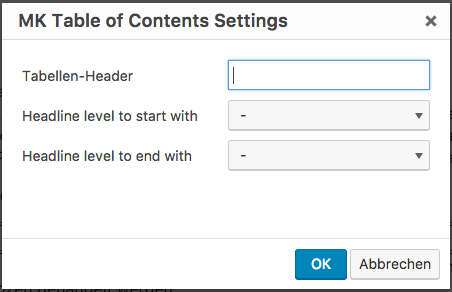
This Plugin adds a TOC to a post via the shortcode [toc]. To enter the shortcode with serveral options, the plugin insert a new button into the TinyMCE with a dialog, which easily allows to configure the [toc]-shortcode.
Look also at http://blog.moritzkanzler.de/portfolio/mk-table-of-contents/ for more informations.
Installation
- Upload the plugin files to the `/wp-content/plugins/mk-toc directory, or install the plugin through the WordPress plugins screen directly.
- Activate the plugin through the ‘Plugins’ screen in WordPress.
- Use the button in the TinyMCE insert a
[toc]-shortcode.
Frequently Asked Questions
Installation Instructions
- Upload the plugin files to the `/wp-content/plugins/mk-toc directory, or install the plugin through the WordPress plugins screen directly.
- Activate the plugin through the ‘Plugins’ screen in WordPress.
- Use the button in the TinyMCE insert a
[toc]-shortcode.
How can I ask the developer any questions?
The easiest way is to open up an issue at the github page for this project: https://github.com/Mo0812/mk-toc
Review feed
Screenshots

Shows an example Table of Contents generated with this plugin. The headings shown here reached from
<h2>to '
Changelog
1.0
- Inital Publishing
1.1
- Updated the plugins author information
2.0
- added clean shortcode output from tinymce when not all options are choosed
2.1
- Support for german language in settings
2.2
- Cleaned Plugin Title in the plugins overview