

By MountDev: Cloudflare Turnstile
Protect your WordPress site from spam and bots with Cloudflare Turnstile - a modern, privacy-friendly CAPTCHA alternative that respects your users.
Plugin info
Maintenance & Compatibility
Maintenance score
Maintained • Last updated 105 days ago
Is By MountDev: Cloudflare Turnstile abandoned?
Likely maintained (last update 105 days ago).
Compatibility
Similar & Alternatives
Explore plugins with similar tags, and compare key metrics like downloads, ratings, updates, support, and WP/PHP compatibility.
Description
Tired of annoying CAPTCHAs that frustrate your visitors? Say goodbye to distorted text puzzles and hello to Cloudflare Turnstile – the next-generation CAPTCHA solution that protects your WordPress site without compromising user experience.
By MountDev: Cloudflare Turnstile brings enterprise-grade bot protection to your WordPress site with zero hassle. Powered by Cloudflare’s cutting-edge Turnstile technology, this plugin seamlessly integrates with your existing forms to stop spam, prevent automated attacks, and protect your site – all while keeping your legitimate users happy.
Why Choose Cloudflare Turnstile?
Better User Experience
Unlike traditional CAPTCHAs that force users to decipher distorted text or identify traffic lights, Cloudflare Turnstile works invisibly in the background. Most legitimate users won’t even notice it’s there – they’ll just submit their forms and move on. No more frustrated visitors abandoning your registration or checkout process.
Privacy-First Approach
Cloudflare Turnstile is built with privacy in mind. It doesn’t track users across sites or collect unnecessary personal data. Your visitors’ privacy is respected, and you stay compliant with modern privacy regulations.
Lightweight & Fast
This plugin is optimized for performance. It won’t slow down your site or add bloat to your WordPress installation. The Turnstile widget loads efficiently, and you have full control over script loading behavior to optimize for your specific needs.
Enterprise Security, Free to Use
Leverage the same powerful bot detection technology that protects millions of websites worldwide. Cloudflare’s advanced algorithms analyze visitor behavior to distinguish between humans and bots – and it’s completely free for most use cases.
Perfect for Every WordPress Site
Whether you’re running a simple blog, a membership site, an online store, or a complex multi-site network, this plugin has you covered. It integrates seamlessly with WordPress core forms and extends support to popular plugins like WooCommerce, Contact Form 7, Elementor Pro, and Fluent Forms.
E-commerce Protection
Protect your WooCommerce store from fake registrations, fraudulent checkouts, and spam orders. Enable Turnstile on login, registration, password reset, checkout, and pay-for-order forms. You can even configure it to only appear for guest checkouts, keeping the experience smooth for your registered customers.
Form Builder Integration
Using Contact Form 7, Elementor Pro Forms, or Fluent Forms? No problem. Enable Turnstile across all your forms with a single click, or selectively protect specific forms. You have complete control over where and how protection is applied.
Multisite Ready
Managing a WordPress Multisite network? This plugin is fully compatible and can be configured independently for each site in your network.
Supported Forms
WordPress Core
- Login Form
- Registration Form
- Password Reset Form
- Comment Form
WooCommerce
- Login Form
- Registration Form
- Password Reset Form
- Checkout Form
- Pay for Order Form
Third-Party Form Plugins
- Contact Form 7 (all forms or specific forms via shortcode)
- Elementor Pro Forms (all forms)
- Fluent Forms (all forms with option to exclude specific form IDs)
Additional Features
- Fully compatible with WordPress Multisite environments
- Customizable widget positioning for different form types
- Guest checkout only option for WooCommerce
Powerful Features, Simple Configuration
-
Visual Customization – Choose between light, dark, and auto themes to perfectly match your site’s design aesthetic. The widget blends seamlessly into your forms.
-
Global Language Support – Set the preferred display language for the Turnstile widget to match your audience. Provide a localized experience for your international visitors.
-
Flexible Appearance Modes – Configure the widget to always be visible, or use managed/non-interactive modes where it only appears when suspicious activity is detected. Balance security with user experience.
-
Form Submission Control – Enable submit button locking to prevent users from submitting forms until Turnstile validation is complete. Ensure every submission is verified.
-
Branded Error Messages – Customize the error message displayed when validation fails. Maintain your brand voice even in error states and provide helpful guidance to users.
-
Precise Widget Positioning – Control exactly where the Turnstile widget appears on different form types. Place it before or after buttons, within specific form sections, or wherever makes the most sense for your layout.
-
Built-in Credential Testing – Verify your Cloudflare API keys are working correctly with one click. No more guessing if your configuration is correct – get instant confirmation.
-
Performance Optimization – Enable script deferral to optimize page load times. The plugin is designed to be lightweight and won’t bog down your site.
-
Granular Form Control – Enable protection globally across all forms of a certain type, or selectively protect individual forms. You decide the level of security for each form.
-
Guest Checkout Options – For WooCommerce stores, optionally show Turnstile only for guest checkouts while keeping the experience frictionless for logged-in customers.
-
Developer Friendly – Clean, well-documented code that follows WordPress coding standards. Hooks and filters available for advanced customization.
Getting Started
You can have Cloudflare Turnstile protecting your WordPress forms in less than 5 minutes. Here’s how:
Step 1: Get Your Cloudflare Turnstile Keys
Head over to your Cloudflare dashboard and create a free Turnstile site. You’ll receive a Site Key and Secret Key – these are like your plugin’s credentials to communicate with Cloudflare’s verification service. Don’t worry, it’s completely free for most websites.
Step 2: Install and Activate
Install this plugin just like any other WordPress plugin. You can upload it manually or install it directly from the WordPress plugin directory. Activate it, and you’ll be automatically redirected to the settings page.
Step 3: Enter Your Keys
Paste your Site Key and Secret Key into the API Configuration tab. This connects your WordPress site to Cloudflare’s Turnstile service.
Step 4: Choose Your Forms
Navigate to the Integrations tab and select which forms you want to protect. You can enable Turnstile on WordPress login forms, WooCommerce checkout, Contact Form 7 submissions, and more. Enable as many or as few as you need.
Step 5: Customize (Optional)
Visit the General Settings tab to customize the widget’s appearance, language, and behavior. Want a dark theme? Done. Need it in Spanish? No problem. Prefer the widget to only appear when necessary? You got it.
Step 6: Test It
Click the TEST CREDENTIALS button to verify everything is configured correctly. You’ll get instant feedback confirming your setup is working.
Step 7: You’re Protected!
That’s it! Your forms are now protected by enterprise-grade bot detection. Sit back and watch as spam submissions drop to zero while your legitimate users breeze through without frustration.
External Services
This plugin connects to Cloudflare Turnstile, a third-party captcha service, to provide spam protection and bot detection for your WordPress forms.
What the service is and what it is used for
Cloudflare Turnstile is a privacy-friendly captcha alternative that helps protect your website forms from spam submissions and automated bot attacks. It replaces traditional CAPTCHAs with a more user-friendly verification system.
What data is sent and when
- When a user interacts with a protected form, the plugin sends the Turnstile response token to Cloudflare’s verification endpoint (https://challenges.cloudflare.com/turnstile/v0/siteverify) for validation
- The plugin loads Cloudflare’s Turnstile JavaScript API (https://challenges.cloudflare.com/turnstile/v0/api.js) to render the captcha widget
- Data sent includes: the response token, your site’s secret key, and the user’s IP address (as part of the verification process)
- This occurs every time a user submits a form that has Turnstile protection enabled
Service provider information
- Service: Cloudflare Turnstile
- Provider: Cloudflare, Inc.
- Terms of Service: https://www.cloudflare.com/terms/
- Privacy Policy: https://www.cloudflare.com/privacypolicy/
- Turnstile Documentation: https://developers.cloudflare.com/turnstile/
User consent and configuration
By enabling this plugin and configuring Turnstile on your forms, you acknowledge that user interactions with protected forms will be processed by Cloudflare’s service. Users are not required to create accounts or provide personal information beyond what’s necessary for form submission verification.
Installation
- Upload the plugin folder
mountdev-cloudflare-turnstileto the/wp-content/plugins/directory - Activate the plugin from the Plugins menu in your WordPress dashboard
- Navigate to Settings > By MountDev: Cloudflare Turnstile in the WordPress admin panel
- Enter your Site Key and Secret Key from Cloudflare
- Select the forms where you want Turnstile enabled
- Save your changes
- Run the integration test using TEST CREDENTIALS to confirm everything is functioning
Frequently Asked Questions
Cloudflare Turnstile is a smart, privacy-friendly CAPTCHA alternative developed by Cloudflare – one of the world’s largest internet security companies. Unlike traditional CAPTCHAs that make users solve puzzles or identify objects in images, Turnstile works invisibly in the background using advanced algorithms to detect bots. Most legitimate users won’t even see a challenge – they’ll just submit their forms normally. It’s faster, more user-friendly, and more privacy-conscious than traditional CAPTCHA solutions.
Yes, you’ll need a free Cloudflare account to generate the Site Key and Secret Key that this plugin requires. The good news? Creating an account takes just a few minutes, and Cloudflare Turnstile is free for most websites. You don’t need to move your DNS to Cloudflare or use any of their other services – just create an account, generate your Turnstile keys, and you’re ready to go.
Absolutely! This plugin has deep WooCommerce integration. You can protect your WooCommerce login forms, registration forms, password reset forms, checkout pages, and even the pay-for-order page. You have granular control too – for example, you can show Turnstile only for guest checkouts while keeping the experience smooth for logged-in customers. You can also choose exactly where the widget appears on your checkout page to match your store’s layout.
Yes! Contact Form 7 is fully supported. You have two options: enable Turnstile protection on all your Contact Form 7 forms with a single click, or selectively add it to specific forms using the [mountdev-contact-form-7-turnstile] shortcode. This gives you complete flexibility to protect your most important forms while keeping others simple.
Yes! If you’re using Elementor Pro Forms, this plugin integrates seamlessly. You can enable Turnstile on all Elementor forms at once, and you have full control over widget positioning – place it before the submit button, after it, or after the entire form. The plugin follows Elementor’s styling and fits naturally into your designed forms.
Not at all! This plugin is built with performance in mind. The Turnstile script is lightweight and loads asynchronously, so it won’t block your page rendering. You can also enable script deferral for even better performance. The plugin itself adds minimal overhead to your WordPress installation – just a few kilobytes. Most users won’t notice any performance impact whatsoever.
Yes! Cloudflare Turnstile is free for most websites. Cloudflare offers generous free tier limits that cover the vast majority of WordPress sites. Only extremely high-traffic sites might need to consider Cloudflare’s paid plans. For reference, the free tier includes millions of verifications per month – more than enough for most businesses.
Absolutely. You can choose between light, dark, and auto themes to match your site’s design. The widget automatically adapts to your form’s styling and can be positioned exactly where you want it. While you can’t completely redesign the widget (it’s provided by Cloudflare), it’s designed to be unobtrusive and blend into any design.
Yes! This plugin is fully compatible with WordPress Multisite installations. Each site in your network can have its own independent Turnstile configuration, or you can network-activate it and manage settings centrally. Perfect for agencies, universities, or anyone managing multiple WordPress sites.
Cloudflare has an exceptional uptime record (99.99%+), but if their service is temporarily unavailable, you can configure fallback behavior. The plugin includes options to handle service disruptions gracefully, ensuring your forms remain functional even in the unlikely event of a Cloudflare outage.
Yes! There are no licensing restrictions. You can install this plugin on as many websites as you like – your own sites, client sites, or commercial projects. Each site will need its own Cloudflare Turnstile keys (which are free to generate), but there’s no limit to how many sites you can protect.
Complimentary support is limited to issues with this plugin’s installation, settings, documented features, and plugin-related errors. If a problem is caused by Cloudflare, other plugins, themes, custom code, or hosting, we may help identify the source but will not troubleshoot it.
We do not assist with Cloudflare account creation, configuration, or troubleshooting, including Turnstile site/secret keys, DNS, or any Cloudflare settings.
We do not assist with WordPress site troubleshooting or styling. This includes the Turnstile badge and any form styling, layout, CSS, theme or plugin conflicts, or site-wide adjustments.
Review feed
Screenshots
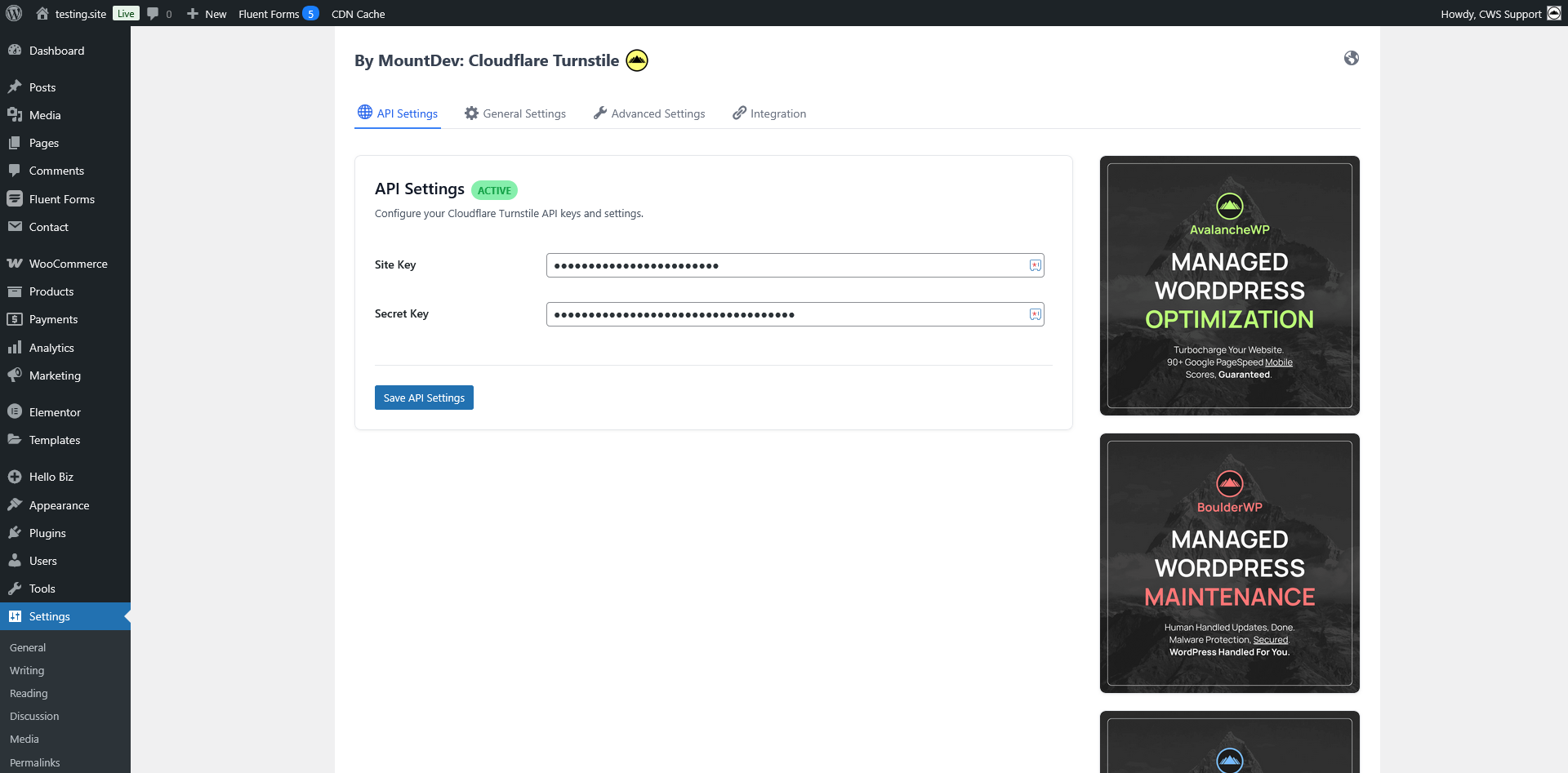
Plugin settings page
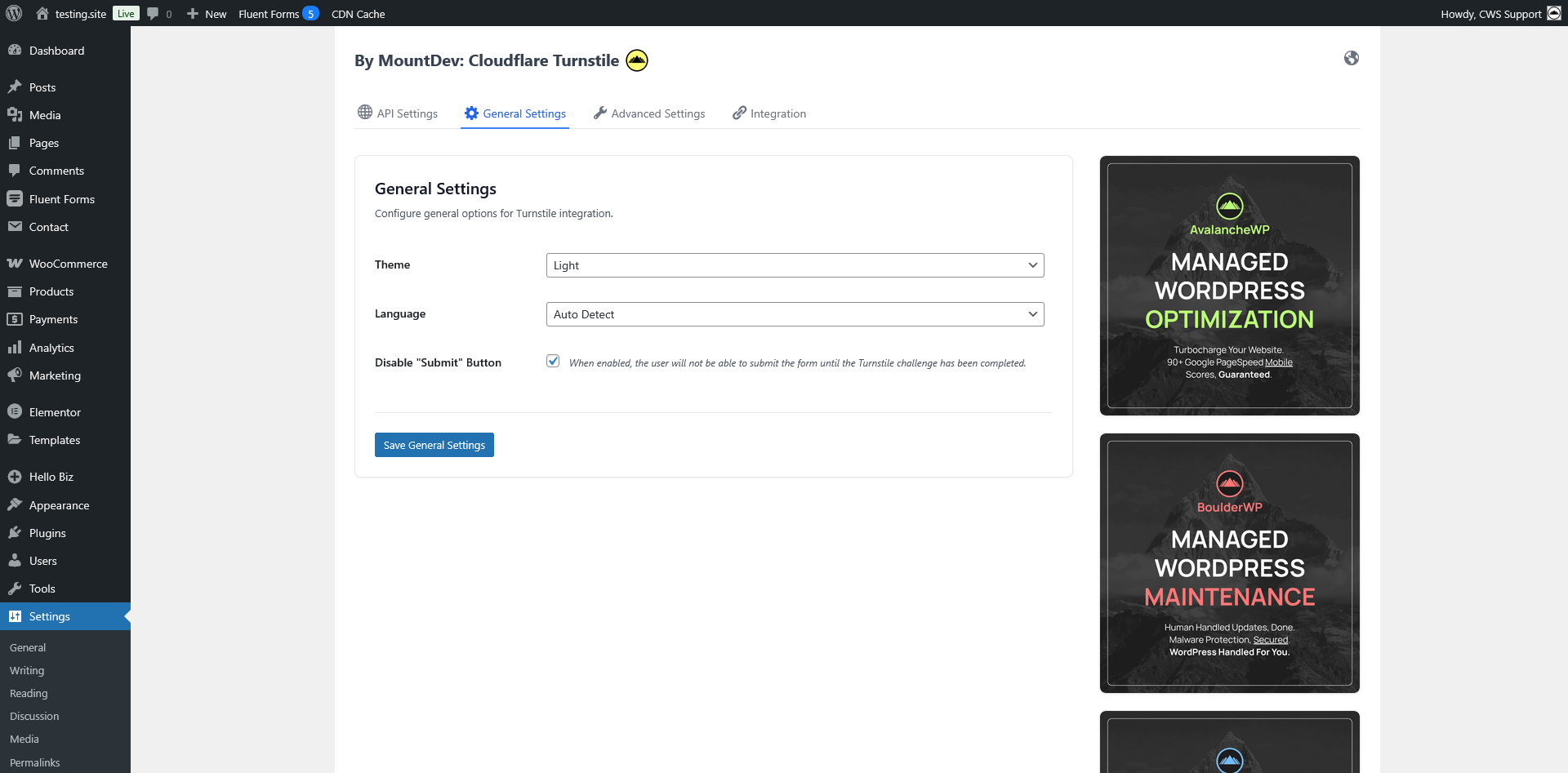
General settings for theme selection, language, and appearance modes
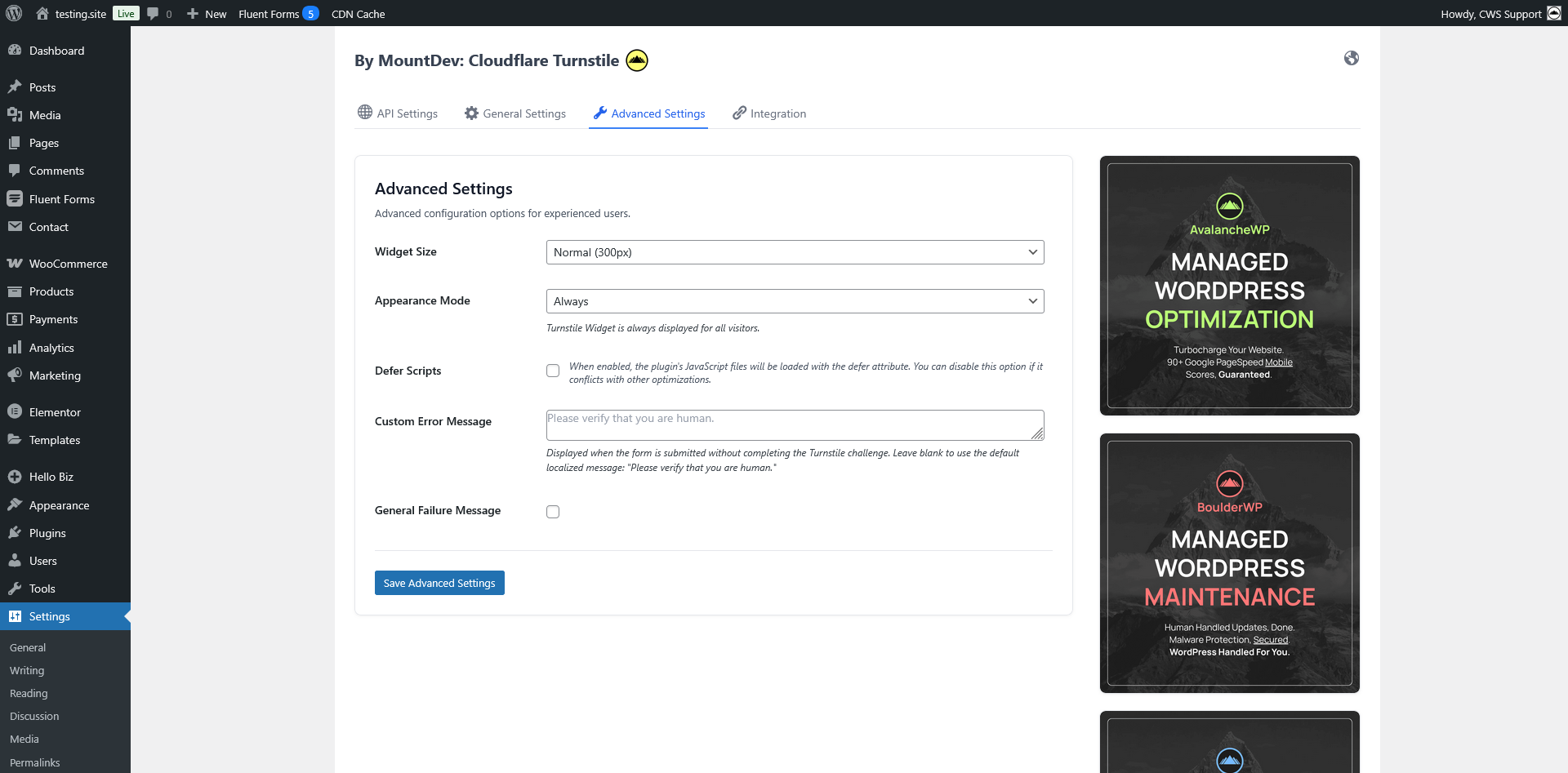
Advanced settings including submit button locking and custom error messages
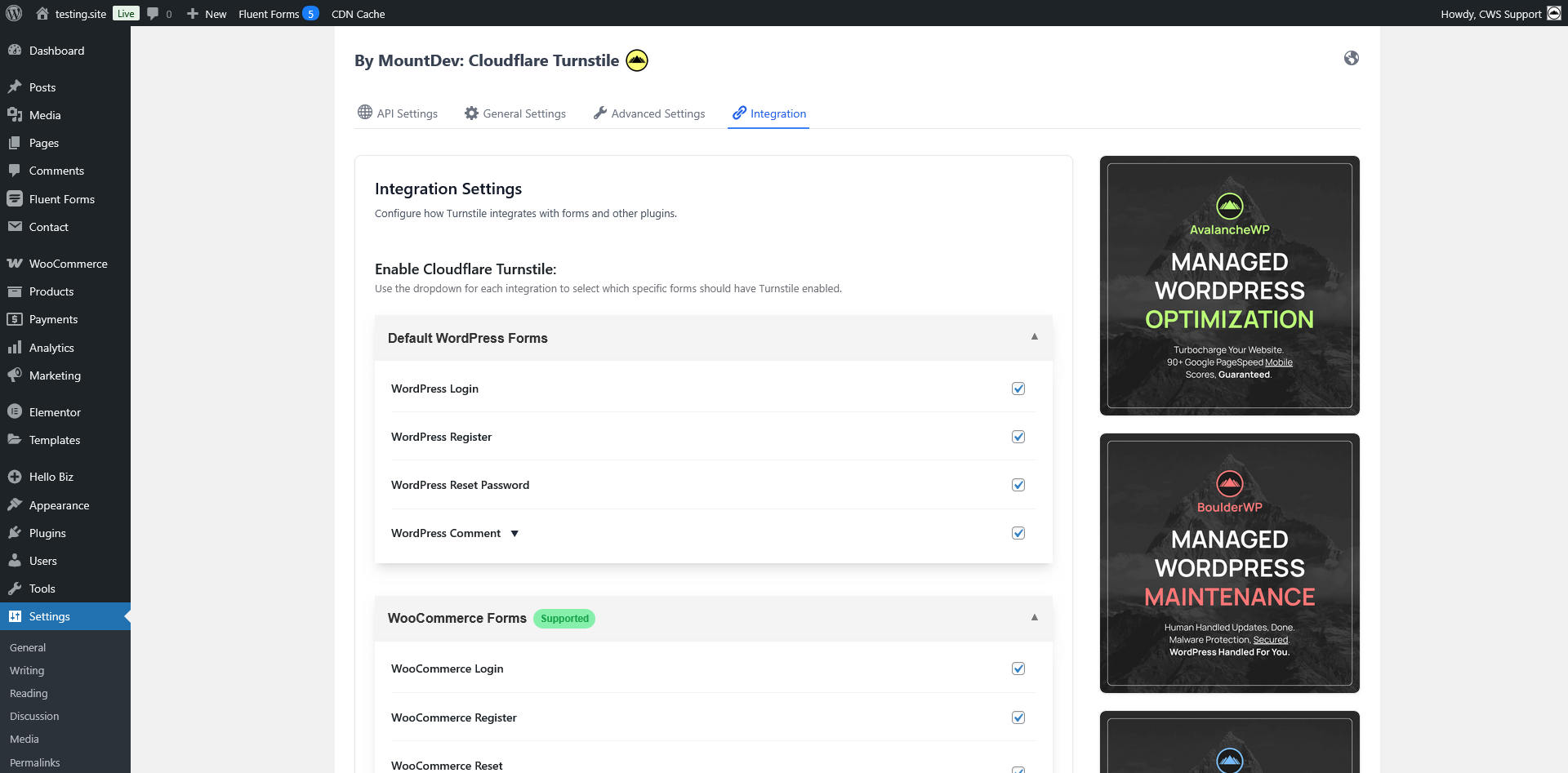
Integration settings showing all supported form types (WordPress, WooCommerce, Contact Form 7, Elementor Pro, Fluent Forms)
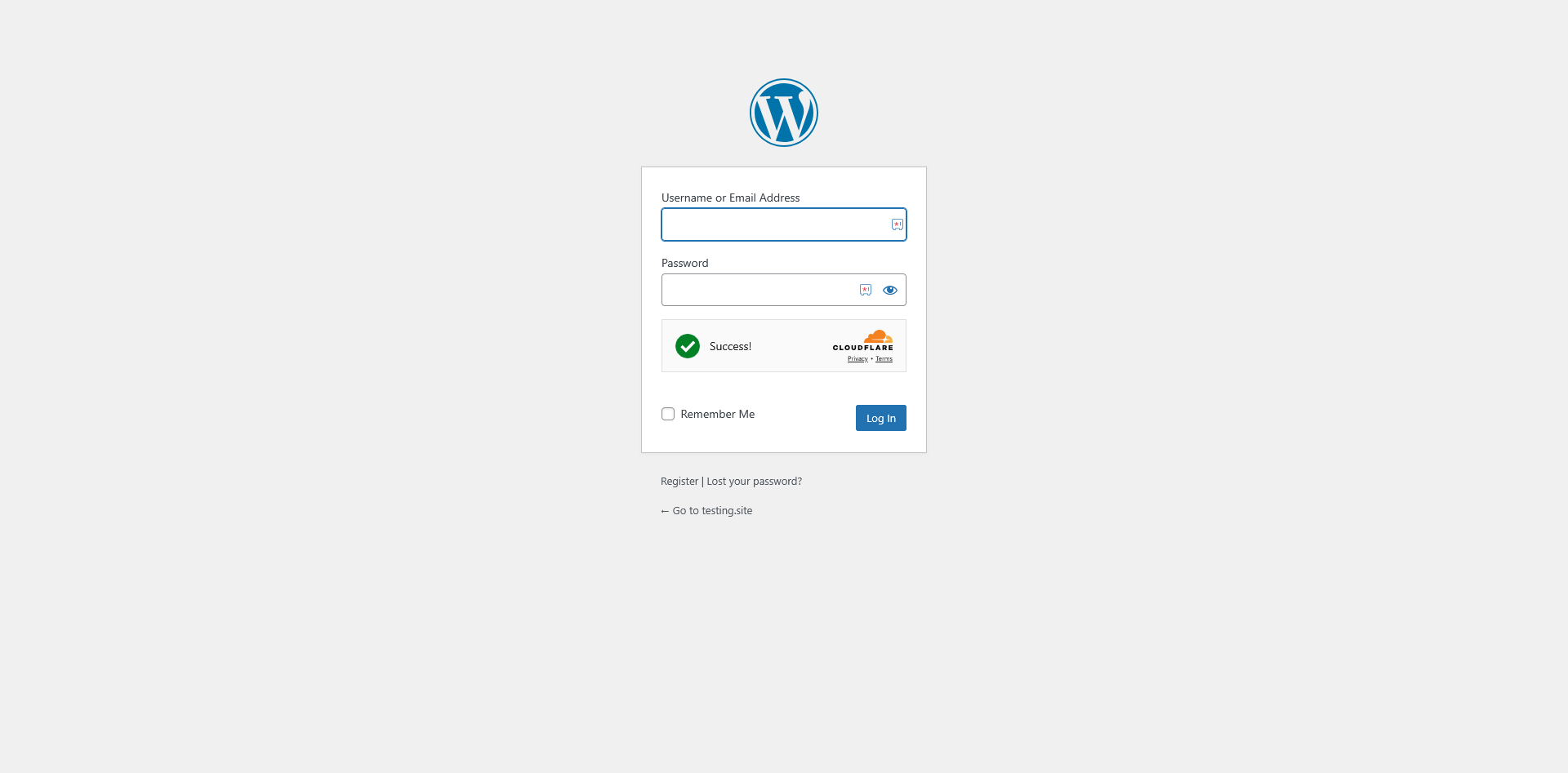
Turnstile widget displayed on WordPress login form
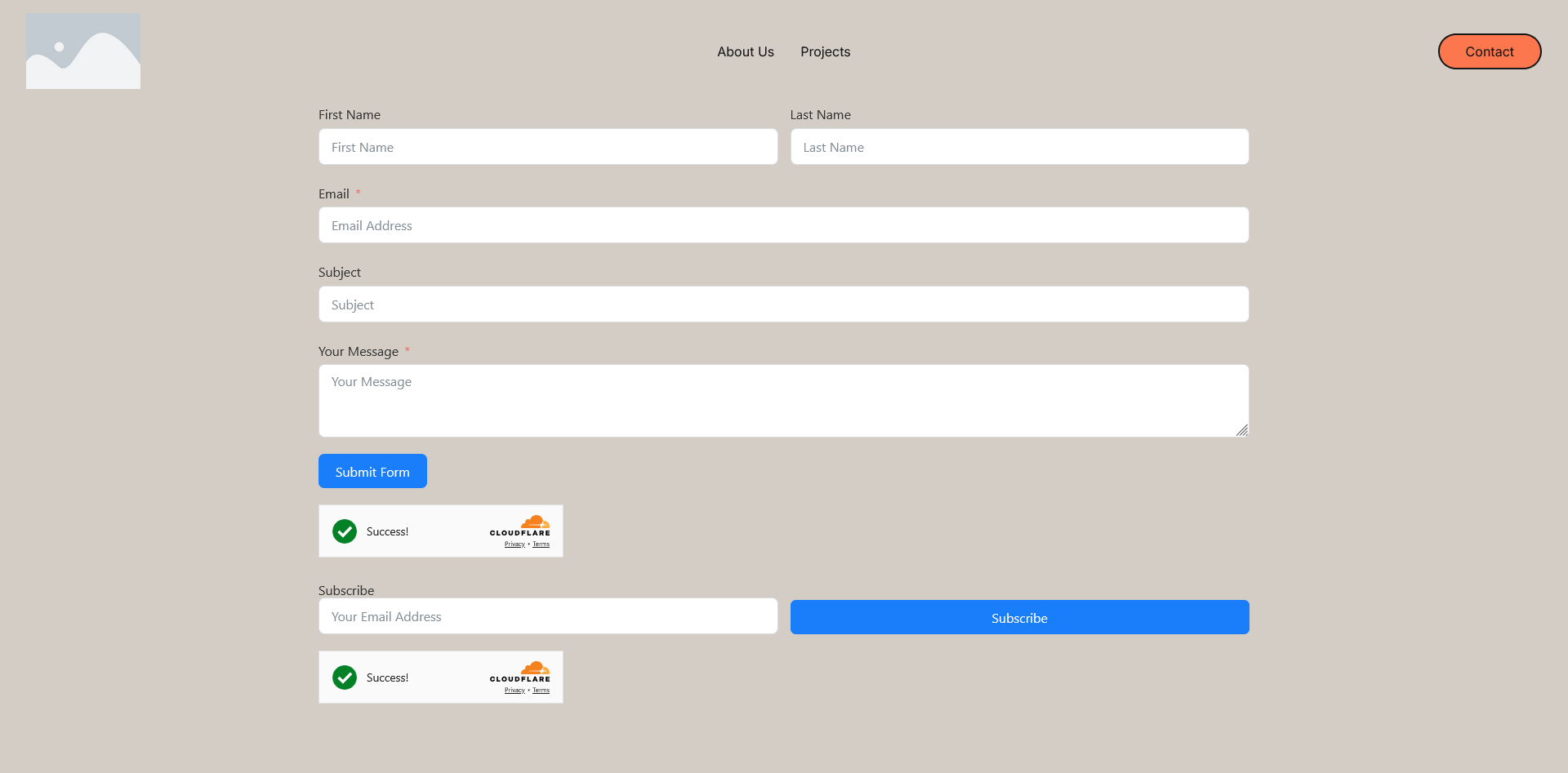
Turnstile widget on Fluent Form page
Changelog
1.0.4 – 2025-11-05
New Features
- WPRemote 2FA Support: Full integration with WPRemote Two-Factor Authentication on WordPress login forms
- Seamless 2FA flow without requiring Turnstile re-verification after 2FA code submission
- Automatic detection and handling of WPRemote 2FA workflow
- Submit button remains enabled when 2FA field appears
- Session-based verification state tracking across multi-step authentication
Bug Fixes
- WordPress Login with 2FA: Fixed “Please verify that you are human” error when submitting 2FA code with WPRemote
- Submit Button State: Fixed submit button remaining disabled after 2FA field appears dynamically
Technical Improvements
- Enhanced frontend JavaScript to detect and handle WPRemote 2FA field structure
- Added MutationObserver to monitor for dynamically appearing 2FA fields
- Improved form submission logic to bypass Turnstile check for 2FA code submissions
- Updated backend to skip Turnstile verification when
twofa_codeparameter is present - Added comprehensive documentation in
docs/WPREMOTE_2FA_SUPPORT.md - Updated all asset versions to 1.0.4 for cache busting
1.0.3 – 2025-10-30
Security Enhancements
- Encrypted Credential Storage: API credentials (Site Key and Secret Key) are now encrypted in the database using AES-256-CBC encryption
- Automatic Migration: Existing installations automatically migrate plain-text credentials to encrypted format on update – no manual action required
- API test status automatically reset after migration to verify encrypted credentials work correctly
- UI Security Improvements: Credentials are no longer visible or copyable from the settings page
- Password fields show masked placeholders (e.g.,
••••••••••1234) - Fields are read-only by default to prevent autofill attacks
- Clear messaging when credentials are securely stored
- Password fields show masked placeholders (e.g.,
- Backward Compatibility: Fully compatible with existing installations – seamless migration for all ~200 existing users
Bug Fixes
- WooCommerce Block Checkout: Fixed “Invalid input for parameter ‘sitekey'” error caused by encrypted credentials being passed directly to Turnstile widget
- Contact Form 7: Fixed site key retrieval to use decrypted credentials
- Elementor Pro Forms: Fixed site key retrieval to use decrypted credentials
- All Integrations: Updated all credential retrieval points to properly decrypt stored credentials
Technical Improvements
- Added
CFTurnstile_Encryptionclass for secure credential management - Added helper functions
mountdev_turnstile_get_site_key()andmountdev_turnstile_get_secret_key()for consistent credential access - Updated all integrations (WooCommerce, Contact Form 7, Fluent Forms, Elementor, WordPress core) to use helper functions
- Encryption keys derived from WordPress salts for unique per-installation security
- Updated asset versions to 1.0.3 for cache busting
1.0.2 – 2025-10-27
Bug Fixes
- WooCommerce Blocks Checkout: Fixed “Please verify that you are human” error on checkout
- WooCommerce Lost Password: Fixed issue where the “Please verify that you are human” error would appear even after successful verification
- Button Disabling: Fixed issue where submit buttons would be disabled even when the “Disable Submit Button” setting was unchecked
- Elementor Integration: Fixed critical JavaScript errors preventing form submissions
- Fixed “Invalid or missing type for parameter ‘sitekey’, expected ‘string’, got ‘object'” error in form re-render functions
- Fixed PHP validation to properly accept alphanumeric Elementor form IDs (previously only accepted numeric IDs)
- Updated callback function references to use proper function objects instead of string names
1.0.1 – 2025-10-22
Bug Fixes & Improvements
- Fixed: Admin test credentials button now always enabled and functional – you can re-test your API keys at any time
- Fixed: WooCommerce block-based checkout Turnstile verification now works correctly with improved error handling
- Improved: Enhanced Cloudflare API response validation to prevent processing invalid responses
- Improved: Better error handling for network communication failures with Cloudflare’s service
- Code Quality: Stricter type checking and validation throughout verification functions
1.0.0 – 2025-10-21
Initial Release – Welcome to Cloudflare Turnstile for WordPress!
We’re excited to bring enterprise-grade bot protection to WordPress with this first release. Here’s everything included:
Core WordPress Integration
* Full support for WordPress login forms – protect your admin area from brute force attacks
* Registration form protection – stop fake account creation and spam registrations
* Password reset form security – prevent automated password reset abuse
* Comment form spam prevention – say goodbye to comment spam forever
WooCommerce E-commerce Protection
* WooCommerce login and registration forms – protect your customer accounts
* Password reset security for WooCommerce accounts
* Checkout form protection – stop fraudulent orders and fake transactions
* Pay for Order page security – protect payment processing pages
* Guest checkout options – show Turnstile only for guests, not logged-in customers
* Flexible widget positioning for checkout pages
Third-Party Form Plugins
* Contact Form 7 – Enable globally or use shortcode for specific forms
* Elementor Pro Forms – Full integration with customizable positioning
* Fluent Forms – Protect all forms with option to exclude specific form IDs
Customization & Control
* Three visual themes (light, dark, auto) to match any design
* Multi-language support for global audiences
* Flexible appearance modes (always visible, managed, non-interactive)
* Customizable widget positioning for each form type
* Custom error messages to maintain your brand voice
* Submit button locking for enhanced security
Performance & Testing
* Lightweight, optimized code that won’t slow down your site
* Script deferral options for improved page load times
* Built-in credential testing – verify your setup with one click
* Clean, well-documented code following WordPress standards
Enterprise Features
* WordPress Multisite compatibility
* Developer-friendly with hooks and filters
* Granular control over which forms to protect
* Automatic redirect to settings on activation