

Multilingual Contact Form 7 with Polylang
Enables string translation and use of the same forms in different languages of Contact Form 7 forms with Polylang
Plugin info
Maintenance & Compatibility
Maintenance score
Stale • Last updated 344 days ago • Support resolved 0% • 17 reviews
Is Multilingual Contact Form 7 with Polylang abandoned?
Likely maintained (last update 344 days ago).
Compatibility
Developers
Languages
Similar & Alternatives
Explore plugins with similar tags, and compare key metrics like downloads, ratings, updates, support, and WP/PHP compatibility.
Description
This plugin makes it possible to use Contact Form 7 forms on multilingual pages by using Polylang and its string translations.
Other than existing solutions you don´t have to create a form for each language, but you can use one single CF7 form for all languages.
How does it work?
With this plugin active, you can setup translatable placeholders in your forms, emails and form messages.
The placeholders are using curly braces, like this: {Text to translate}.
When these are setup, you can then translate the strings in Languages > String translations, filter for “Contact Form 7”
Translate form messages
This plugin gives you two ways of translating the form messages.
The simple way: You only have to make sure the form messages are all set to the english default values. Then they are automatically translated via the normal plugin language pack.
You may have to update your WordPress language packs after setting up your languages in Polylang.
The custom way: Set the strings (or part of strings) you want to have translated in curly braces and they will appear in the Polylang string translations where you can translate them.
Installation
- Upload the zip to the
/wp-content/plugins/directory - Activate the plugin through the ‘Plugins’ menu in WordPress
- You also need the plugins [Contact Form 7] (https://wordpress.org/plugins/contact-form-7/) and [Polylang] (https://wordpress.org/plugins/polylang/)
- Create a from and add the strings that have to be translated in curly braces, e.g. {Your Message}
- Translate the strings in Polylang via Languages > String translations, filter for “Contact Form 7”
- Create a page for the form for every of your website´s languages and add the same form to all of them
Frequently Asked Questions
Make sure the form messages are set to their english default values (which might not be the case if the general UI language is different to english).
Also make sure the Contact Form language packs for all your site´s languages are installed.
Alternatively you can add curly braces around the message texts, so they are translatable via the Polylang string translations
Just go to the support forums and kindly ask for it, then we´ll see what we can do. Thank you!
Review feed
Great plugin
Super Helpful!
Easy and functional
Screenshots
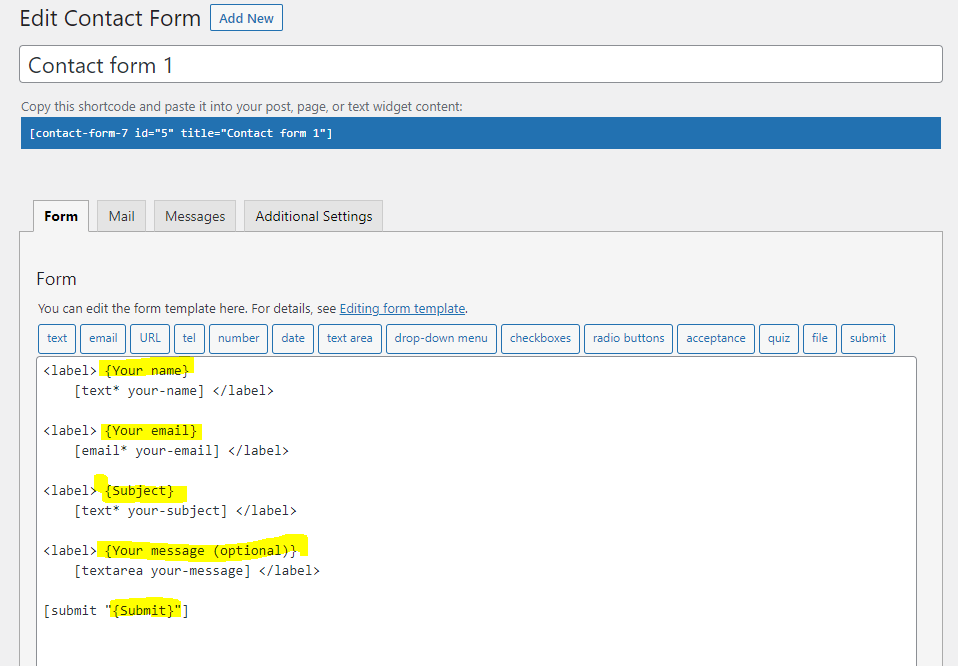
Make strings translatable by putting them into curly braces
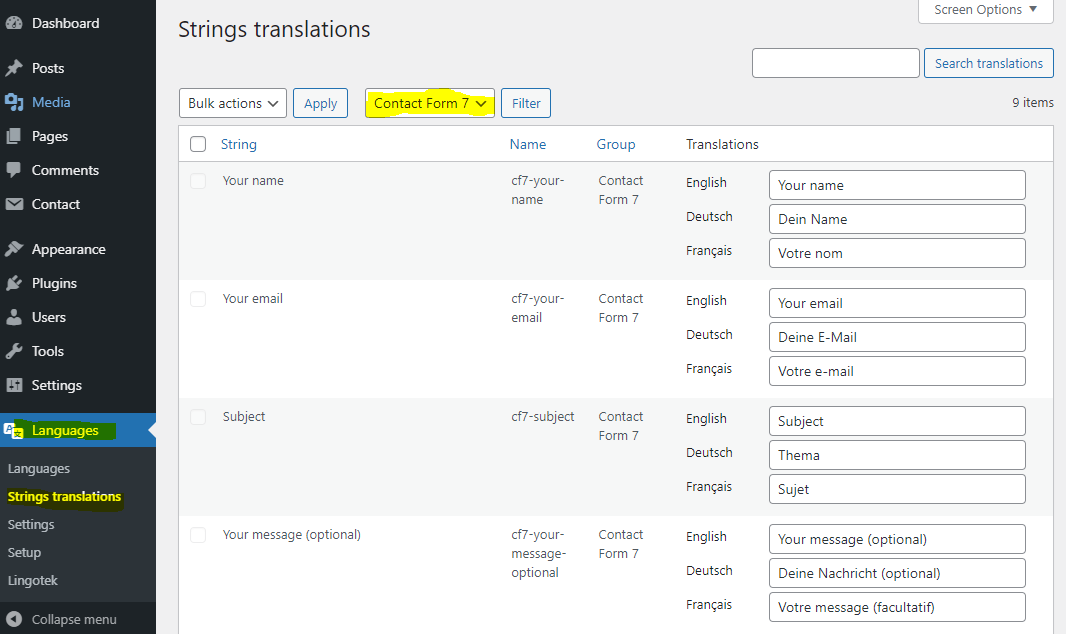
Translate strings in the Polylang String translations
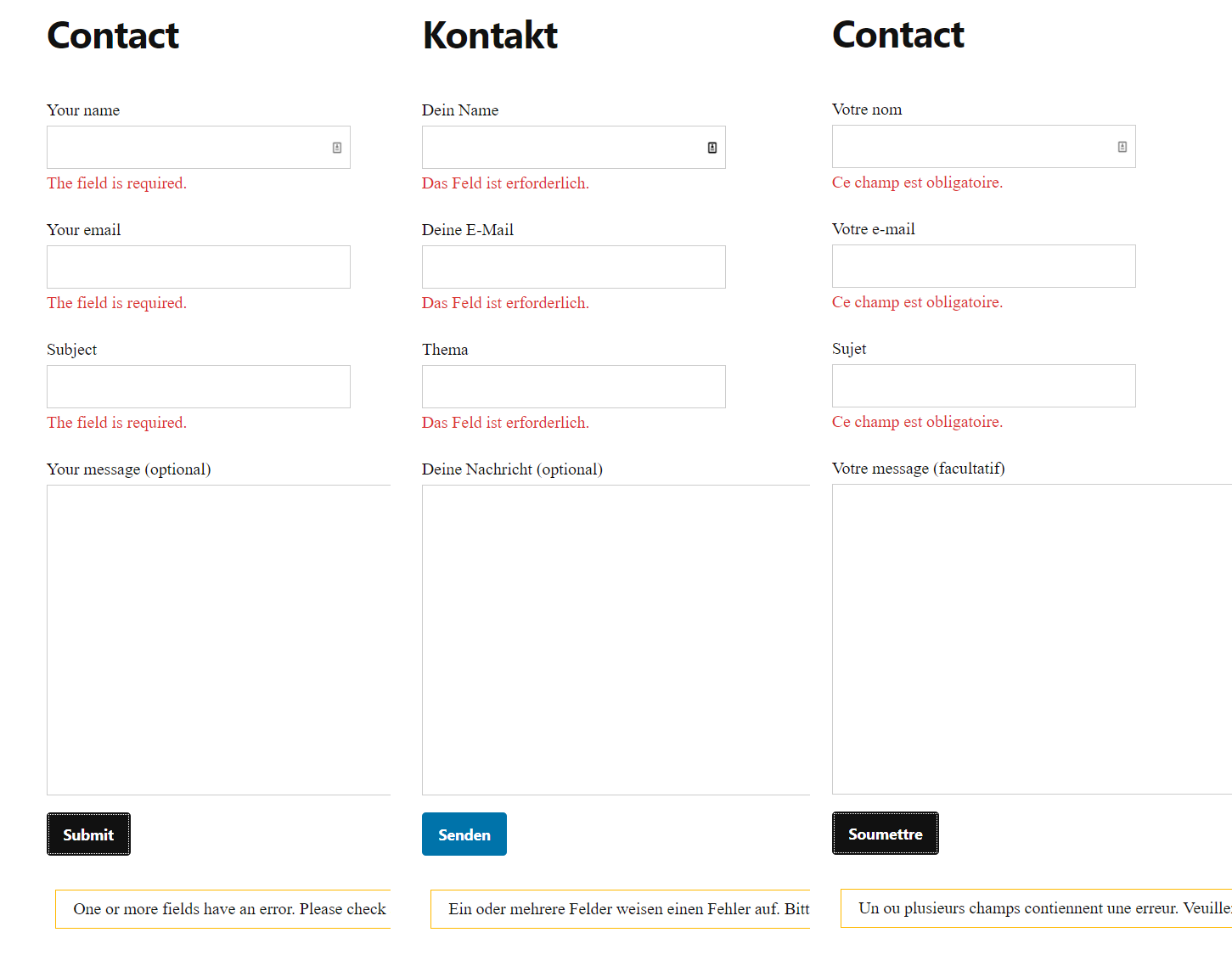
Example contact form in different languages
Changelog
1.0.12
- fix warning notice that _load_textdomain_just_in_time was called too early
1.0.11
- implement detection of untranslatable custom message strings
- implement feature to reset message strings
- improve detection of current language in AJAX form submit
1.0.10
- fix issue with mb_stripos(), see https://wordpress.org/support/topic/critical-error-with-last-update/#post-17711176
1.0.9
- fix issue with translated select and multi checkbox fields, see https://wordpress.org/support/topic/conflict-with-contact-form-7-validations/
1.0.8
- fix critical error caused by changed and removed functions in polylang
1.0.7
- fix critical error caused by incompatibility with https://wordpress.org/plugins/drag-and-drop-multiple-file-upload-contact-form-7/
1.0.6
- fix critical error
1.0.5
- make ajax response fix optional
1.0.4
- fix fatal errors when polylang is not active
- fix strings with special characters not being translated
- fix pipes feature for select, checkbox, radio
1.0.3
- fix ajax response messages not being translated
1.0.2
- fix issue of strings needing a second reload after language change to be displayed correctly
- fix form lang attribute to be set to current locale
1.0.1
- remove test setting
1.0.0
- Initial release