

Multilingual Text
With this plugin you can have a text in multiple languages. Easy to use, no requirements.
Plugin info
Maintenance & Compatibility
Maintenance score
Possibly abandoned • Last updated 5308 days ago
Is Multilingual Text abandoned?
Possibly abandoned (last update 5308 days ago).
Compatibility
Similar & Alternatives
Explore plugins with similar tags, and compare key metrics like downloads, ratings, updates, support, and WP/PHP compatibility.
Description
Just tag parts of your text to be in different languages, and a flag will appear next to the text and allows users to switch between them.
No other elements of the blog will be translated.
Use [:gb] to specify that the following text part is english, or use any other two char language code.
To use one text block in multiple languages use e.g. [:gb,de], which is handy for parts like images.
Write [:*] to use the block in all (within the text already known) languages.
You can without any problem mix many of those tags. e.g. [:gb]english-intro[:de]german-intro[:*]common image[...].
Optionally also the title of a text can be multilingual, but requires theme modification.
The flags can be placed:
- next to the text. This is the default and do work out of the box.
- next to the title. This requires a template change.
- an other place. If you would like to place e.g. the flags in a widget (which is included).
Thanks
Thanks to:
- zorun for the flags
- Tamas, Anton for beta testing
Contributing
You may overwork the readme and also the other texts… that would be great.
If you have ideas/bugs please contact me.
Code
The package also contains an version for PHP5.3+. The file is functional identical to the other one (which only requires PHP 5.2) but makes usage of a nice new feature and is easier to read/write.
When WordPress requires PHP5.3+ (sometime in the future) that file will be used.
Flags
The flags are from http://www.free-country-flags.com/ and under CC-BY-SA License (http://creativecommons.org/licenses/by-sa/3.0/).
Installation
Requirements:
- WordPress 2.7+
- PHP 5.2+
Installation:
- Use the ‘Plugins/Add New’, or extract the archive into the
/wp-content/plugins/directory - Activate the plugin through the ‘Plugins’ menu in WordPress
- See the configuration in the ‘Settings/General’ menu
Flags (optional):
- Use the flags in ‘/wp-content/plugins/multilingual-text/flags/’ or create a new directory, place your flags there, and specify it in the config (it’s not recommended to place your flags in the plugin’s directory because those will be overwritten on update)
Theme Modifications (optional):
- Flags on title: place a
<?php Multilingual_Text::Flags(); ?>in front of the title, or where you like to have the flags - Multilingual title: replace the
<?php the_title(); ?>with<?php Multilingual_Text::Title(); ?>, this can’t be done automatically because some titles (like the<title>or other<meta>elements) do not support switching
Widget (optional):
- You can place a widget to switch between the languages, in this case you can disable the flags on text/title. You have to enter the name of all languages which will be showed.
Custom usage:
- I you want to use the Multilingual-Text Engine for your own text, you can do so.
Multilingual_Text::Parse(string $text [, bool $with_flags = true [, bool $with_text = true ]] )will parse the text (ml-style) and returns the generated code.- With the two options
$with_flagsand$with_textyou can control wether flags and/or text will be returned. - The generated code will only be returned, so you have to
echoit – or process it anyway.
Frequently Asked Questions
What language will be displayed?
The first matching will be picked:
- If the user was (within the last year) on the site, a cookie has been set and the preferred language of that user is shown
- The preferred languages supplied by the browser will be used
- The default language you specified
In which language are the Feeds
In the system default language.
What about bots?
Bots (everything with a “bot” in the user agent) will see a different page:
- Cookies and preferred browser languages will not take place
- On a post page all texts are visible
- On other pages (like home, archive, …) only the system default language will be used
Maybe this is not perfect, please mail me if you know a better way.
Review feed
Screenshots
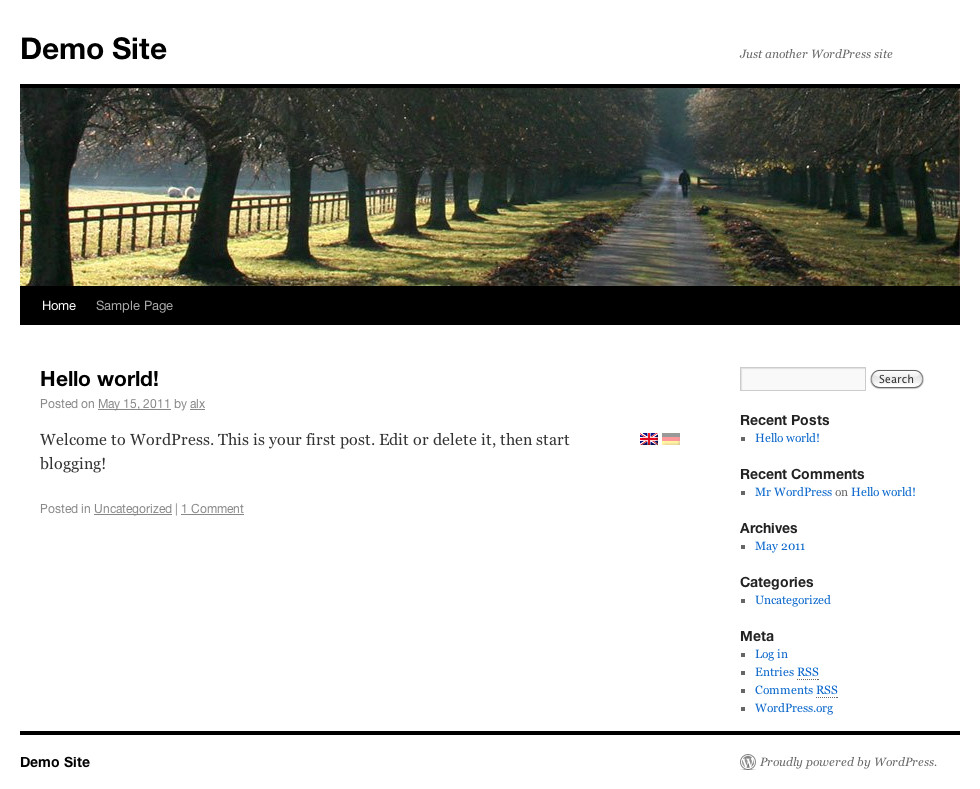
How a blog looks like

How you write a text
Changelog
1.4
- Added custom usage
- Small fixes
1.3
- Fixed an bug where the language selection was dropped
- Added “[:*]” to write for all languages
1.2
- Added a “Settings” Link to the plugin page
- Added many flags
1.1
- Added support for PHP 5.2
- Fixed a few flaws
1.0
- Initial release.