

n8n Chat Widget
Adds a customizable n8n chat widget to your website frontend. It allows visitors to interact with n8n chat workflows directly from your website throug …
Plugin info
Maintenance & Compatibility
Maintenance score
Stale • Last updated 288 days ago • 1 reviews
Is n8n Chat Widget abandoned?
Likely maintained (last update 288 days ago).
Compatibility
Similar & Alternatives
Explore plugins with similar tags, and compare key metrics like downloads, ratings, updates, support, and WP/PHP compatibility.
Description
This plugin adds a customizable n8n chat widget to your website frontend. It allows visitors to interact with n8n chat workflows directly from your website through a popup interface.
Features
- Easily integrate n8n chat workflows into your website
- Customizable chat widget appearance:
- Choose the widget position (left or right)
- Set custom widget title
- Change the primary color
- Select custom emoji icon or upload SVG icon
- Adjust content zoom level (50% – 150%)
- Mobile-responsive design
- Smooth animations
- Lightweight implementation
Requirements
- WordPress 5.0 or higher
- n8n with an existing chat workflow
Configuration
- n8n Chat URL: Enter the full URL of your n8n chat webhook (e.g.,
https://n8n.example.com/webhook/your-chat-id/chat) - Enable Chat Widget: Toggle to enable or disable the chat widget on your website
- Widget Position: Choose between right or left side positioning
- Chat Widget Title: Set the title that appears in the chat header
- Widget Color: Select a custom color for the widget button and header
- Chat Icon: Choose an emoji or upload an SVG icon for the chat button
- Chat Content Zoom: Adjust the zoom level of the chat content
External Services
This plugin connects to an external service (n8n) to provide chat functionality:
n8n Chat Service
- What is it?: n8n is a workflow automation platform that can be configured to provide AI-powered chat functionality.
- What data is sent: When a user interacts with the chat widget, their messages are sent to your n8n instance via the webhook URL you provide in the settings.
- When data is sent: Data is only sent when a user actively engages with the chat widget by opening it and sending messages.
- Terms and Privacy: This plugin requires you to have your own n8n instance or use n8n Cloud. For more information about n8n’s terms and privacy policy, please visit:
Note: You are responsible for ensuring that your use of n8n complies with all applicable laws and regulations regarding user data and privacy.
Installation
- Upload the
n8n-chat-widgetfolder to the/wp-content/plugins/directory - Activate the plugin through the ‘Plugins’ menu in WordPress
- Go to n8n Chat Widget in the main admin menu to configure
Frequently Asked Questions
Yes, you can customize the widget title, position, color, and icon. You can also adjust the zoom level to make the content larger or smaller.
Yes, this plugin works with any n8n chat workflow that is publicly accessible via a webhook URL.
Review feed
Screenshots
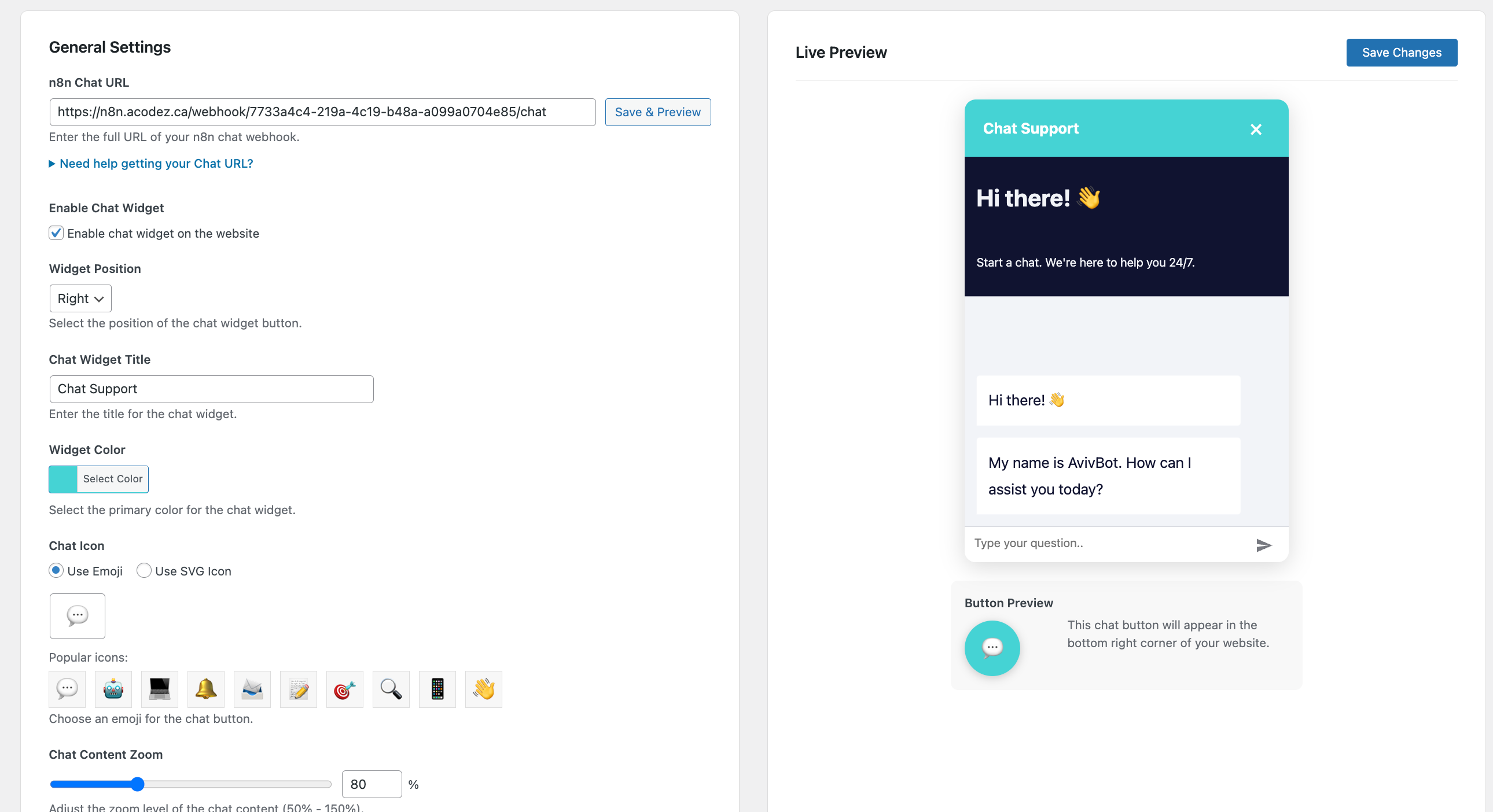
Admin settings page
Changelog
1.0.0
- Initial release