
OtFm Gutenberg Spoiler – (or FAQ) collapse block
The plugin provides in the block editor 2 types of spoilers. Need FAQ or Spoiler?
Plugin info
Maintenance & Compatibility
Maintenance score
Possibly abandoned • Last updated 1718 days ago • Support resolved 0% • 5 reviews
Is OtFm Gutenberg Spoiler – (or FAQ) collapse block abandoned?
Possibly abandoned (last update 1718 days ago).
Compatibility
Developers
Similar & Alternatives
Explore plugins with similar tags, and compare key metrics like downloads, ratings, updates, support, and WP/PHP compatibility.
Description
WordPress 5.0 introduces a block-based editor (codename “Gutenberg”) that offers a streamlined editing experience.
The plugin provides in the block editor 2 types of spoilers:
- Little Spoiler
- Box spoiler
Little Spoiler – small spoiler for plain text.
Box spoiler – consists of 2 blocks:
Opening spoiler (Box Spoiler Start) and closing spoiler (Box Spoiler End)
Between them, you insert any block (or several block’s) with content that you want to hide.
In the frontend, the spoiler (accordion) opens with animation.
In the editor you can choose the color design of the spoiler.
Ability to add new colors or replace a set of colors. See FAQ
Want to hide part of the publication? or make up the FAQ? – plugin is perfect for this
Check out all beauty and power of the plugin by watching this video:
Requirements
PHP 5.6+, 7, 7.1, 7.2 or 7.4 recommended for better performance, WordPress 5.8
Translation
Available in English, Russian, Ukrainian, Spanish, German, Swedish, Dutch, Japanese, French, Italian, Norwegian, Portuguese and more other languages in becoming.
Acknowledgements
Thanks to Nilo Velez for Spanish (Spain) translation approval.
Thanks to Yordan Soares for Spanish (Venezuela) translation.
Thanks to Tor-Bjorn Fjellner for Swedish translation approval.
Thanks to Peter Smits for Dutch translation approval.
Thanks to miccweb for Japanese translation approval.
Thanks to FX Bénard for French translation approval.
Thanks to Luisa Ravelli and aliceorru for Italian translation approval.
Thanks to Eivind for Norwegian translation approval.
Thanks to Pedro Mendonça for Portuguese translation approval.
Thanks to Sergey Kovalets for Ukrainian translation.
Thanks to Jens Ratzel for German translation.
Installation
- Upload the
otfm-gutenberg-spoilerfolder to your/wp-content/plugins/directory or alternatively upload the otfm-gutenberg-spoiler.zip file via the plugin page of WordPress by clicking ‘Add New’ and selecting the zip from your computer. - Activate the OtFm Gutenberg Spoiler WordPress plugin through the ‘Plugins’ menu in WordPress.
- Use OtFm Gutenberg Spoiler blocks on your next page or post.
Frequently Asked Questions
Yes!
Navigation by “Tab” button:
The “Up arrow” key pressed – If the focused spoiler is open, you close it
The “Down arrow” key pressed – If the focused spoiler is closed, you open it
Either the “Enter” key or “Space bar” pressed – You toggle the focused spoiler. If it is open, close it; if it is closed, open it.
The “End” key pressed – You move focus to the last spoiler on the page
The “Home” key pressed – You move focus to the first spoiler on the page
Support screen readers
- find “Box Spoiler Start” and paste (spoiler open)
- blocks, blocks, blocks…
- find “Box Spoiler End” and paste (this spoiler closed)
Add this snippet to your file functions.php:
// add new colors to spoiler
function otfmgs_add_new_colors($colors){
    $colors[]= array( 'color' => '#bd4747', 'name' => 'my_brown' );
    $colors[]= array( 'color' => '#32dd94', 'name' => 'my_green' );
    //... etc

    return $colors;
}
add_filter('otfmgs_colors','otfmgs_add_new_colors');
where: #bd4747 – new hex color
result: https://yadi.sk/i/223x_1-S3e_H1w
(available from plugin version 1.4.0)
Add this snippet to your file functions.php:
// add my color palette to spoiler
function otfmgs_add_my_color_pallete($colors){
    $colors['new'][]= array( 'color' => '#bd4747', 'name' => 'my_brown' );
    $colors['new'][]= array( 'color' => '#32dd94', 'name' => 'my_green' );
    //... etc

    return $colors;
}
add_filter('otfmgs_colors','otfmgs_add_my_color_pallete');
where: #bd4747 – new hex color
result: https://yadi.sk/i/Fv7BaxRLkjj_SA
(available from plugin version 1.4.0)
Any properly developed WordPress theme will work with OtFm Gutenberg Spoiler
- Go to the block editor (add new post)
- Click “insert block”
- Search for a block “spoiler” or “otfm” or “faq”
Yes! OtFm Gutenberg Spoiler core features are absolutely free.
Write me [email protected]
Review feed
Screenshots
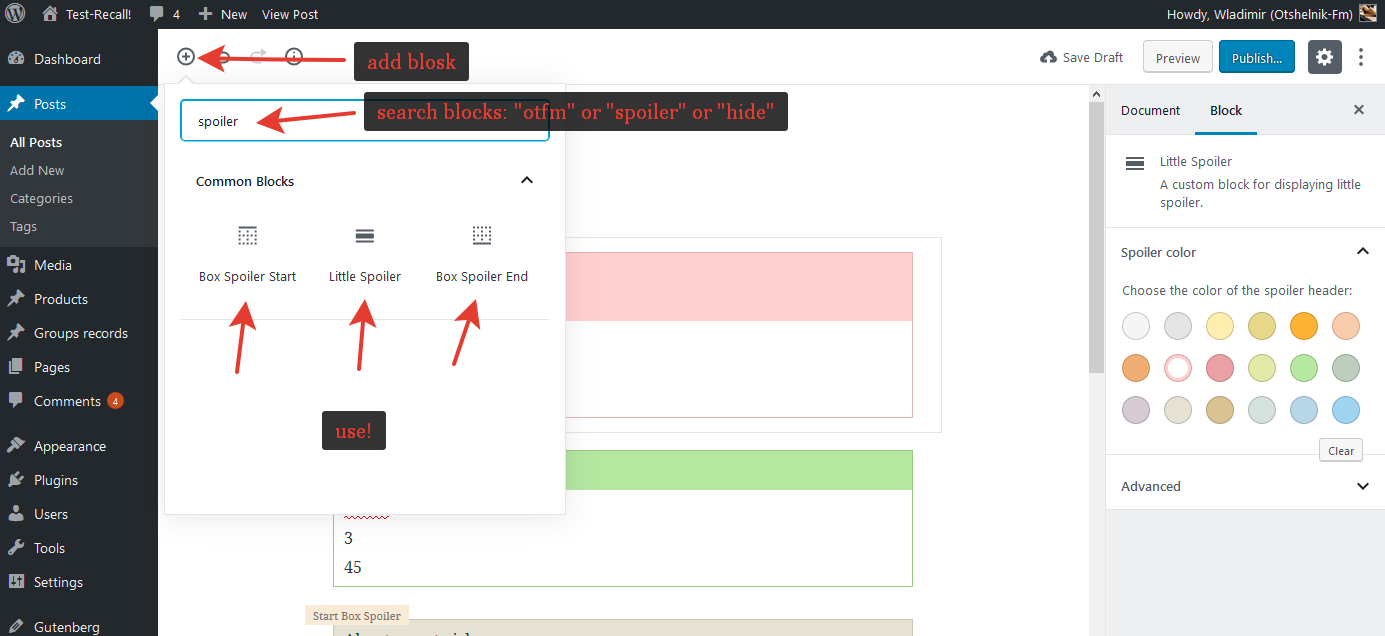
Find & add spoiler blocks

Little spoiler

Box spoiler

In frontend

Open spoiler