

Performant Translations
Making internationalization/localization in WordPress faster than ever before.
Plugin info
Maintenance & Compatibility
Maintenance score
Maintained • Last updated 118 days ago • 16 reviews
Is Performant Translations abandoned?
Likely maintained (last update 118 days ago).
Compatibility
Languages
Similar & Alternatives
Explore plugins with similar tags, and compare key metrics like downloads, ratings, updates, support, and WP/PHP compatibility.
Description
Making internationalization/localization in WordPress faster than ever before.
Disclaimer about WordPress 6.5
Attention: most functionality of this plugin has been merged into WordPress 6.5! You might not need it anymore.
However, this plugin is still relevant for cases where language packs are not downloaded from WordPress.org but somewhere else, for example if you are developing your own plugins or using commercial plugins.
The Performant Translations plugin converts the translation files of those plugins to the new file format introduced in WordPress 6.5, to really optimize them for speed.
What this plugin does
This project uses a new approach to handle translation files in WordPress, making localization blazing fast.
An in-depth i18n performance analysis showed that localized WordPress sites load significantly slower than a site without translations.
With this plugin’s new approach to localization, this overhead is massively reduced, making your site fast again. It does so by converting .mo translation files to .php files.
If your site is using a language other than English (US), you should see immediate speed improvements simply by activating this plugin.
Installation
Installation from within WordPress
- Visit Plugins > Add New.
- Search for Performant Translations.
- Install and activate the Performant Translations plugin.
Manual installation
- Upload the entire
performant-translationsfolder to the/wp-content/plugins/directory. - Visit Plugins.
- Activate the Performant Translations plugin.
Frequently Asked Questions
By converting .mo files to .php files, the translations can be parsed much faster.
Plus, .php files can be stored in the so-called OPcache, which provides an additional speed boost.
While the plugin is mostly considered to be a beta testing plugin, it has been tested and established to a degree where it should be okay to use in production.
Still, as with every plugin, you are doing so at your own risk.
Yes. This plugin has been tested with common multilingual plugins, such as WPML, Weglot, TranslatePress, MultilingualPress, and Polylang.
If you still encounter issues, please let us know.
No. Once the plugin is activated, it just works, and you should see speed improvements right away. If you run into issues, please open a new support topic.
Yes. Once you deactivate and uninstall the plugin, all .php files generated by it will be removed from the server.
Contributions are always welcome! Learn more about how to get involved in the Core Performance Team Handbook.
If you have suggestions or requests for new features, you can submit them as an issue on the GitHub repository.
If you need help with troubleshooting or have a question about the plugin, please create a new topic on our support forum.
To report a security issue, please visit the WordPress HackerOne program.
Review feed
Commendable effort
Plugin speeds up the presentation of your site
Cool
Screenshots
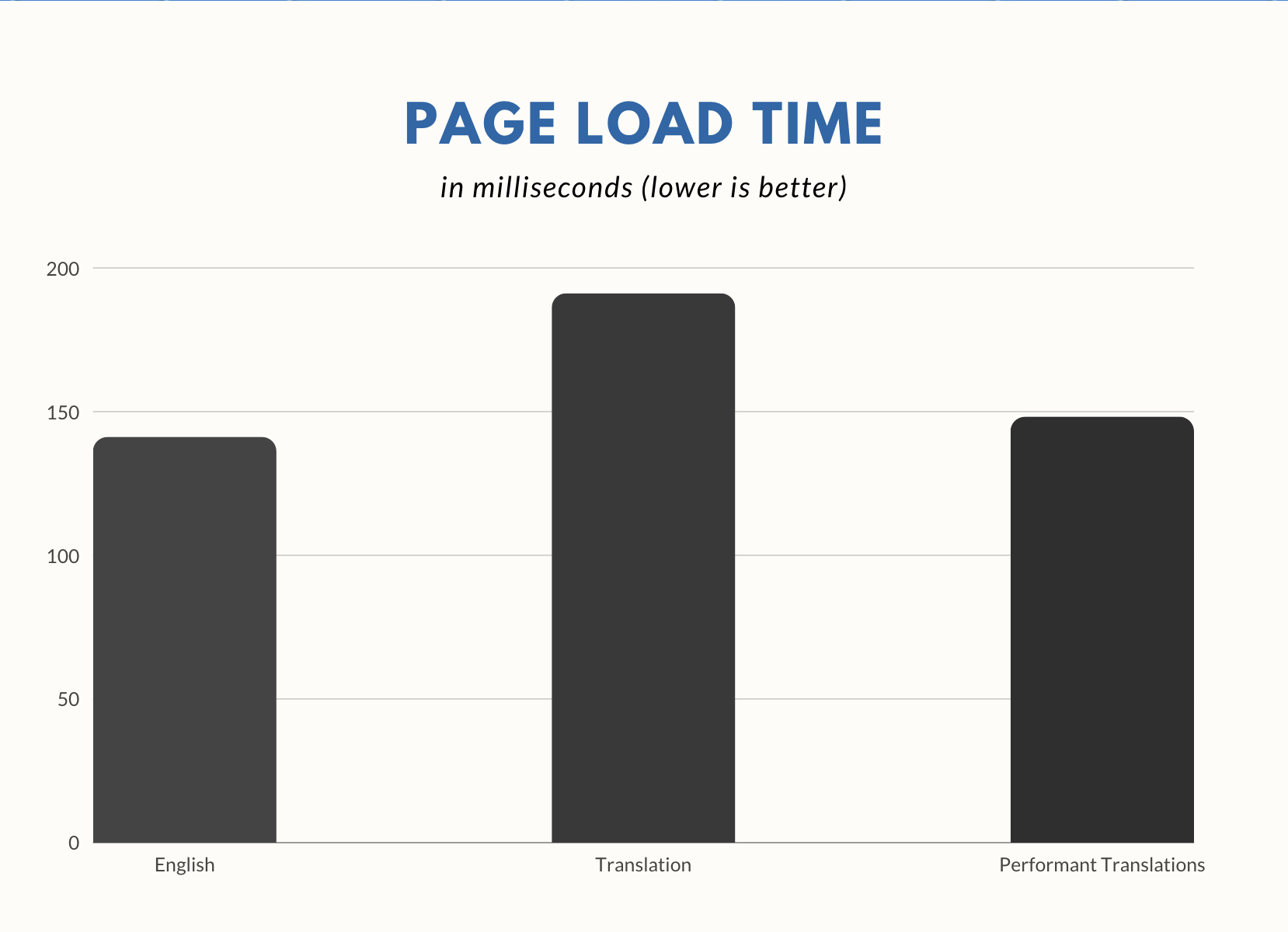
Chart showing the load time improvement achieved with this plugin.
Changelog
For the plugin’s full changelog, please see the Releases page on GitHub.
1.2.0
- This plugin now requires WordPress 6.5
1.1.2
- Fixed a minor regression when assembling file paths to look up.
1.1.1
- Fixed: Addressed a slight performance regression in 1.1.0.
- Fixed: Addressed an issue with incorrect plural forms for certain locales.
1.1.0
- Enhancement: Support for this functionality existing in WordPress 6.5.
- Enhancement: Added hardening for file paths not being strings because of a faulty plugin filter.
- Enhancement: Invalidate OPcache after writing PHP files.
- Enhancement: Improve compatibility with pluralized strings referenced as singulars.
1.0.9
- Enhancement: Improved compatibility with WPML string translation add-on.
1.0.8
- Fixed: Added workaround for potential file permission issues.
1.0.7
- Fixed: Prevent issue where not all core translations were updated.
- Enhancement: Change the order translations are loaded in to improve backward compatibility.
1.0.6
- Enhancement: Remove JSON file support.
- Fixed: Add hardening when using translation file paths with symlinks.
1.0.5
- Enhancement: Improved compatibility with Loco Translate to avoid duplicate files.
1.0.4
- Enhancement: Several minor performance improvements.
- Enhancement: Use different file extension (
.mo.phpinstead of just.php) to prevent conflicts. - Enhancement: “Import” existing translation file if one is already loaded for a text domain.
- Enhancement: Use WP Filesystem API if available.
1.0.3
- Enhancement: Improved compatibility with Query Monitor’s developer tools panel.
- Enhancement: Added new
performant_translations_load_translation_filefilter. - Enhancement: Enforce network-only activation on Multisite.
1.0.2
- Fixed: Add hardening for invalid values being passed to translation functions.
1.0.1
- Enhancement: Regenerate translation files when Loco Translate updates MO files.
- Fixed: Add hardening for invalid context being passed.
- Fixed: Fix handling of locales without plurals, such as Persian.
1.0.0
- Initial release.